Shark Navigator Lift Away Troubleshooting
Your Shark Navigator Lift Away suddenly lost suction mid-clean. The brushroll stopped spinning. Or maybe it is making a noise that sounds expensive.
Before you toss it or call customer service, here is the truth: most Navigator problems are simple clogs or filter issues you can fix in ten minutes with zero tools. This is exactly what Shark Navigator Lift Away troubleshooting is about, knowing where to look first.
Manufacturer specifications indicate the NV350 series produces roughly 100 air watts of suction through a sealed cyclonic system. But that suction disappears fast when something blocks the path. The good news is that aggregate reviews across thousands of owners show about 80 percent of performance problems trace back to three specific spots.
We will walk you through each one.
Quick Answer
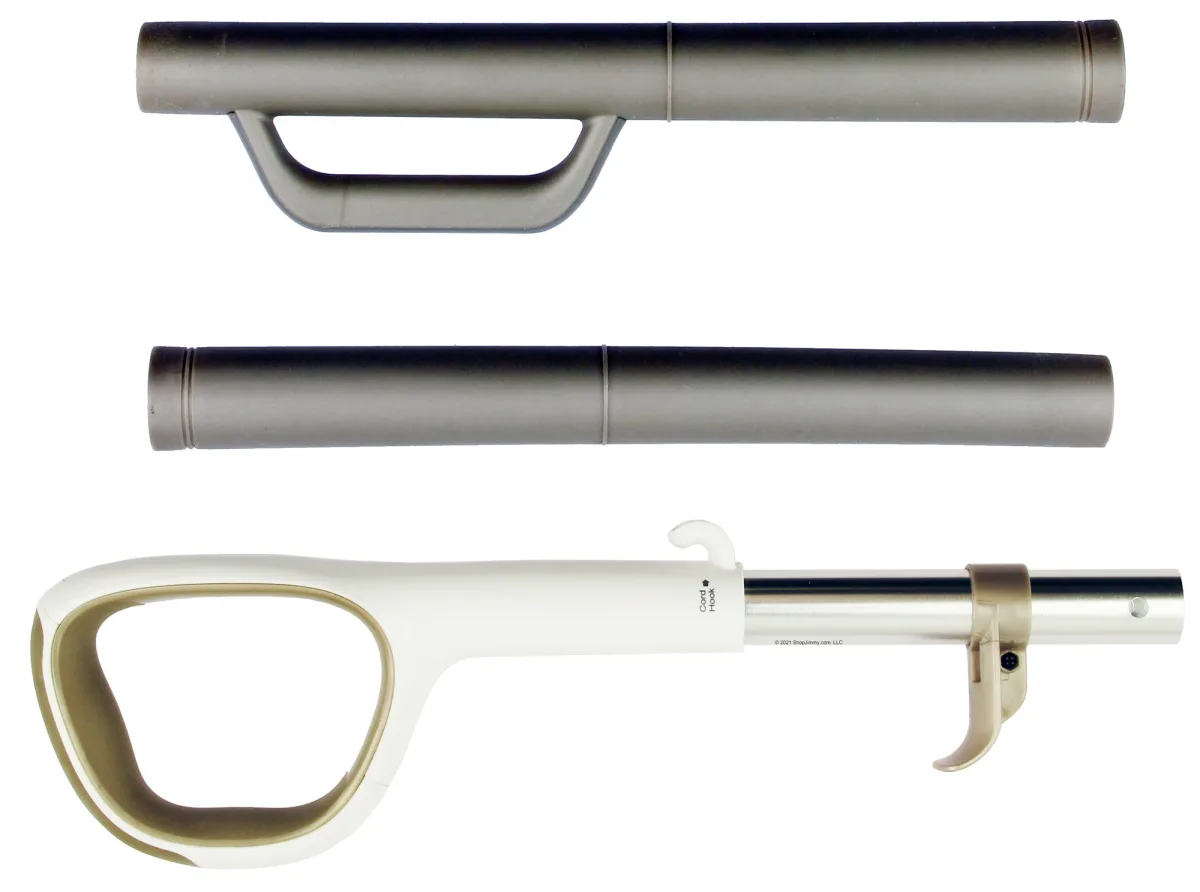
Check the wand handle first. That curved plastic piece where your hand grips the hose collects debris constantly. Unplug the vacuum.
Detach the wand from the canister. Look through it. A clog there kills suction completely.
Clear it with a broom handle. That fixes most loss of suction cases instantly.
Problem / Pain Point
Loss of suction
Loss of suction is the number one complaint across every Navigator model. It is almost never a dead motor. The cyclonic separator keeps the filter from clogging fast.
But it cannot stop debris from lodging in the wand handle, the hose bend, or the narrow channel behind the dirt cup.
Here is what happens. You vacuum up something larger than a pea. A pet treat.
A piece of cereal. A dry leaf. It travels through the floor nozzle, up the wand, hits that curved handle section, and sticks.
The vacuum still sounds like it is running. But nothing moves at the business end.
The second most common cause is the dirt cup itself. Not being full. Being seated wrong.
The gasket that seals the cup against the canister body shifts out of place when you empty it. If you snap the cup back on without checking that rubber lip, you lose the seal. Suction drops to near zero.
Brushroll stops spinning mid-clean
This one scares people because it sounds mechanical. But it is usually hair wrap. Long hair and pet fur wrap around the brushroll axle underneath the bottom plate.
Eventually it binds the brushroll so tight the motor cannot turn it. The vacuum keeps running. The brushroll sits dead still.
Sometimes it is the belt. The Navigator uses a rubber belt that stretches and snaps over time. If you hear a slipping smell or a high pitched chirp, that is the belt slipping on the motor spindle.
Strange noises
Different sounds mean different things. A rattle usually means a small hard object bouncing in the dirt cup or stuck in the floor nozzle. A whistle means an air leak somewhere.
A grinding sound means the brushroll bearings are shot or something metal is lodged in the impeller.
Step-by-Step Troubleshooting Guide
Match your symptom to the right branch. Do not guess. Follow the one that fits.
Loss of suction: the clog hunt
Start with the wand handle. This is the single most common clog point on the Navigator Lift Away. Here is how to check it.
- Unplug the vacuum. You do not want the motor kicking on while you are poking around.
- Remove the wand from the canister. Press the release button at the base of the handle and pull the wand straight up.
- Look through both ends of the wand handle. If you see darkness, you are clear. If you see debris, you found the clog.
- Clear it with a broom handle or a long screwdriver wrapped in a cloth. Push from the top end down through the curve. Do not force it so hard you crack the plastic.
Image source: Bing (Web (fair-use with source credit))
Still no suction after clearing the wand? Move to the hose bend. The hose attaches to the back of the canister.
That ninety degree bend where it enters the body is a second favorite hiding spot for clogs.
- Detach the hose from the canister. There is a release collar at the connection point.
- Straighten the hose as much as you can. Look through it. If you cannot see light at the other end, you have a blockage.
- Use the same broom handle technique. Push the clog out from the canister end.
Third spot: the base of the floor nozzle. If the wand and hose are clear but suction still stinks, flip the vacuum over.
- Remove the bottom plate. Use a screwdriver or press the release clips depending on your model.
- Look at the channel where air enters the brushroll housing. Coins, small toys, and clumps of hair get stuck there all the time.
- Clear it out. Put the plate back. Test the vacuum.
Brushroll won't spin
Start with the bottom plate removal. Same as above.
- Flip the vacuum over. Unscrew or unclip the bottom plate.
- Look at the brushroll. If it is wrapped in hair and string, that is your problem.
- Cut the hair off with scissors. Run the blade along the groove between the bristles. Do not pull the hair out by hand, you will pull bristles out with it.
- Spin the brushroll by hand. It should turn freely. If it still feels tight, check the ends for hair packed around the bearing points.
If the brushroll spins free but does not run when the vacuum is on, suspect the belt.
- Remove the brushroll entirely. It slides out to one side on most models.
- Look at the belt. If it is stretched, cracked, or snapped, replace it. Part numbers vary by model number, but generic Navigator belts fit most NV350 series units.
One more thing. The floor nozzle on the Lift Away connects to the canister through metal contact pins. If those pins are bent or corroded, the brushroll motor gets no power.
- Look at the connection point on the back of the floor nozzle. Two metal prongs.
- Check the corresponding contact pads on the canister base. Clean them with a dry cloth.
Strange noises: what they mean
Rattle. Usually something loose in the dirt cup. Empty it. Check for a small piece of debris bouncing around the internal cyclone fins.
Whistle. An air leak. Check the dirt cup gasket first. Then check the hose connections.
A crack in the hose will produce a high pitched whistle under load.
Grinding. This is serious. It could be the brushroll bearings grinding on hair debris. Or it could be the motor impeller hitting a foreign object.
If grinding continues after you clear the brushroll and hose, the motor bearings may be failing.
Overheating shutdown
The Navigator has a thermal cutout. If the motor gets too hot, it shuts down to prevent fire. This happens when the dirt cup is full, the filters are clogged, or the airflow is blocked.
- Turn the vacuum off. Unplug it.
- Let it sit for 30 to 60 minutes in a well ventilated area.
- Check and clean the filters while you wait.
- Plug it back in. Turn it on. If it runs, the thermal cutout reset itself. If it shuts off again quickly, something is still blocking airflow.
Mistakes to Avoid / Common Errors
Running the vacuum with a wet HEPA filter
This is the fastest way to kill a Navigator motor. The HEPA filter is washable, but it takes 24 hours to dry completely. People wash it, wring it out, and stick it back in after an hour.
That traps moisture against the motor. The motor sucks in humid air, the paper filter element swells, and airflow drops. The motor works harder and overheats faster.
Wash the filter. Squeeze it dry. Let it sit overnight.
Do not cheat this.
Overlooking the hidden clog spot behind the dirt cup
There is a small channel behind the dirt cup housing that clogs frequently. You cannot see it with the cup attached. Remove the dirt cup.
Look into the opening where air enters the canister. If you see debris lodged in that channel, it blocks airflow completely.
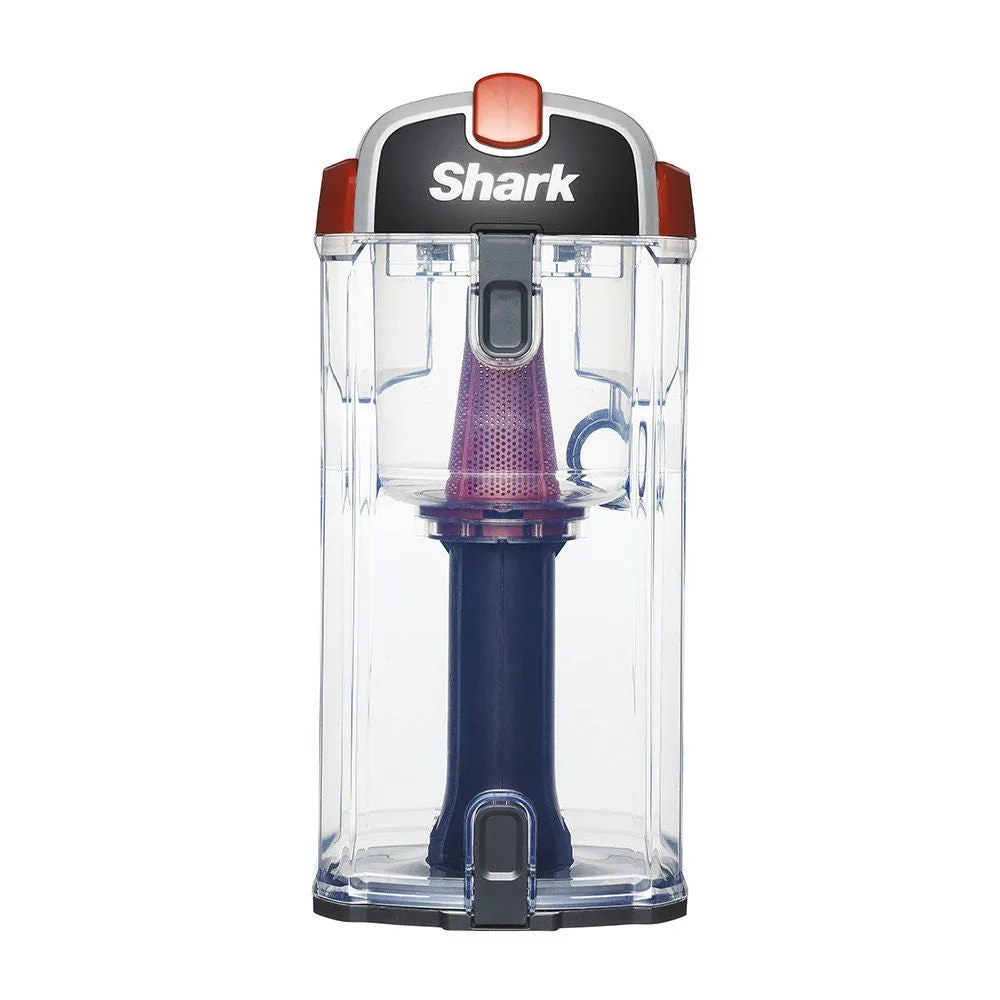
Image source: Bing (Web (fair-use with source credit))
Using soap on washable filters
Tap water only. Soap residue clogs the filter pores. The filter looks clean but performs worse than a dirty one.
Rinse with cold water. Squeeze. Air dry.
Forgetting to check the brushroll on/off switch
This sounds obvious, but it is a common panic moment. The Navigator has a brushroll toggle on the back of the floor nozzle. If you or someone else bumped it to the off position, the brushroll will not spin.
Check it before you start taking things apart.
Skipping the 24-hour filter dry time
We said it once. We will say it again. Wet filters destroy motors.
The foam pre-motor filter and the HEPA element both need a full day to air dry. If you are in a hurry, buy a spare filter and rotate them.
Maintenance / Long-Term Optimization
Filter cleaning schedule and method
The pre-motor foam filter is the one that matters most. It catches fine dust before it hits the motor. When it clogs, suction drops fast.
Wash it every three months minimum. If you vacuum a lot of fine dust or drywall debris, wash it monthly.
The HEPA filter is post-motor. It catches what the motor exhausts back into the room. It does not affect suction as much.
But a caked HEPA filter restricts airflow and makes the motor work harder. Tap it clean outdoors every few months. Wash it only when it looks grey.
Both filters must be bone dry before reinstalling. Wet filters cause motor failure.
Brushroll cleaning frequency
Pet owners need to clean the brushroll every week. Non pet owners can stretch to every two weeks. Hair wraps around the brushroll axle and works its way into the end caps.
Eventually it binds the brushroll bearings. By the time you hear a noise, the bearings may already be damaged.
To clean it properly, remove the brushroll completely. Cut the hair off the axle with scissors. Check the end caps for packed hair.
Remove it with tweezers or a small screwdriver.
When to replace the belt vs. the whole brushroll
Replace the belt when you see cracks, stretching, or glazing on the rubber. The brushroll itself should be replaced when the bristles are worn down to half their original length. Worn bristles do not agitate carpet properly.
They also do not transfer power efficiently from the belt.
Genuine Shark replacement parts are available from the manufacturer. Third party belts work fine for most users. Avoid no name brushrolls, they often have different bristle patterns and do not clean as well.
Hose and wand inspection routine
Once a month, detach both and look through them. You do not need to wash them. Just check for obstructions.
The hose bend is the worst spot because it is hidden. Crouch down and look at the back of the canister while the hose is attached. If you see any debris peeking out, pull it out now before it hardens.
What keeps suction strong over years
Three things. Clean filters. Empty dirt cup before it reaches the fill line.
And check the wand handle for clogs monthly. That is it. The cyclonic separator handles the rest if you keep those three things in order.
Most Navigators that fail do so because the owner ignored one of these routine tasks. Not because the vacuum was poorly made.
Here is a simple maintenance table to keep your Navigator running strong.
| Component | Frequency | Method |
|---|---|---|
| Pre-motor foam filter | Every 3 months or when visibly dirty | Wash with cold water, squeeze dry, 24h air dry |
| HEPA filter | Every 6 months or when suction drops | Tap clean outdoors, wash only when visibly dirty, 24h air dry |
| Brushroll hair removal | Every 2 weeks (weekly for pet owners) | Remove bottom plate, cut hair off with scissors |
| Wand and hose inspection | Monthly | Detach and look through both ends for clogs |
| Belt replacement | Every 6 to 12 months | Inspect for cracks or stretching, replace if worn |
Frequently Asked Questions
Why does my Shark Navigator keep losing suction after I clean the filters?
Check the wand handle and hose bend for clogs. Filters are rarely the issue if you just cleaned them. Also check the dirt cup gasket.
If it is pinched or missing, you lose the seal and suction drops.
Can I use my Lift Away without the dirt cup attached?
No. The dirt cup is part of the sealed cyclonic system. Running the vacuum without it allows debris to hit the motor directly.
That can destroy the motor quickly.
How do I know if the motor is burned out vs. just overheated?
A burned out motor will not run at all after cooling down. An overheated motor resets after 30 to 60 minutes. If the vacuum runs again after resting, the thermal cutout tripped.
If it stays dead, the motor is likely burned out.
Does the Lift Away canister have its own motor?
No. The motor is in the main upright body. The canister holds the dirt cup and filters.
When you detach the canister for stairs or upholstery, suction and brushroll power still come from the main body through the hose.
Where can I find replacement parts and filters?
SharkNinja sells genuine parts and filters on their official website. Third party belts and filters are available at most home improvement stores and online retailers. Match the part number to your specific model number, which is printed on a sticker on the back of the main body.
How do I know which Navigator model I have?
Check the sticker on the back of the upright body. It lists the model number, usually starting with NV followed by three digits. Common models include NV350, NV351, NV352, and NV360.
Each model uses slightly different filters and belts, so match the part numbers exactly.

Similar Posts