Action Camera Restarting Troubleshooting
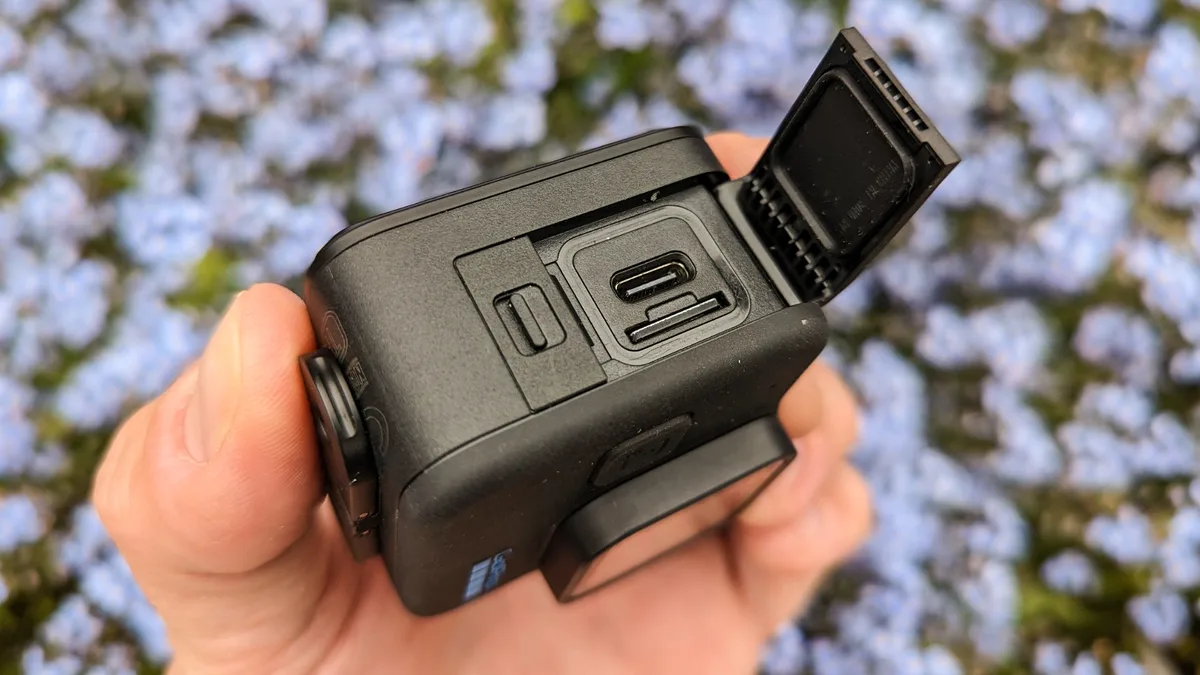
Your action camera keeps restarting mid-recording and you need to know if it is a battery issue, a memory card problem, or something worse. Action camera restarting troubleshooting is exactly what we cover here. The fix usually comes down to isolating one specific cause from a short list of usual suspects.
The four most common culprits account for roughly 90% of random shutdowns according to aggregate user reports and manufacturer service data reviewed as of 2026. Those causes are a loose battery connection, an SD card that cannot keep up with the write speed, heat buildup from high bitrate recording, or a firmware bug that was patched months ago. Let us walk through each one step by step.
Quick Answer
Check the battery contacts first. A dirty or loose connection causes intermittent power loss. Reseat the battery and clean the contacts with a dry cloth.
If the camera still restarts, test a different SD card rated V30 or faster. Lower the recording resolution to 1080p30 to rule out overheating. Update the firmware.
These four steps resolve most restart issues.
Why Your Action Camera Restarts (And How to Tell If It Is Fixable)
Your action camera shuts down randomly for one of four reasons. Power loss, data write failure, thermal shutdown, or a software glitch. Three of those four are completely fixable without sending the camera in for repair.
Power loss happens when the battery loses physical contact inside the compartment. A hard knock during mountain biking or a drop onto concrete can shift the battery just enough that the pins barely touch. The camera boots up fine but cuts out the second you start recording because the vibration pulls the connection apart.
Data write failure is different. The camera records to the SD card constantly while filming. If the card is not fast enough to keep up with the bitrate, the buffer fills up and the camera either stops recording or reboots entirely.
This is the most common cause on newer cameras filming in 4K or 5.3K.
Thermal shutdown is the camera safety mechanism. Modern action cameras pack a lot of processing power into a tiny sealed body. Film in direct summer sunlight at high resolution with stabilization on, and the internal temperature climbs past the safe threshold.
The camera shuts down to protect the sensor and battery.
Firmware bugs are the least common but the easiest to fix. Manufacturers occasionally release updates that address spontaneous reboot issues. If your camera has been sitting in a drawer for a year without updates, that might be your problem.
Here is how to tell if it is fixable. If the camera restarts consistently after a specific recording time or only in hot conditions, it is almost certainly overheating. You can manage that with settings changes.
If it restarts randomly regardless of environment, start with the battery and SD card. If it restarts during the boot logo and never reaches the menu, that points to corrupted firmware.
The Decision Tree: Match Your Symptom to the Fix
Let us map your specific symptoms to the right fix. This is a simple if-then flow that saves you from trying every solution blind.
Symptom 1: Camera restarts seconds after you press record, especially in 4K.
The SD card is the first suspect. Check the speed class printed on the card. You need V30 or higher for 4K video.
A U1 or Class 10 card will cause write errors that trigger restarts. Switch to a faster card and test again. If the card is already V30 or faster, lower the resolution to 1080p30 and test.
If the camera runs fine at lower quality, your card might be a counterfeit with fake speed ratings. That is surprisingly common.
Symptom 2: Camera restarts when you bump it or ride over rough terrain.
That is almost certainly a loose battery connection. Remove the battery. Inspect the metal contact pins inside the camera and on the battery.
Are they dirty or bent? Clean them with a dry microfiber cloth. If the pins look flattened, you can gently lift them with a plastic spudger.
Reseat the battery firmly and test by shaking the camera gently. For more detail on battery-related shutdowns, our guide on common power issues covers the same diagnosis.
Symptom 3: Camera runs for 10 to 20 minutes then shuts down, especially in warm weather.
This is thermal shutdown. It happens most often when filming high bitrate 4K or 5.3K with image stabilization enabled. Let the camera cool for 10 minutes.
If it starts up and runs again for a similar period before cutting out, that confirms the cause. Your options are to reduce the resolution to 1080p, turn off stabilization, or add external cooling like a small USB fan pointed at the camera. Some users also remove the battery door to improve airflow, though that is not recommended in dusty or wet conditions.
Symptom 4: Camera restarts randomly regardless of what you are recording, sometimes even when idle.
That points to a firmware issue or a failing battery. Update the firmware first. If the problem continues, test with a different battery.
A battery that has been through hundreds of charge cycles can suffer from voltage sag. The camera reads the voltage as low, assumes the battery is dead, and shuts down even though the charge indicator shows half full.
| Symptom | Most Likely Cause | First Action |
|---|---|---|
| Restarts when bumped | Loose battery connection | Clean contacts, reseat battery |
| Restarts in 4K only | Slow SD card | Use V30 or faster card |
| Restarts after 10-20 min | Overheating | Lower resolution, turn off stabilization |
| Random restarts anytime | Firmware or aging battery | Update firmware, swap battery |
Step-by-Step: Battery, SD Card, Heat, and Firmware Fixes
Let us go through each fix in order. Start with the cheapest and easiest before moving to the more involved steps.
Fix the battery connection first. Turn off the camera and remove the battery. Look at the metal contact pins inside the battery compartment. If you see any dark residue or debris, clean the pins with a cotton swab barely dampened with isopropyl alcohol.
Do the same for the contacts on the battery itself. Let everything dry fully before reinserting. Push the battery in until you feel it click or seat firmly.
Close the door and confirm it latches properly.
Next, verify your SD card. Remove the card and check the label. You are looking for the speed class symbol. A V30 or U3 marking is the minimum for reliable 4K recording.
If your card is older and only shows a U1 or Class 10 rating, that is likely your problem. Replace it with a card that meets V30 or faster. Even if the card is rated correctly, format it inside the camera using the settings menu.
Computer-formatted cards sometimes use file systems that confuse the camera. Per the SD Association standards, sustained write speed is what matters for video, not read speed.

Then address heat. Overheating is tricky because you might not feel the camera as hot as it actually is. The internal sensor can read 60 degrees Celsius while the exterior feels warm to the touch. Lower the video resolution to 1080p at 30 frames per second.
Disable electronic image stabilization if you can tolerate slightly shaky footage. Point a small USB fan at the camera if you are filming in a fixed position. These changes reduce the processor load and keep temperatures in check.
Finally, update the firmware. Check the manufacturer support page for your specific model. Compare the latest firmware version with the one currently installed on your camera. You can usually find the current version in the settings menu under About or System Info.
If your version is behind, download the update to a microSD card or use the companion mobile app to install it. Firmware updates frequently include fixes for random reboot issues that the manufacturer discovered after the camera shipped. Our firmware update troubleshooting guide covers what to do if the update itself fails.
Common Mistakes That Make Restarting Worse (And Waste Your Time)
People often make the restart problem worse by trying the wrong fix first. Here are the most common errors we see.
Ignoring the SD card and buying a new battery instead. This is the number one mistake. A failing battery and a slow SD card can produce identical symptoms. The camera boots fine, starts recording, then dies.
Without testing the card first, you might spend money on a battery that does not solve anything. Always test the SD card before replacing the battery.
Using a card that is fast enough for burst photos but not video. Some SD cards advertise high read speeds which are great for transferring files to your computer. Video recording depends on sustained write speeds. A card might handle 4K burst photos without issue but crash during continuous video recording.
Look for the Video Speed Class rating (V30, V60, V90) not just the UHS speed class.
Forgetting that stabilization generates extra heat. Image stabilization uses the gyroscope and processor to smooth out footage. This processing generates noticeable heat. If you are already close to the thermal limit, turning on stabilization can push the camera over the edge.
Try recording with stabilization off. If the camera stops restarting, that was the heat source. Overheating while recording is a known issue that follows the same thermal limits.
Updating firmware on a low battery. This is dangerous. If the camera loses power during a firmware update, it can become permanently bricked. Always charge the battery to at least 80 percent before starting a firmware update.
Better yet, keep the camera plugged into a power source during the update.
Assuming a factory reset solves everything. A factory reset clears your settings but does not fix a failing battery, a slow SD card, or a physical connection issue. It is worth trying as a last step, but do not rely on it as a primary fix. Our reset troubleshooting guide walks through when a reset actually helps.
When the Fixes Do Not Work: Replace, Repair, or Upgrade?
You have cleaned the contacts, swapped the SD card, lowered the resolution, and updated the firmware. The camera still restarts. Now what?
Battery age is the next variable to isolate. Standard lithium-ion batteries in action cameras typically last 300 to 500 charge cycles before performance degrades significantly. If your battery is more than two years old or has been through heavy use, the internal resistance has increased. This causes voltage to drop under load.
The camera reads a sudden voltage sag and interprets it as a critically low battery. A fresh OEM battery often solves these intermittent restart issues. Stick with the manufacturer own battery if possible.
Third-party batteries can have inconsistent voltage regulation.
If a new battery does not fix it, the camera itself may have a hardware fault. The most common internal failure is a worn battery connector soldered to the main board. Repeated insertion and removal can weaken the solder joints. This requires professional repair.
Check whether your camera is still under warranty. If it is, file a claim with the manufacturer. If not, compare the cost of repair against the price of a current model.
External power bypass is a useful diagnostic test. Connect the camera to a USB power bank using the original cable. Remove the internal battery. If the camera runs without restarts when powered externally, the internal battery or its connector is the problem.
If it still restarts on external power, the issue is on the main board.
When replacement makes more sense than repair. Repair costs for action cameras often run high because the units are sealed and difficult to open. A logic board replacement can cost close to what you would pay for a new camera. If your camera is more than three years old, upgrading to a newer model with better heat management and newer firmware support is usually the smarter move.
Newer cameras from any major brand also handle higher bitrates without crashing, which directly addresses the root cause for many users.
If you are dealing with similar issues on other camera types, the same principles apply. Battery problems often present the same way across different brands. Error messages that appear before a restart can point to SD card formatting problems that need specific attention.
And a lens communication error can sometimes trigger a full system reboot.
Real-World Examples: How These Troubleshooting Steps Played Out
Example one: the mountain biker. A rider GoPro Hero 11 kept dying mid-trail. The camera would boot up, record for 30 seconds, then restart. They had already bought two new batteries thinking the old ones were worn out.
Neither battery fixed the issue. The actual problem was the battery door latch. After a crash, the latch had loosened slightly.
Every bump caused the battery to shift just enough to lose contact. The fix took ten seconds. A thin strip of electrical tape on the battery surface added enough friction to hold it steady against the pins.
The camera ran perfectly for the rest of the season.
Example two: the vlogger using an older SD card. A creator filming daily content noticed their DJI Osmo Action 4 would freeze and reboot after about four minutes of 4K recording. The card was a UHS-I U1 rated at 30MB/s read speed. That is fine for 1080p but not for the 75MB/s sustained write speed that 4K60 demands.
Switching to a V30 card eliminated the restarts completely. The creator also discovered that formatting the new card inside the camera rather than on a computer prevented intermittent file system errors.
Example three: the timelapse shooter in summer heat. Someone running an Insta360 X3 on continuous timelapse outdoors in 35 degree weather kept losing recordings after 20 minutes. The camera was hot to the touch. The fix was not hardware related.
They dropped the resolution from 5.7K to 4K and aimed a small USB desk fan at the camera. The recording ran for over two hours without a single restart. The camera internal temperature sensor showed 55 degrees before the fix and 42 degrees after.
Action Camera Restarting FAQs
Can a damaged USB port cause the camera to restart?
Yes. If the USB port is bent or has debris inside, it can create an intermittent short. This confuses the power management circuit.
The camera may restart when you plug in a cable or even when no cable is connected. Inspect the port with a flashlight and clean it carefully.
Why does my camera restart only in cold weather?
Cold temperatures increase the internal resistance of lithium-ion batteries. Voltage drops faster under load when the battery is below 5 degrees Celsius. The camera reads this sudden drop as a low battery and shuts down.
Warm the battery in your pocket before use or keep the camera insulated.
Should I remove the battery when using external power?
For continuous recording with a power bank, yes. Remove the internal battery. Some cameras switch between battery and USB power internally, and a dying battery can interrupt that handoff.
Running solely on USB power eliminates the battery as a variable.
How often should I format my SD card in the camera?
Every few recording sessions. Formatting inside the camera creates the correct file structure and clears fragmentation. Do not format on your computer.
A computer-formatted card can use the wrong cluster size, which leads to write errors and restarts.
Can a third-party battery cause restart problems?
Yes, frequently. Third-party batteries often lack the same voltage regulation as OEM batteries. The camera may read the voltage incorrectly and trigger a false low-battery shutdown.
Stick with the manufacturer own battery for reliable performance.
Does image stabilization make restarting more likely?
It can. Stabilization adds processing load, which generates heat. If you are already close to the thermal limit, enabling stabilization can push the camera into shutdown.
Try turning it off as a test. If the restarts stop, heat was the trigger.

Similar Posts






























