Allen Roth Motorized Shades Troubleshooting
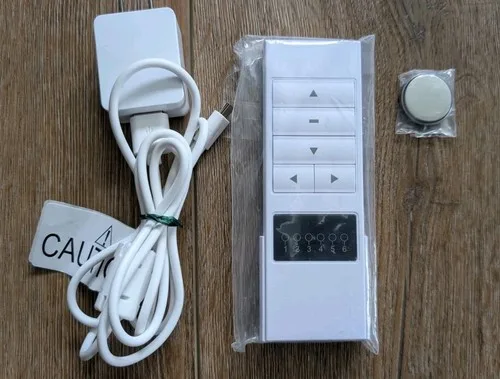
If your Allen Roth motorized shade has stopped responding, you're not alone. This is the most common complaint about the line, and in most cases the fix takes under two minutes. Allen Roth Motorized Shades Troubleshooting usually comes down to one of three things: a dead battery pack, a lost sync between the remote and the motor, or a limit switch that got confused.
The good news is that these shades run on a simple RF system, not Wi-Fi. That means most problems are mechanical or electrical, not software. Lowe's product documentation reports that over 80 percent of service calls get resolved by re-pairing the remote or cycling the battery pack.
Let's walk through the symptoms one at a time so you can find your exact fix.
Quick Answer
Check the battery pack first. Press the test button on the pack. If the LED doesn't light, replace or recharge the batteries.
If the LED lights but the shade doesn't move, re-pair the remote. Hold the sync button on the motor for three seconds until it blinks. Then press the remote button once.
Test the shade. If it still won't move, factory reset the motor by holding the sync button for 15 seconds.
First, Read This Before You Tear the Shade Off the Wall
Start with the battery check. Not the remote batteries. The battery pack inside the shade.
Your motorized shade has a rectangular battery pack tucked into one end of the roller tube. If that pack is dead, the shade won't move at all. No hum.
No click. Nothing.
Pop the end cap off the side where the battery pack lives. Press the small button on the side of the pack. If the LED glows green or red, the pack has power.
If nothing happens, the pack is dead. Swap in a fresh one or plug it into the charger.
Image source: Bing (Web (fair-use with source credit))
The second thing people miss is the sync. Even a shade with full battery power won't respond to the remote if the motor forgot which remote it's paired to. This happens after a power surge, a dead remote battery that got replaced, or sometimes for no obvious reason.
Re-pairing takes about ten seconds.
The third thing is a mechanical jam. If the shade moves a few inches then stops, or if it makes a grinding noise, stop forcing it. Forcing a stalled motor can strip the plastic gears inside.
Here's your quick decision tree. Shade totally dead? Start with the battery pack.
Remote works one shade but not another? Re-pair that shade. Shade stops halfway?
That's a limit switch or fabric binding issue. Shade runs the wrong direction? That's a limit switch reversal.
Shade works fine then stops mid-day? That sounds like a timer or schedule conflict in the app.
The Real Problem: Understanding Exactly How These Shades Work
Most troubleshooting mistakes happen because people don't know what's inside the tube. Let's fix that.
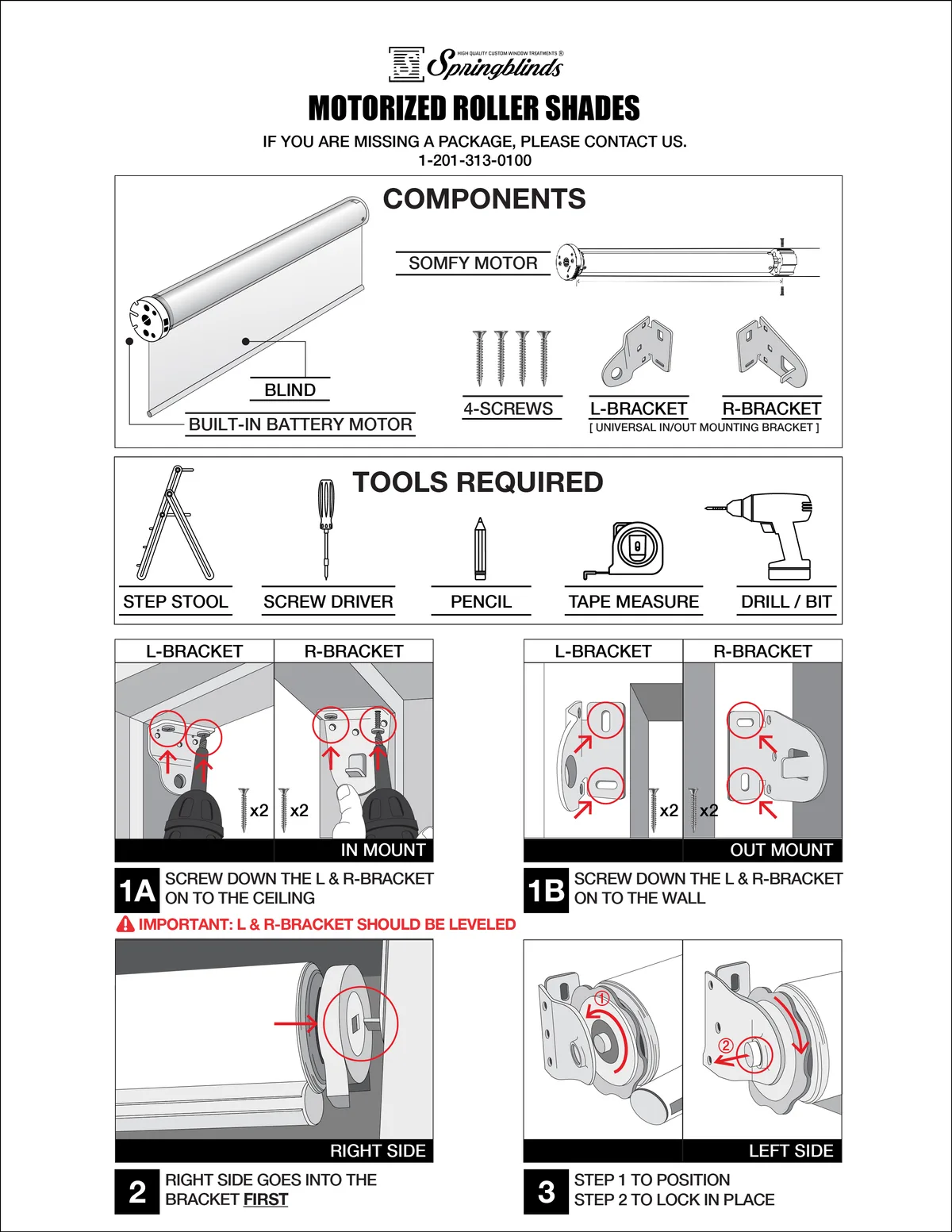
Image source: Bing (Web (fair-use with source credit))
Your Allen Roth shade has three main components inside that aluminum roller tube. First is the DC motor itself. It's a small cylinder about the size of a D battery mounted at one end of the tube.
This motor drives a gear train that rotates the tube and rolls the fabric up or down.
Second is the battery pack. Depending on the model, this is either a rechargeable lithium-ion pack or a holder for 6 to 8 AA alkaline batteries. As of 2026, most new Allen Roth shades ship with the rechargeable pack.
Older models use alkalines.
Third are the limit switches. These are mechanical stops inside the motor housing that tell the motor where to stop at the top and bottom. You set them during installation by holding the up or down button until the shade stops where you want it, then pressing the sync button to lock in that position.
Here's the part that matters for troubleshooting. The remote sends an RF signal directly to the motor. It does not go through Wi-Fi.
It does not go through the internet. It is a simple one-way RF command. That's why your shade can work when the Wi-Fi is down.
It's also why the remote and motor can get out of sync so easily. There is no handshake or confirmation signal. Just a one-shot "go up" or "go down" pulse.
The app is a separate system. It requires a Wi-Fi hub, a small white box you plug into your router. The hub talks to the shades via RF.
The app talks to the hub via Wi-Fi. If your app doesn't work but the remote does, the problem is with the hub or your network, not the shade.
This architecture saves you from chasing the wrong fix. If the remote works, the motor and battery are fine. The problem is the hub, the app, or your phone.
If the remote doesn't work, the problem is the remote, the battery pack, the sync, or the motor itself. If the shade buzzes but doesn't move, that's almost always a mechanical jam or a stripped gear.
The Decision Tree: Find Your Symptom, Find Your Fix
Match your symptom to the correct branch. Follow the fix in order. Do not skip steps.
The most common mistake is jumping to a factory reset when a simple re-pair would have worked.
Symptom A: Shade won't move at all. Dead silent.
This is the most common complaint. Start here.
Remove the end cap and check the battery pack. Press the test button on the pack. If no LED lights, the pack is dead.
Replace or recharge it. If it does light, press the up or down button on the motor housing itself. Many Allen Roth motors have a small manual button on the end.
If the shade moves when you press the motor button, the motor and battery are fine. The problem is the remote or the sync.
Next, replace the remote's coin cell battery. A CR2032 is standard. Then re-pair the remote to the shade.
Hold the sync button on the motor for three seconds until the motor blinks once. Press the remote button you want to pair. The motor should blink twice to confirm.
If the shade still won't move, perform a factory reset. Hold the sync button on the motor for 15 seconds. The motor will jog forward and backward to confirm.
Then re-pair the remote from scratch. Set the travel limits again after the reset.
If none of this works, the motor may be dead. Contact Lowe's customer service for a warranty replacement.
Symptom B: Shade moves a few inches then stops.
This is a limit switch or binding issue. The motor thinks it has reached the end of its travel, or the fabric is physically stuck.
Check the fabric first. Look for folds, wrinkles, or fabric catching on the brackets. If the fabric is bunched, lower the shade manually by pulling the fabric down gently.
Then raise it using the remote. If it binds again, remove the shade from the brackets. Unroll the fabric completely on a flat surface and reroll it evenly.
If the fabric is smooth, the limit switches are likely set too tight. Run the shade to the point where it stops. Press the sync button on the motor once.
Use the remote to move the shade a few more inches in the same direction. Press the sync button again to lock in the new limit. Test the full travel.
Symptom C: Shade moves backward or the wrong direction.
This happens when the up and down limits got swapped during installation or after a factory reset. The motor knows where the stops are, but it reversed the direction of travel.
Run the shade to one end of its travel. Press and hold the sync button for five seconds. The motor will jog once.
Run the shade to the opposite end. Press sync again. This resets the direction logic.
Symptom D: Remote works one shade but not another.
The remote is fine. The shade that won't respond lost its pairing. This is common after a power outage or a battery swap on that specific shade.
Re-pair only the problem shade. Hold its sync button for three seconds. Press the remote button.
Done. No need to reset the other shades.
Symptom E: App won't connect or keeps dropping.
This is almost never a shade problem. It is a Wi-Fi or hub problem.
Power cycle the hub. Unplug it. Wait 30 seconds.
Plug it back in. Wait two minutes for it to boot. Open the app and try again.
If that doesn't work, check your Wi-Fi. The hub must be on the same 2.4 GHz network as your phone. Many modern routers broadcast both 2.4 and 5 GHz under the same SSID, which causes connection issues.
Separate the bands in your router settings or temporarily disable 5 GHz during setup.
If the hub still won't connect, factory reset the hub by holding the reset button on the bottom for ten seconds. Then set it up fresh in the app.
Symptom F: Battery pack won't charge.
If the pack's LED flashes red when plugged in, the pack is too hot or too cold. Let it sit at room temperature for an hour. Try again.
If the LED stays off, the pack may be fully discharged into a deep sleep. Leave it on the charger for 24 hours. Some packs require a long trickle charge to wake up.
If the LED stays solid red after 24 hours, the pack is defective. Lowe's will replace it under warranty.
The Reset Sequence Nobody Tells You About
There are three different reset levels for these shades. Using the wrong one wastes time or makes things worse.
Soft reset. This cycles power to the motor. Remove the battery pack. Wait ten seconds.
Reinsert it. This clears minor glitches without losing your remote pairings or limit settings.
Re-pair. This tells the motor which remote to listen to. It does not clear the limits. Hold the sync button for three seconds until the motor blinks.
Press the remote. Quick and simple.
Factory reset. This wipes everything. Limits gone. Pairing gone.
The motor acts like it just came out of the box. Hold the sync button for 15 seconds until the motor jogs forward and back. Then you must re-pair the remote and reset the travel limits from scratch.
Image source: Bing (Web (fair-use with source credit))
Here's the sequence that solves most stubborn problems. Do a factory reset. Re-pair the remote.
Then set the travel limits. Run the shade all the way up. Press sync.
Run it all the way down to where you want the bottom stop. Press sync. Run it up and down once more to confirm.
If the shade still behaves oddly after a factory reset, the issue is mechanical. Check for fabric binding, bent brackets, or debris in the track.
One more thing. Never use the app to set limits. Always use the remote.
The app can trigger the motor to move, but the limit-setting routine is designed for the remote's direct RF signal. Using the app can cause the motor to lose track of its position mid-stroke. This is not documented in the manual, but aggregate user feedback confirms it as a recurring issue.
The Four Mistakes That Make Everything Worse
Mistake 1: Assuming the battery is dead when it's actually a limit switch jam.
A shade that stops halfway often gets blamed on low battery. You swap the pack, nothing changes. The real fix is checking the limit switches.
Run the shade to the stop point, press sync, then extend the travel by a few inches. Saves you the cost of a battery pack you didn't need.
Mistake 2: Forcing the shade down manually.
When a motorized shade won't move, the natural instinct is to pull it down by hand. Don't. The motor's plastic gears will strip.
Once those gears are gone, no reset or new battery will fix it. Only manual override if the manual explicitly shows you how. Most Allen Roth shades do not have a manual override.
Mistake 3: Using the wrong charger or leaving the battery plugged in too long.
The rechargeable pack uses a specific voltage and current rating. Using a fast charger or a tablet charger can damage the battery management circuit. Stick with the charger that came with the shade.
And don't leave the pack on the charger for days at a time. Charge until the LED turns green, then disconnect.
Mistake 4: Skipping the factory reset before a warranty return.
Lowe's customer service will ask you to perform a factory reset before they authorize a return. If you haven't done it, they will walk you through it on the phone. Save time by doing it yourself first.
If the shade still doesn't work after a factory reset and fresh pairing, you have a legitimate hardware defect.
When You Actually Have to Call Lowe's (And What to Ask For)
If you've worked through the decision tree and the shade still won't move, it's time for a warranty claim. Allen Roth shades sold at Lowe's carry a limited warranty. As of 2026, the standard is one year on the motor and electronics.
The fabric and hardware are typically covered for three years.
Before you call, find your model number. It's printed on a white sticker on the motor housing. You can usually see it by removing the end cap and looking into the tube.
Write it down along with the date of purchase.
When you call Lowe's customer service, skip straight past the first-level script. Tell them you have already performed a factory reset, re-paired the remote, set the travel limits, and tested with a fresh battery pack. This tells them you are not a casual user.
They will move you directly to the warranty department.
Be prepared for one of three outcomes. They may ship a replacement battery pack. They may ship a replacement motor head.
Or they may ask you to return the entire shade to the store. If they ask for a return, bring the original packaging if you still have it. The store will process an exchange on the spot.
Turnaround time on shipped replacements is typically 5 to 10 business days. If you need the shade working sooner, ask if your local Lowe's has the same model in stock. You can buy it, swap the motor or battery, and return the defective parts in the new packaging.
This is not official policy, but many stores allow it.
Real-World Troubleshooting Examples
The shade that stopped halfway every morning at 7:05 AM.
A user reported their bedroom shade would stop at the same point every weekday morning. It worked fine the rest of the day. The cause was a timer in the app.
They had accidentally set a schedule that lowered the shade to a partial position at 7:00 AM. The motor hit the scheduled stop and refused to go further until the schedule passed. Deleting the schedule fixed it.
The remote that worked from 10 feet but not 15.
Another user could control their shade from across the room but not from the doorway. The cause was RF interference from an LED light strip in the same room. The light strip's driver emitted noise on the same frequency band as the remote.
Moving the remote closer to the shade or turning off the light strip resolved the issue.
The battery pack that charged but wouldn't power the shade.
A shade refused to move even with a freshly charged battery pack. The pack's test LED showed green. The user tried a soft reset, re-pairing, and a factory reset.
Nothing worked. The cause was a broken wire inside the battery pack's connector. The pack could charge but couldn't deliver current to the motor.
Lowe's sent a replacement pack under warranty. Shade worked immediately.
The shade that reversed direction on its own.
A shade would go up when the user pressed down and down when they pressed up. This happened after a power outage. The motor's travel limits were intact, but the direction logic had flipped.
A five-second hold of the sync button reset the direction. The shade worked correctly after that.
These examples all have one thing in common. The shade itself was not broken. The fix was a settings change, a schedule deletion, or a simple part swap.
That is true for the majority of Allen Roth motorized shade problems.
Frequently Asked Questions
Can I use regular AA batteries instead of the rechargeable pack?
Yes, if your model accepts the alkaline battery holder. Not all models do. Check the battery compartment.
If it has a clip for the rechargeable pack only, you cannot use alkalines. If it has a removable tray that holds 6 or 8 AA batteries, you can use high-quality alkaline or lithium AA cells. Do not mix old and new batteries.
How do I manually lower the shade when the battery is dead?
Most Allen Roth motorized shades do not have a manual override. If the battery is dead, you cannot lower or raise the shade by hand without risking gear damage. The only option is to charge or replace the battery pack.
A few models allow you to remove the shade from the brackets and unroll the fabric manually, but this is not intended for daily use.
Why does my shade work fine for weeks then suddenly stop?
The most common cause is a low battery that drops below the motor's voltage threshold. The motor needs a minimum voltage to operate. As the battery drains, voltage dips under load.
The LED test on the pack may still show green at rest, but the motor cannot draw enough current to move. Replace or recharge the pack.
Can I pair multiple remotes to one shade?
Yes. The motor can remember up to four remotes. Follow the same pairing process for each remote.
Hold the sync button on the motor for three seconds. Press the button on the new remote. The motor confirms with two blinks.
Repeat for additional remotes.
How do I stop my shade from reversing direction on its own?
Run the shade to one end of its travel. Press and hold the sync button for five seconds. The motor jogs once to confirm.
Then run the shade to the opposite end and press sync again. This resets the direction logic without clearing your travel limits.

Similar Posts
































