Why Is Asus Rt-Ax88U Pro Router Disconnecting: Fix It Fast

ASUS RT-AX88U Pro disconnects most often because of firmware bugs, interference, bad settings, overheating, or ISP instability.
If your ASUS RT-AX88U Pro Router Disconnecting issue feels random, you are not alone. I have seen this exact pattern on Wi-Fi 6 routers many times: the router looks fine, then devices drop for a few seconds or lose the internet completely. The good news is that the cause is usually fixable once you narrow it down the right way.

Why the ASUS RT-AX88U Pro Keeps Disconnecting
The ASUS RT-AX88U Pro Router Disconnecting problem can come from several places at once. In my experience, the most common trigger is a mix of firmware, wireless congestion, and a setting that sounded good during setup but does not play well in real homes.
This router is powerful, but power also means more complexity. Dual-band Wi-Fi 6, smart channel features, QoS, mesh options, and security tools can all help performance, but they can also create instability if one piece is off. The trick is to test one cause at a time instead of guessing.
Common Causes of ASUS RT-AX88U Pro Router Disconnecting
1. Outdated or buggy firmware
Firmware is the router’s operating system. If it is old or has a bug, you may see random drops, slow reconnects, or the full ASUS RT-AX88U Pro Router Disconnecting issue.
I have seen routers become stable again after a simple firmware update. That is why I always check firmware first before changing anything else.
2. Wi-Fi interference and crowded channels
Homes are full of signals now. Neighboring routers, Bluetooth gear, baby monitors, smart TVs, and microwaves can all crowd the same airspace.
If the router keeps dropping only on Wi-Fi but not on wired devices, interference is a strong suspect. The 2.4 GHz band is especially busy, while 5 GHz can be faster but more sensitive to walls and distance.
3. Bad channel selection
Auto channel is not always smart enough. Sometimes the router picks a channel that looks free at startup but becomes crowded later.
A poor channel choice can make the ASUS RT-AX88U Pro Router Disconnecting issue seem random. In reality, the router is just fighting for clean airtime.
4. Overheating
Heat can make even strong routers act unstable. If the unit sits in a closed cabinet, near other electronics, or in direct sun, it may throttle or reboot.
When I test routers for long periods, heat is one of the easiest things to overlook. Yet it often explains why disconnects happen more after several hours of use.
5. ISP or modem problems
Sometimes the router is innocent. If the modem loses signal or the internet provider has unstable service, the router may look like the problem because all devices go offline at once.
This is especially important if both wired and wireless devices disconnect at the same time. That usually points to the internet link, not just Wi-Fi.
6. Conflicts from security or optimization features
Features like Adaptive QoS, AiProtection, band steering, DFS channels, and smart connect can improve performance in some homes. In others, they create extra handoffs and instability.
I have seen users turn on every “smart” feature during setup, only to end up with more drops. Simple settings often win over fancy ones.
7. Faulty cables or weak power
A loose Ethernet cable, damaged modem cable, or failing power adapter can cause disconnects that look like Wi-Fi trouble. Power issues can also cause random reboots.
If the router light flickers oddly or restarts on its own, check the power path first. It is boring, but it saves time.

How to Diagnose the Problem Step by Step
Start with the easiest checks. That helps you avoid changing ten things at once and not knowing what worked.
Check whether wired devices drop too
If both wired and wireless devices disconnect, the issue may be the modem, ISP, or power.Note when the drops happen
Look for patterns like evening slowdowns, heat buildup, or drops after heavy streaming.Test one band at a time
Connect a device to 2.4 GHz, then 5 GHz. If only one band fails, you have narrowed the cause.Reboot both modem and router
This clears temporary glitches and gives you a clean baseline.Check the router logs
ASUS router logs can reveal WAN loss, wireless deauth events, DHCP problems, or reboot loops.Move the router to an open spot
A better location can reduce heat and interference fast.Try another Ethernet cable
A bad cable can cause WAN drops that feel like Wi-Fi failure.
Best Fixes for ASUS RT-AX88U Pro Router Disconnecting
Update the firmware
This is usually the first real fix. Use the latest stable firmware from ASUS and apply the update carefully.
After updating, reboot the router and test for a few days. Many stability problems disappear here, especially if the disconnects started after a previous update or reset.
Change the wireless channel
For 2.4 GHz, use channels 1, 6, or 11 if possible. For 5 GHz, pick a cleaner channel and avoid settings that keep jumping around unless you know your environment well.
In my own testing, manual channel selection often beats auto mode in dense neighborhoods. Think of it like choosing a lane on a crowded road instead of letting traffic control guess for you.
Turn off features that may cause instability
If the ASUS RT-AX88U Pro Router Disconnecting problem continues, try disabling one feature at a time:
• Smart Connect
• DFS channels
• Adaptive QoS
• AiProtection temporarily for testing
• Band steering options
Do this slowly. Change one item, then test. That way you can find the exact trigger.
Improve ventilation
Give the router breathing room. Keep it upright if the design allows, and avoid stacking it near modems, gaming consoles, or TV boxes.
Heat can build up like pressure in a small room. Once the router gets too warm, wireless performance may degrade before a full disconnect happens.
Replace weak cables
Use a known good Ethernet cable between modem and router. Also check the power adapter and the wall outlet.
This sounds basic, but it is one of the most common blind spots. A weak cable can mimic a major router fault.
Separate the bands
If you keep getting the ASUS RT-AX88U Pro Router Disconnecting issue on one device type, split the bands into separate SSIDs. Then connect devices manually.
This helps older devices that do not roam well between bands. It also makes testing much easier.
Factory reset only if needed
A reset is useful when bad settings have piled up. But do it only after backing up your config and trying simpler fixes first.
After a reset, set up only the essentials. Avoid restoring a backup if the backup may contain the same bad setting that caused the problem.
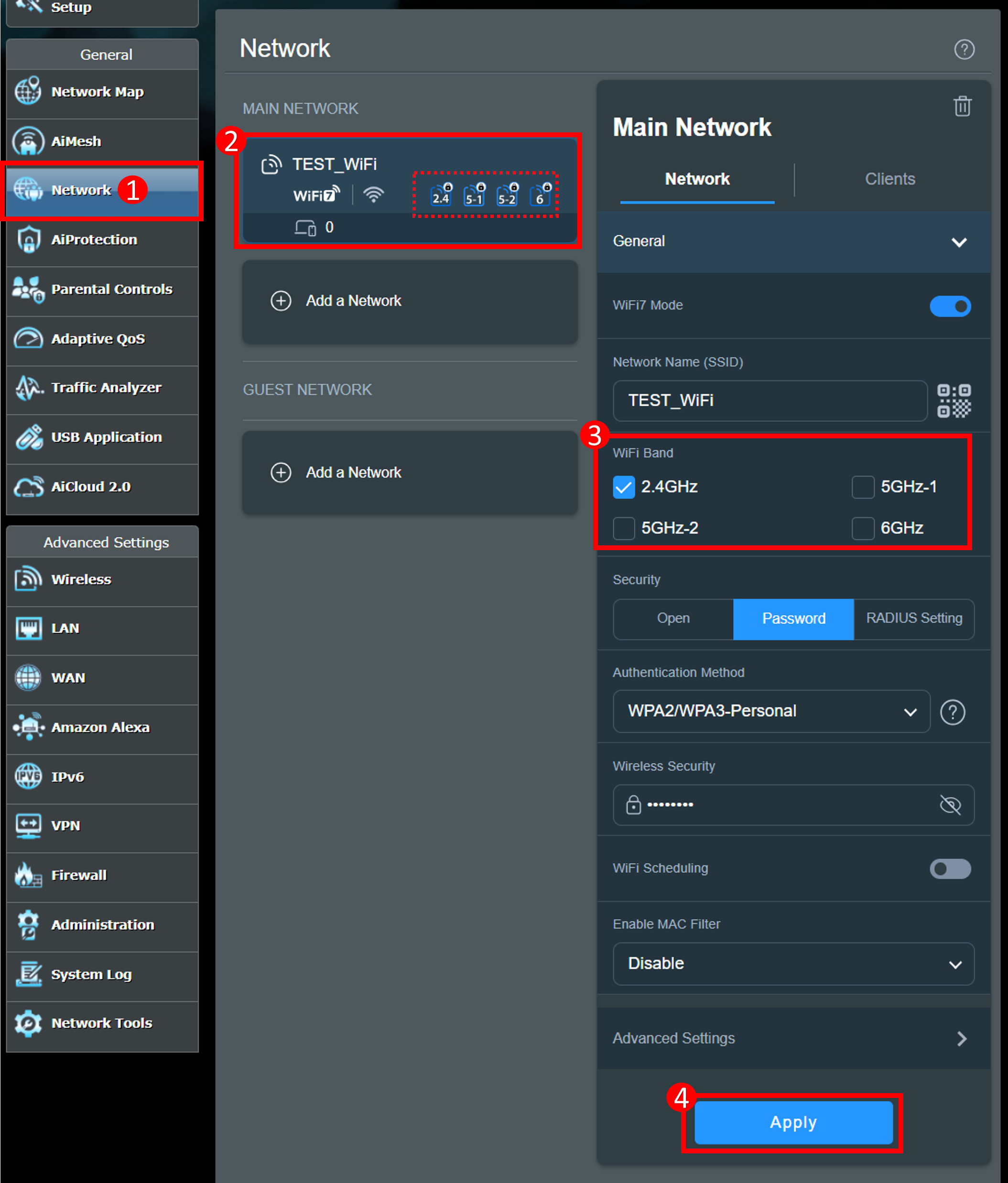
Advanced Settings Worth Reviewing
MTU and WAN settings
If your ISP uses special connection settings, a wrong MTU value can cause strange drops. This is less common, but it matters in some setups.
If you recently changed ISP equipment, check whether the WAN type still matches your service. A mismatch can create unstable internet even when Wi-Fi looks fine.
DHCP lease issues
If devices keep dropping and reconnecting, the router may be struggling with IP address assignment. This can happen when lease times are odd or another device acts like a second DHCP server.
Make sure only one device on your network is handing out IP addresses. Two DHCP servers on the same home network can create chaos.
DNS instability
DNS problems do not always disconnect the Wi-Fi itself, but they can make the internet feel broken. Pages fail to load, apps time out, and users assume the router is dead.
Testing a trusted public DNS can help confirm whether name resolution is part of the problem. If the issue improves, your ISP DNS may be the weak link.
When the Problem Is Not the Router
Sometimes the ASUS RT-AX88U Pro Router Disconnecting issue is really one of these:
• ISP line noise or outages
• Faulty modem
• Failing ONT in fiber setups
• Apartment-wide interference
• Device-specific Wi-Fi driver problems
• Malware or network settings on one client device
A helpful clue is whether every device drops at once. If only one phone or laptop disconnects, the router may be fine and the client device may need a driver update.
Real-World Troubleshooting Tips From Experience
One mistake I see often is changing too many settings at once. It feels productive, but it hides the real cause.
When I troubleshoot unstable routers, I follow a simple rule:
• Test the modem first
• Test wired internet next
• Test wireless on one band
• Change one setting at a time
• Keep notes
That method saves hours. It also turns the ASUS RT-AX88U Pro Router Disconnecting issue from a mystery into a list of small checks.
Another lesson is not to trust a “strong signal” icon alone. A device can show full bars and still disconnect if the channel is noisy or the router is overheating.
How to Prevent Future Disconnects
A stable home network is usually about consistency. Once your router works well, protect that setup.
• Keep firmware current
• Use a ventilated location
• Avoid stacking network gear
• Check cables every few months
• Review settings after major updates
• Reboot only when needed, not constantly
These habits may sound small, but they make a big difference over time. The ASUS RT-AX88U Pro Router Disconnecting problem often comes back only when something changes in the setup.

Frequently Asked Questions of Why Is ASUS RT-AX88U Pro Router Disconnecting?
Why does my ASUS RT-AX88U Pro keep dropping Wi-Fi?
The most common reasons are firmware issues, interference, overheating, or a bad channel selection. If only Wi-Fi drops while wired devices stay online, the problem is likely wireless rather than internet service.
Can a bad modem cause the ASUS RT-AX88U Pro Router Disconnecting issue?
Yes, a bad modem can absolutely cause it. If the modem loses sync or the ISP line is unstable, the router may seem like the source of the problem even though it is not.
Should I factory reset my ASUS RT-AX88U Pro?
Only after you try updates, cable checks, and basic wireless adjustments. A reset can help if a bad setting is stuck in the system, but it should not be the first move.
Does overheating make the ASUS RT-AX88U Pro disconnect?
Yes, heat can make the router unstable and may cause slowdowns, wireless drops, or reboots. Good airflow and open placement often help more than people expect.
Is Smart Connect good for stability?
It can be helpful in some homes, but it can also cause roaming issues or band switching problems. If you keep seeing disconnects, testing with Smart Connect off is a smart step.
Conclusion
The ASUS RT-AX88U Pro Router Disconnecting problem usually comes down to a few practical causes: firmware, interference, overheating, bad settings, cables, or a modem or ISP issue. Once you test each layer in order, the fix becomes much easier to find.
The best approach is simple: update first, simplify the settings, test the bands, and watch the logs. If you take it step by step, you can turn a frustrating drop-off problem into a stable, reliable network again. Try the fixes above, then share your results or explore more router troubleshooting guides to keep your home network running smoothly.

Similar Posts