Honeywell T4 Pro Troubleshooting
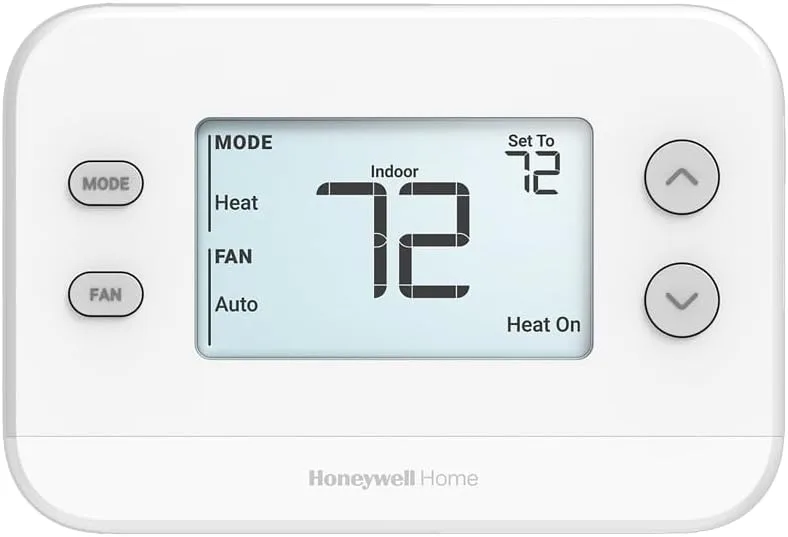
Your thermostat is showing a blank screen. Or maybe it's flashing an E1 error. You're already annoyed because the house is too hot or too cold, and you just want it fixed.
That's exactly where Honeywell T4 Pro troubleshooting begins. Start with a clear symptom, not a vague guess.
The T4 Pro is a basic, reliable thermostat that uses either battery power alone or a common wire (C-wire) for constant 24VAC power. As of 2026, it remains a common choice for homes without a smart thermostat and for simple HVAC systems. Most issues come down to power, wiring, or settings.
You can solve them yourself with a few tools and a logical approach. Let's walk through the most common symptoms and exactly what to do for each.
Quick Answer
If your Honeywell T4 Pro has a blank screen, replace the batteries first. If that doesn't work, check the furnace fuse. For error codes E1 or E2, inspect wiring for shorts or loose connections.
If the system won't turn on, check the thermostat mode. Make sure it is set to Heat or Cool. Verify all safety switches are closed.
Most problems are simple power or wiring issues.
Image source: Bing (Web (fair-use with source credit))
Where to Start: Identify Your Symptom First
The simplest approach is to observe carefully and match your symptom to the right branch of the decision tree. Don't start guessing. Don't replace parts one by one.
Ask yourself three questions:
- Is the display blank or showing an error code? That points to power or internal communication issues.
- Does the thermostat itself seem to be working, but the furnace or air conditioner won't kick on? That points to wiring, settings, or equipment-side problems.
- Is the system running but doing something wrong? Short cycling, running constantly, or blowing lukewarm air points to configuration, airflow, or equipment issues.
Each symptom has a distinct troubleshooting path. This guide walks you through each one in order, starting with the most common: the blank screen.
Tools You'll Need for T4 Pro Troubleshooting
Most T4 Pro problems can be diagnosed with items you probably already have around the house. You don't need a full HVAC toolkit. But a few basic tools make the difference between a five-minute fix and a call to the HVAC company.
| Tool / Item | Why You Need It |
|---|---|
| Two fresh AA alkaline batteries | Quickest test for dead-battery blank screen |
| Multimeter (digital) | Measure voltage at thermostat and furnace for power and continuity checks |
| Small flathead or Phillips screwdriver | Remove thermostat faceplate and tighten wiring |
| Needle-nose pliers (optional) | Straighten or trim wires before inserting into terminals |
| Phone camera (with flash) | Take a photo of existing wiring before you disconnect anything |
| Furnace manual or wiring diagram (if available) | Identify the control board and fuse location |
If you don't own a multimeter, you can still test batteries and replace them. But the multimeter is essential when checking for a blown fuse or dead transformer. They are cheap (under 20 dollars) and worth owning for any homeowner.
Important safety note: Always shut off power at the breaker to both the thermostat and the furnace before removing wires or touching the control board. Low-voltage wiring is generally safe, but the furnace interior has high-voltage components that can hurt you.
Blank Screen – Dead Batteries, Blown Fuse, or No Power?
A blank screen on the T4 Pro is the most common complaint. It almost always means one of three things: dead batteries, a tripped breaker or blown fuse on the furnace side, or a failed 24VAC transformer.
Step 1: Replace the batteries
The T4 Pro runs on two AA alkaline batteries. Even if you have a C-wire connected, the batteries still power the display. If they are dead, the screen goes dark.
- Remove the faceplate by pulling straight off from the base.
- Pop out the old batteries.
- Install fresh alkaline batteries. Do not use rechargeables. Rechargeable AAs (NiMH) supply only 1.2V instead of 1.5V. The T4 Pro can behave erratically or go blank with them.
- Reattach the faceplate.
If the screen lights up, you are done. If it is still blank, move on.
Step 2: Check the furnace fuse and breaker
The thermostat gets its 24VAC power from the furnace's control board. If that board has a blown fuse or a tripped breaker, the thermostat gets nothing. It stays blank even with fresh batteries.
- Go to your furnace or air handler. Find the control board. It is usually behind a small metal panel.
- Look for a small automotive-style blade fuse. It is typically rated 3A or 5A. Pull it out and inspect it. A blown fuse will have a broken metal strip or visible charring.
- If it is blown, replace it with an identical fuse. But first, find out why it blew. A blown fuse usually means a short circuit somewhere in the low-voltage wiring. It could be at the thermostat itself or a wire touching metal near the furnace. Replace the fuse, then turn the system back on. If it blows again immediately, you have a wiring short.
- If the fuse is fine, check the furnace's power switch. It is often on the side of the unit. Also check the breaker in your electrical panel. Make sure the breaker has not tripped.
Step 3: Measure voltage at the thermostat base
Still blank? Time for the multimeter.
- Set your multimeter to AC voltage (V~).
- Touch one probe to the R terminal and the other to the C terminal at the thermostat base. Keep the faceplate off and power on.
- You should see 24 to 28 VAC. If you get zero, the transformer is likely dead. There could also be a break in the wire between the thermostat and furnace.
- If you get voltage but the screen is still blank, the thermostat itself may be faulty. Try a factory reset. Remove batteries, wait 30 seconds, then reinstall. If that does not work, it is time to replace the T4 Pro.
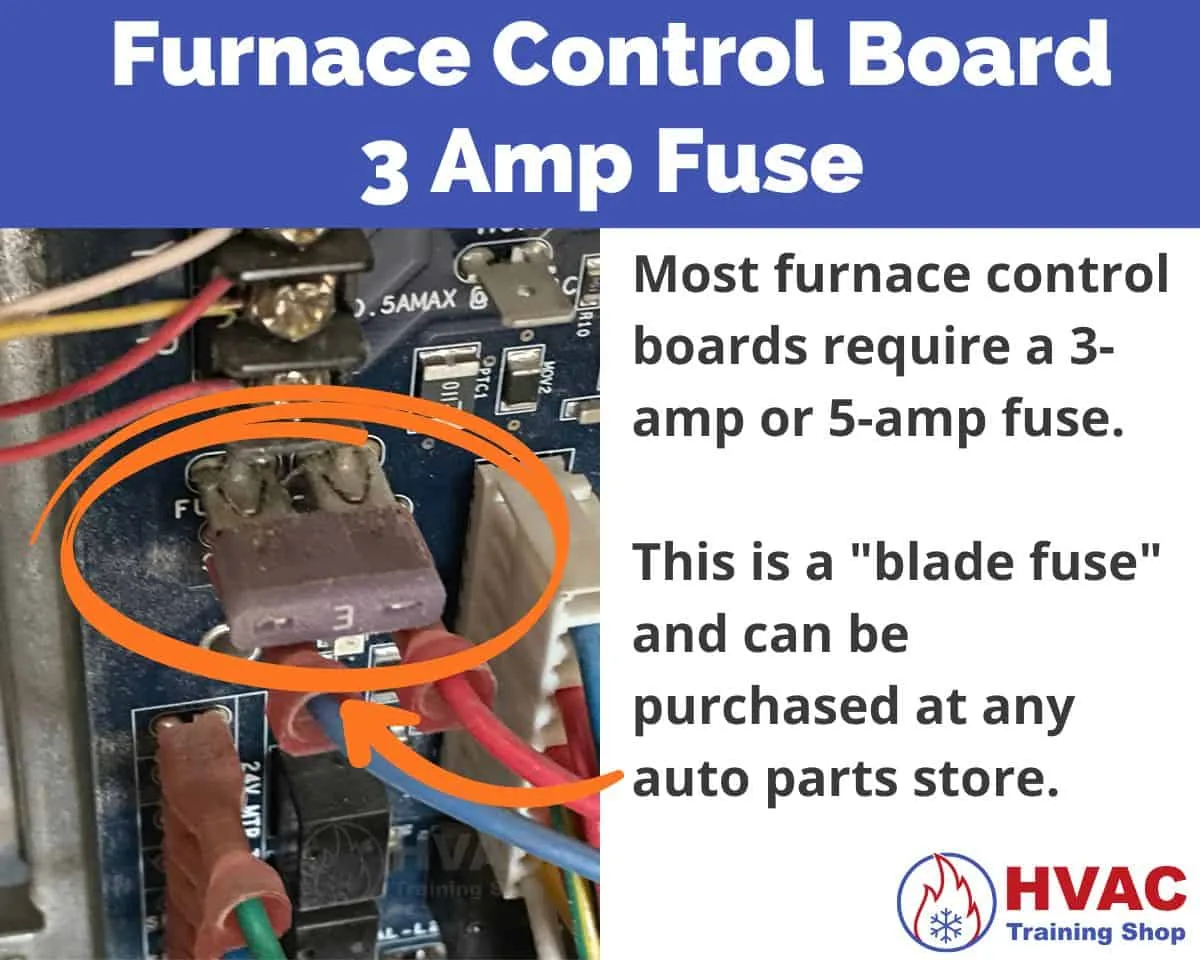
Image source: Bing (Web (fair-use with source credit))
E1 and E2 Error Codes – Communication Loss or Sensor Failure
An E1 error means the thermostat has lost communication with the HVAC equipment. You will see the error code blinking on the display. An E2 error means an internal sensor fault.
These are less common but still straightforward.
E1 – What to check
The E1 error usually means a wiring problem between the thermostat and the furnace control board. The most common causes are:
- A loose or corroded wire at the thermostat base. Open the faceplate and gently tug each wire. If one comes out easily, tighten the screw.
- A shorted wire. A bare wire touching the thermostat metal backplate or another terminal can cause communication loss. Look for frayed insulation or wire strands touching.
- A C-wire issue. If the T4 Pro is using the common wire for power but the C-wire is loose or missing at the furnace end, communication can fail. Verify the C-wire is connected at both ends.
What to do:
- Turn off power to the furnace and thermostat.
- Inspect all thermostat wires. Straighten any bent wires and trim any frayed strands.
- Reinsert each wire into its correct terminal and tighten the screw firmly.
- Turn power back on. If E1 clears, you are good.
- If it persists, check the furnace control board connections. The wires from your thermostat should match the letters on the board. R to R, W to W, Y to Y, and so on. A miswire at the furnace end can cause E1.
E2 – What it means
E2 is a sensor error inside the thermostat. The internal temperature sensor has failed or is reading out of range.
- First, try a full power reset. Remove batteries and faceplate. Wait two minutes. Reinstall.
- If E2 returns, the thermostat is faulty. Replacement is the only reliable fix. The T4 Pro is inexpensive. It costs around $30 to 50 retail. Swapping it out is often faster and cheaper than further diagnosis.
System Won’t Turn On (No Heat or No Cool) – Wiring, Settings, and Safety Switches
This is the tricky one. The thermostat display works fine. You see the setpoint and the room temperature.
But when you select Heat or Cool, nothing happens. The furnace or AC stays silent.
Seven possible causes, in order of likelihood:
1. Thermostat mode is set incorrectly
It sounds obvious, but it is the number one cause. Check that the system switch is set to Heat or Cool. It should not be set to Off or Auto.
Auto mode only runs when there is a call for both, which may not happen. Also check the fan switch. Set it to Auto so the fan runs only when heating or cooling is active.
If it is set to On, the fan should run. If the fan does not run with it set to On, you have a different problem.
2. Wiring mismatch
The T4 Pro is designed for conventional systems. It handles single-stage heat and cool or heat pumps with an O/B reversing valve. If your system uses a two-stage furnace or a dual-fuel heat pump, the T4 Pro may not control it correctly.
- Look at the wires at the thermostat. You should see R (power), W (heat), Y (cool), G (fan), and possibly C (common). If you have additional wires like W2, Y2, or AUX, the T4 Pro likely cannot drive them.
- Check if your HVAC equipment actually needs those extra stages. If not, the unused wires can be capped off. If you need two-stage heating, you will need a different thermostat. The Honeywell T6 or T10 are good options.
3. Blown fuse or tripped breaker (again)
Even if the thermostat display is on, the furnace might not have power to its control board. Check the fuse and breaker as described in the blank screen section. A blown fuse often prevents the system from running.
This happens even though the thermostat has backup battery power for its display.
4. Safety switches are open
Furnaces and air handlers have several safety switches. If any are open, the equipment will not operate.
- Door switch: A button on the furnace cabinet. If the panel is loose or removed, the switch disconnects power. Make sure the panel is fully seated.
- Condensate pump float switch: For high-efficiency furnaces and air conditioners that produce water. If the pump is full or clogged, the float switch kills power to prevent flooding. Check the pump and clear any blockage.
- High-limit switch: If the furnace overheated, the high-limit switch opens. This often happens from a dirty filter or restricted airflow. It will not reset until it cools. Wait 30 minutes with the power on and see if it restarts.
5. Bad transformer
If the multimeter shows no voltage between R and C at the thermostat, and the fuse is good and safety switches are closed, the 24VAC transformer on the furnace board may have failed. Replace it. Typical cost is $15 to 25.
Make sure to turn off power before touching.
6. Loose or corroded wiring at the equipment
Check the wire connections on the furnace control board. Corrosion or loose screws can prevent the signal from reaching the contactor or gas valve. A common spot is the C-wire terminal.
If it looks green or white from corrosion, clean it with a small wire brush or replace the terminal.
7. Failed contactor (for AC) or gas valve (for furnace)
If all wiring and safety checks pass but the system still will not start, the problem may be inside the equipment itself. It could be a stuck contactor on the AC unit or a faulty gas valve on the furnace. At this point, it is time to call an HVAC professional.

Image source: Web (Bing) / timesofindia.indiatimes.com (Web image (fair-use with source credit))
Quick wiring reference: The T4 Pro uses standard thermostat wire colors. Red (R) is power. White (W) is heat.
Yellow (Y) is cooling. Green (G) is fan. Blue or black (C) is common.
If you have a heat pump, the orange wire is typically O/B for reversing valve. Verify your system's documentation before changing anything.
For more detailed installation and troubleshooting guidance, refer to Honeywell's official support page for the T4 Pro manual. Always follow the manufacturer's instructions for your specific sub-model.
System Runs But Incorrectly – Wrong Temperature, Short Cycling, or Won't Shut Off
This category is frustrating because the system is working, just not working right. The thermostat says it is 72°F but you are sweating. The furnace kicks on for three minutes then shuts off.
Or it runs nonstop and never reaches the setpoint. Let's break these down.
Wrong temperature reading on the display
If the thermostat shows a temperature that does not match how the room feels, the issue is usually placement.
- Mounting location matters. The T4 Pro reads temperature through a small vent on the top edge. If it is mounted on an exterior wall, near a drafty window, above a stove, or in direct sunlight, the reading will be off. The sensor cannot tell if it is 80°F because the sun is hitting the wall or 60°F because cold air is leaking under the door.
- What to do: Compare the thermostat reading to a standalone thermometer placed in the center of the room at roughly the same height. If they differ by more than a few degrees, relocate the thermostat to an interior wall away from heat sources and drafts. That is a bigger job, but it fixes the problem permanently.
- Temperature offset: The T4 Pro does not have a built-in calibration adjustment. If the reading is consistently off by 2 to 3 degrees and you cannot move it, you will need to accept the offset mentally. Set the thermostat a few degrees higher or lower to compensate.
Short cycling – furnace or AC runs for a few minutes then stops
Short cycling means the equipment starts, runs briefly, then shuts off before reaching the set temperature. Then it restarts a few minutes later. This stresses the system and wastes energy.
Compressor short-cycle protection: The T4 Pro has a built-in five-minute minimum off-time for the compressor. This is normal after a cooling cycle ends. You will see "WAIT" on the display. That is not a problem.
Short cycling during normal operation: The most common cause is a dirty air filter. A clogged filter restricts airflow. This causes the system to overheat (furnace) or freeze (AC), triggering a safety limit switch that cuts power. Try this first.
Other causes: , Oversized system for the space: The equipment reaches the temperature too fast and shuts off. This requires professional sizing adjustments.
, Faulty limit switch or pressure switch: A safety switch that is stuck or failing can falsely trigger system shutdown.
, Low refrigerant charge in an AC system: Causes the evaporator coil to freeze, tripping a pressure switch.
Quick test: Run the system on fan-only mode. If the fan runs continuously without issue, the problem is likely related to the heating or cooling cycle itself. Call an HVAC technician for refrigerant or limit switch diagnosis.
System won't shut off – runs constantly
If the furnace or AC runs nonstop and never reaches the set temperature, you have a different problem.
- Stuck relay on the furnace control board: The system is getting a constant call for heat. This usually requires replacing the control board. It is an HVAC repair, not a thermostat fix.
- Short or bridged wiring at the thermostat: If the W wire is touching the R wire inside the thermostat or at the furnace, the furnace thinks it is getting a constant call for heat. This happens even when the thermostat says to stop. Inspect for bare wires touching.
- Thermostat set too aggressively: If you set the temperature 10°F above or below the room temperature, the system may run for hours trying to catch up. That is normal system behavior, not a failure.
- Undersized system: The unit cannot meet demand because it is too small for the space. The only fix is to upgrade equipment.
- Program settings: If you have a schedule set, check whether "hold" is engaged. The T4 Pro can hold one temperature indefinitely if you have put it into permanent hold. Press "Run" to return to schedule.
Mistakes to Avoid When Troubleshooting the T4 Pro
Everyone makes mistakes when they are frustrated. These are the most common ones that turn a small fix into an expensive repair call.
Mistake 1: Replacing parts without diagnosing first
The biggest mistake is replacing the thermostat before checking the power supply, wiring, and furnace fuse. Many HVAC technicians report that a large percentage of returned thermostat "dead units" are actually fine. The problem was a blown fuse or dead batteries.
Do not waste time or money on a new thermostat until you have verified the old one is truly faulty.
Mistake 2: Using rechargeable batteries
We already covered this, but it is worth repeating. The T4 Pro is designed for alkaline batteries only. Rechargeable AA batteries supply lower voltage (1.2V vs. 1.5V).
They also discharge differently. Using them can lead to a blank screen, erratic display, or early battery failure. Stick with fresh Energizer or Duracell alkalines.
Mistake 3: Ignoring the furnace safety switch
The door switch on the furnace is easy to overlook. If you were working near the furnace earlier, you may have bumped the panel slightly. Now it is not fully seated.
The safety switch kills power to the control board. This disconnects power to the thermostat. Check that the panel is firmly closed before you dive into deeper diagnostics.
Mistake 4: Tightening wires too much
Thermostat terminal screws are small and easy to overtighten. If you strip the screw or crush the wire, you will end up with a loose connection. This causes intermittent problems.
Snug the screw until the wire will not pull out. Then stop. Do not crank hard enough to twist the wire into a spring shape.
Mistake 5: Misusing Auto or Emergency Heat modes
Auto mode lets the system pick between heat and cool. But if both setpoints are far apart, the system may cycle both in spring or fall. This can cause confusion.
Emergency Heat bypasses the heat pump and uses only electric resistance strips. It is expensive to run. Only use it if the heat pump has failed.
When to Call a Pro – Signs It's Beyond DIY
Most T4 Pro issues are straightforward. But there are clear lines where a homeowner should stop and call an HVAC technician.
You've checked all the basics and nothing works
If you have replaced batteries, checked the fuse, verified voltage at the thermostat (24 VAC), inspected wiring for shorts, and the thermostat still will not turn on, it is time to call a professional. The problem has moved beyond simple low-voltage troubleshooting.
You smell gas or hear a hissing sound
If you smell gas near the furnace, turn off the gas supply immediately. Do not flip any switches or use a phone in the area. Leave the house and call the gas company from outside.
A gas leak is not a DIY safety concern. If the issue is inside the furnace and involves the gas valve or heat exchanger, only a licensed gas technician should handle the repair.
The AC line is frozen
If you see ice on the refrigerant line, do not run the system. Turn off the AC at the breaker. A frozen line usually means low refrigerant, restricted airflow, or a failing fan motor.
All of these are HVAC repairs. Running the system while frozen can damage the compressor. Thaw the ice completely before restarting, then call a tech.
You are uncomfortable with electrical work
Thermostat wiring is low voltage, so it is generally safe. But the furnace has 120V or 240V components, capacitors, and potential for shock. If you are not comfortable removing panels or handling wires near a breaker box, stop.
The cost of a service call is worth avoiding an emergency room visit.
The error code doesn't match common fixes
If the T4 Pro shows an error code that isn't E1 or E2, that points to a unique problem inside the equipment. Pull the manufacturer manual for the correct code definition. If the solution requires equipment diagnosis, call a specialist.
Frequently Asked Questions
Does the T4 Pro have a factory reset?
Yes. Remove the faceplate and batteries. Wait 30 seconds.
Reinstall the batteries and faceplate. For a deeper reset on some sub-models, press and hold the button where the faceplate meets the base. The screen should flash and the thermostat will restore its default schedule.
How do I know if my T4 Pro needs a C-wire?
The T4 Pro can run on batteries alone. You will need to replace them every 12 to 18 months. If you connect a C-wire, the display is constantly powered and battery life is greatly extended.
Check your existing thermostat wiring. A blue or black wire connected to the C terminal means you have a C-wire available.
Why is my T4 Pro showing "Wait"?
This is normal protection for your AC compressor. The thermostat enforces a five-minute minimum off-time before the compressor can restart. The display should clear in a few minutes.
Can I install a T4 Pro myself?
Yes, if you are comfortable with low-voltage wiring. The manual includes clear wiring diagrams matched to wire colors. Most homeowners finish in 30 to 60 minutes.
If your system uses unconventional wiring without letter labels, it is best to hire a professional.
What's the difference between E1 and E2 errors?
E1 indicates a communication failure between the thermostat and the HVAC equipment. It often traces back to a loose wire, shorted wire, or missing C-wire connection. E2 indicates an internal sensor fault inside the thermostat itself.
E2 generally requires complete replacement of the thermostat.
Why is my thermostat blank but the furnace is running?
This indicates the furnace is running independently of the thermostat. A stuck relay on the furnace control board is a common cause. Shut off power immediately.
This can create a safety issue if the furnace runs continuously without thermostat control.
Quick Reference Decision Guide – From Symptom to Fix
Use this guide as a checklist when something goes wrong.
| Symptom | Most Common Fix | Time Required | Difficulty |
|---|---|---|---|
| Blank screen | Replace batteries or check fuse | 5 minutes | Easy |
| E1 error | Check wiring or loose connection | 15 minutes | Easy |
| E2 error | Replace thermostat | 10 minutes | Easy |
| System won't start | Check mode, fuse, safety switches | 20 minutes | Moderate |
| Short cycling | Replace air filter first | 5 minutes | Easy |
| Wrong temperature | Check thermostat placement | 30 minutes | Easy |
| Runs nonstop | Check wiring short or stuck relay | 20 minutes | Moderate |
| Ice on line | Turn off AC, call a technician | Do not DIY | Professional |
One last word of advice: Start with the simplest possible solution. Change the batteries. Look at the breaker.
Inspect the wire connections. Most thermostat calls are fixable with a 10 dollar multimeter and a set of fresh batteries. Save the complex diagnosis for what genuinely needs it.
If your system returns to running, you just saved a hundred to two hundred dollars on a service call. That is the best outcome.

Similar Posts