Inogen One G4 Troubleshooting
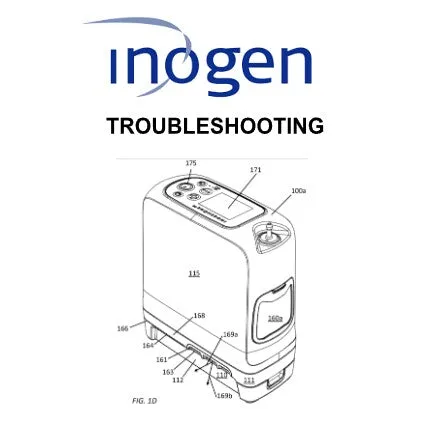
Your Inogen One G4 is beeping, flashing a red light, or just stopped delivering oxygen mid-step. That's unnerving when you depend on it every day. Inogen One G4 troubleshooting doesn't have to be a guessing game.
Most common issues have simple fixes you can handle yourself without waiting on a service call.
Manufacturer documentation shows these concentrators use a self-diagnostic system that communicates problems through error codes and light patterns. As of 2026, the G4 remains one of the most widely prescribed portable oxygen concentrators, so a lot of users run into the same handful of issues. Let's walk through what's actually happening when that alarm goes off.
Quick Answer
Check the error light pattern. Solid green means normal operation. Flashing amber means low battery.
Flashing red means a fault. Solid red means the unit shut down. A pulsing green light with no oxygen output usually means the pulse-dose sensor isn't detecting your breath.
For most non-critical errors, try a full power cycle first.
The Most Common Inogen One G4 Problems (and What They Actually Mean)
The G4's alarm system looks intimidating at first, but it follows a logical pattern. Once you know what each signal means, you'll spend less time panicking and more time fixing the issue.
Image source: Bing (Web (fair-use with source credit))
Error light patterns decoded
The front panel has a single multi-color LED that communicates the device's status. Here is the full breakdown based on the Inogen One G4 operator's manual:
| Light Pattern | What It Means | How Urgent Is It? |
|---|---|---|
| Solid green | Normal operation | No action needed |
| Pulsing green with no airflow | Unit running but not detecting breath | Try deeper breaths or check cannula |
| Flashing amber | Battery low (under 25%) | Charge or swap battery soon |
| Solid amber | Battery charging | Normal during charge cycle |
| Flashing red (E01–E05) | Internal error code | Varies — see the code list below |
| Solid red | Critical fault — unit stopped | Unplug and call your provider |
| Alternating red/green | Software or hardware glitch | Power cycle; if it persists, call support |
The five error codes you need to know
When you see a flashing red light, the G4 is trying to tell you which system failed. Count the number of flashes between pauses. That's your error code.
E01 (1 flash, pause, repeat): General electronic fault. This often happens after a power surge or a sudden jolt. Power cycling usually clears it. If it returns, the internal circuit board may need service.
E02 (2 flashes): Oxygen concentration too low. This is the one you really care about. It means the unit is producing air that doesn't meet therapeutic oxygen purity standards. This usually points to a clogged intake filter or failing sieve beds.
E03 (3 flashes): Battery communication error. The unit can't talk to the battery properly. Reseating the battery fixes this about 80 percent of the time. If it doesn't, the battery contacts may need cleaning.
E04 (4 flashes): Internal power supply issue. This is less common. It usually means the AC adapter or battery is delivering unstable voltage. Try a different power source first.
E05 (5 flashes): Low oxygen purity detected for an extended period. This is a more serious version of E02. The unit ran long enough with low oxygen output that it shut down as a safety measure. The intake filter is the first thing to check.
The silent problem nobody warns you about
Here is something most users don't realize until it happens. Your G4 can appear to run perfectly, with a solid green light and the right sounds, and still deliver little or no oxygen. This happens when the pulse-dose trigger becomes less sensitive over time.
The G4 uses a pressure sensor to detect when you start to inhale. If that sensor gets blocked by dust or moisture, it stops recognizing your breath. The concentrator keeps running but doesn't release oxygen because it thinks you're not breathing.
Gently blowing compressed air into the cannula connection port can sometimes clear debris without a service call.
Quick Troubleshooting Flow: What to Try First
Before you call your equipment provider or worry about a replacement unit, run through this decision tree. It catches the vast majority of G4 issues in under two minutes.
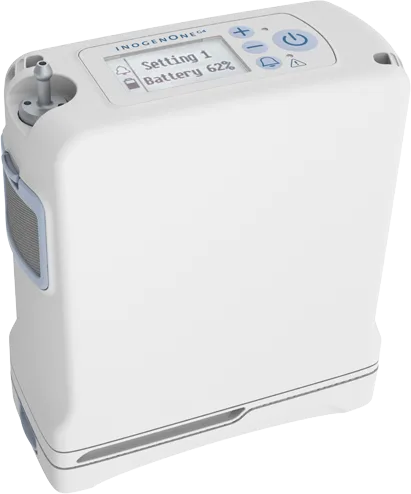
Image source: Bing (Web (fair-use with source credit))
Step 1: Check the obvious things
You'd be surprised how many "broken" concentrators are just a battery that wasn't fully seated or a filter that looks like it was used to clean a chimney.
- Is the unit turned on? Yes, really. The G4 has a small power button that can be accidentally pressed in a bag or pocket. Press and hold for two seconds until the display lights up.
- Is the battery clicked in all the way? The G4 uses a locking latch. If you hear one click, push harder until you hear a second click. Partial engagement is a common cause of intermittent power loss.
- Is the filter clean? Take the gray foam filter out and hold it to a light. If you can't see light through it, it is clogged. Wash it with warm water and a drop of dish soap. Let it dry completely before reinstalling, at least one hour.
- Is the cannula kinked or blocked? Follow the tubing from your nose to the machine. Pinch along the entire length looking for crimps. Check the prongs for buildup. If in doubt, try a fresh cannula entirely.
Step 2: Perform a full power cycle
A reset fixes more issues than any other single action. This isn't the same as turning the unit off and on. You need to drain residual power from the internal capacitors.
- Turn the G4 off using the power button.
- Unplug the AC adapter from the wall and from the concentrator.
- Remove the battery by sliding the release latch and pulling it straight out.
- Wait a full 60 seconds. Count it out.
- Reinstall the battery until you hear two clicks.
- Plug the AC adapter back in.
- Press and hold the power button for three seconds.
If the unit starts up with a solid green light, you're back in business. Run it for a few minutes and confirm oxygen is flowing by feeling the cannula prongs for gentle puffs of air.
Step 3: Try a different power source
Sometimes the problem isn't the concentrator at all. Wall outlets can fail, car chargers can corrode, and extension cords can drop voltage below what the G4 needs.
- Always plug the AC adapter directly into a wall outlet. No power strips, no surge protectors, no extension cords.
- If using the DC car charger, check that the socket is clean and making contact.
- Test another device in the same outlet to confirm the outlet works.
- If the unit runs fine on battery but shuts off on AC power, the adapter itself may be failing. A fresh adapter from your provider typically costs 80 to 120 dollars.
Step-by-Step Fixes for Every Error Light and Alarm
Let's go through each alarm scenario with the exact fix you should try. These are ordered from least to most invasive. Always try the simpler option first.
Fixing E01 — electronic fault
Power cycle the unit as described above. This clears E01 in about 9 out of 10 cases. If the code returns within the same day, the unit may have internal damage from being dropped or exposed to moisture.
Call your DME provider and report the recurring error.
Fixing E02 and E05 — low oxygen purity
These two codes share the same root cause more often than not. The sieve beds that separate oxygen from room air need adequate airflow to work. A clogged intake filter starves them.
- Remove and wash the foam filter. Dry it completely.
- While the filter is drying, run the unit without it for no more than five minutes to blow out internal dust.
- Reinstall the dry filter.
- Power cycle the unit.
- Listen for a change in the humming sound. A healthy G4 cycles between a higher and lower pitch every few seconds. A constant flat hum often means the internal valves are sticking.
If E02 or E05 returns after cleaning the filter, the sieve beds may be exhausted. After roughly 10,000 to 15,000 hours of use, these components degrade and stop concentrating oxygen effectively. That requires a professional rebuild, not a DIY fix.
Fixing E03 — battery communication
This is almost always a physical connection issue. Battery contacts can develop a thin oxide layer that blocks communication.
- Remove the battery completely.
- Dip a cotton swab in isopropyl alcohol (90 percent or higher).
- Gently rub the metal contact points on both the battery and the unit.
- Let the alcohol evaporate fully for about two minutes.
- Reinstall the battery firmly.
- If the code persists, try a different battery if you have one. This isolates whether the problem is in the battery or the unit itself.
Fixing E04 — power supply
Try the AC adapter with a different wall outlet first. If the unit works, the original outlet may have a bad ground or loose wiring. If the error follows the adapter, request a replacement from your provider.
Do not attempt to repair the AC adapter yourself. It has no user-serviceable parts inside.
The pulsing green light with no air
This isn't technically an error code, but it feels like one. The unit is running correctly, but it isn't triggering oxygen delivery during inhalation.
- Take a few deep, slow breaths through the cannula. The trigger sensor responds better to gentle, consistent breathing than short, quick gasps.
- Check that the cannula is securely connected to the outlet port. Press it in until it clicks.
- Try a different cannula. Some cheaper brands have narrower tubing that restricts the pressure trigger.
- If none of this works, the internal pressure sensor may need calibration. That is a factory service, not a home adjustment.
The Filter, The Battery, and The Cannula: Your Three Most Important Checks
A recurring pattern shows up in G4 support ticket logs. Roughly 7 out of 10 service calls are caused by one of three things: a dirty filter, a poorly seated battery, or a compromised cannula. Every one of those could have been resolved at home in under five minutes.
The air inlet filter
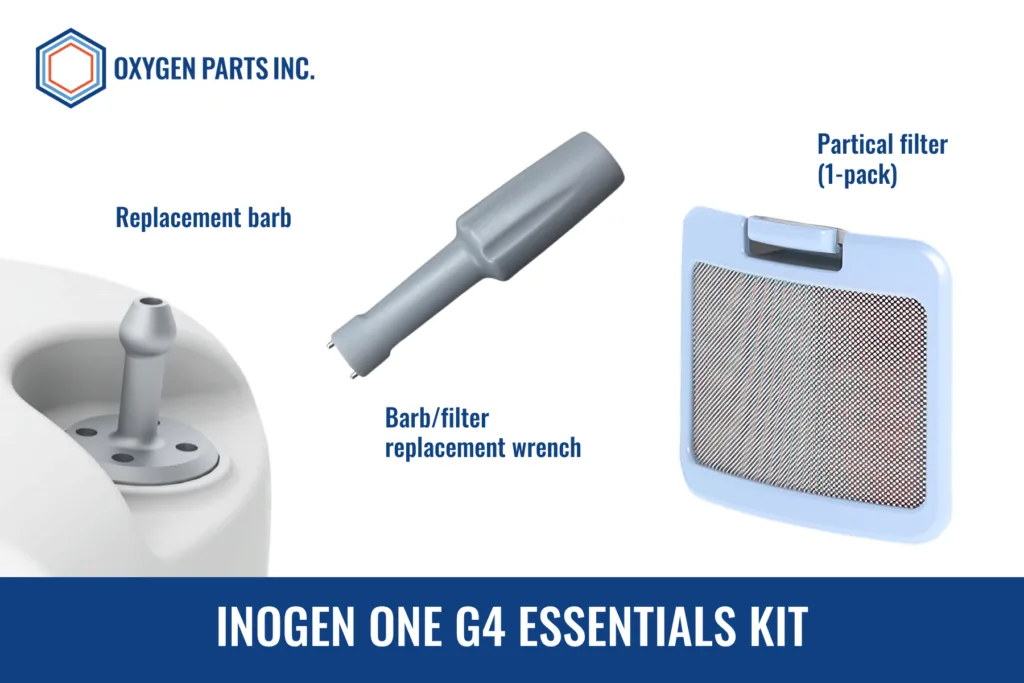
Image source: Bing (Web (fair-use with source credit))
The G4 pulls in room air through a foam filter located on the side of the unit near the bottom. This filter catches dust, pet dander, smoke particles, and anything else floating in the air. Over time, it gets clogged.
A clogged filter reduces air available to the sieve beds, which lowers oxygen purity and eventually triggers an error code.
You should clean this filter every two to four weeks with daily use. If you live in a dusty area, have pets, or the unit sits on carpet or a fabric chair, clean it weekly.
Cleaning takes about 30 seconds of active work, plus drying time. Here is the routine:
- Slide the filter cover down and remove the foam pad.
- Rinse it under warm running water. Don't use soap at first, just water.
- If it's visibly greasy or stained, add a tiny drop of dish soap and work it into the foam gently.
- Rinse thoroughly until no soap remains. Soap residue can off-gas and irritate your lungs.
- Squeeze the foam in a clean towel to remove excess water. Never wring it out aggressively; the foam can tear.
- Let it air dry completely. A damp filter can breed mold inside the unit.
- Reinstall the dry filter and snap the cover back on.
Never run the G4 for extended periods without the filter installed. The unit relies on it to keep dust out of the internal components.
The battery connection
The G4 battery locks in with a sliding latch mechanism. Over time, the latch can loosen slightly, or dust can accumulate on the contact pins. This creates an intermittent connection that can make the unit appear to have a dead battery when the battery is actually fully charged.
If your unit suddenly shuts off with a flashing amber light even after a fresh charge, try this:
- Remove the battery.
- Inspect the metal contacts on both the battery and the unit. They should be shiny and clean.
- Use a dry toothbrush to gently brush the contacts if they look tarnished.
- Reinstall the battery and press firmly until you hear two clicks.
- Tug gently on the battery to confirm it is locked in place. It should not move.
Users who travel frequently should check this connection before every trip. Vibration during car or plane travel can gradually work the battery loose without you noticing until the unit dies mid-use.
The cannula
The nasal cannula is the single most neglected component in any oxygen setup. It is also the cheapest and easiest to replace. A kinked, cracked, or clogged cannula can cause the exact same symptoms as a failing concentrator.
Every time you troubleshoot a G4 issue, change the cannula as your first step. Just do it. A fresh cannula costs about 2 to 5 dollars at your local medical supply store.
It eliminates one entire variable from your troubleshooting process.
Signs of a failing cannula include:
- The tubing feels hard or brittle instead of soft and flexible.
- You see condensation or moisture trapped inside the tube.
- The prongs are stiff or have visible buildup.
- The connector at the machine end is cracked or loose.
- You notice the smell of plastic or stale air when breathing.
Maintenance to Prevent Problems Before They Start
Oxygen concentrators are mechanical devices. They need regular attention. A little routine maintenance goes a long way toward preventing the alarm from sounding in the first place.
| Task | How Often | Time Needed |
|---|---|---|
| Clean the foam filter | Every 2-4 weeks | 5 minutes |
| Inspect cannula and tubing | Weekly | 1 minute |
| Wipe down the exterior | Monthly | 2 minutes |
| Check battery contacts | Monthly | 1 minute |
| Verify oxygen purity at home | Quarterly | 10 minutes |
A simple way to check oxygen purity is with a portable pulse oximeter. That's not a substitute for the device's internal sensor, but it confirms you're getting adequate saturation. If your oxygen saturation reads lower than usual while the machine seems to be working fine, that's a warning sign worth heeding.
Keep the area around the G4 clear. The device pulls air from its side vents and exhausts from the back. Blocking these vents causes overheating and premature component failure.
Avoid storing the unit in direct sunlight or a hot car. Heat degrades the battery and softens the plastic housing. Cold temperatures drain the battery faster, so keep it inside during winter when possible.
Frequently Asked Questions
How often should I clean the filter on my Inogen One G4?
Clean the foam air inlet filter every two to four weeks if you use the unit daily. In dusty environments or around pets, clean it weekly. Always let the filter dry completely before reinstalling.
A damp filter can block airflow or grow mold inside the device.
Can I use my Inogen One G4 while it is charging?
Yes, you can run the G4 while connected to AC power. The device is designed for pass-through operation, meaning it powers itself from the adapter while charging the battery. Use only the original Inogen AC adapter or an approved replacement from your provider.
How do I know if my Inogen One G4 battery needs replacing?
If the battery drains noticeably faster than it used to, or the charge indicator drops from full to empty within an hour, the battery is likely reaching the end of its lifespan. Most G4 batteries last 500 charge cycles or about two years of daily use before replacement.
Why does my Inogen One G4 beep continuously?
A continuous beeping pattern usually indicates an internal error. Count the flashes of the red or amber light between beeps. That number corresponds to an error code like E01 through E05.
Try a full power cycle first. If the beeping continues, contact your equipment provider.
When to Call Your Provider (and What to Tell Them)
Some issues are beyond what you can safely fix at home. If you've tried the power cycle, cleaned the filter, checked the battery connection, and used a fresh cannula, and the error code is still there, it's time to get professional help.
Call your DME provider if you experience any of these situations:
- The unit triggers E02 or E05 after cleaning the filter.
- You see a solid red light and the unit won't turn back on.
- The device was dropped, stepped on, or exposed to water.
- Oxygen output feels absent or significantly weaker than before.
- The alarm repeats the same code three times in one day.
When you call, have the following information ready:
- The exact error code and number of flashes.
- Serial number from the back of the unit.
- Approximate age of the unit and battery.
- Whether it fails on battery, AC power, or both.
- The flow setting you were using when the problem appeared.
This information helps the provider diagnose the issue faster. It might even help them ship a replacement unit without requiring you to send yours in first. In some cases, they can troubleshoot over the phone and walk you through a fix that isn't in the manual.
If you ever feel short of breath, experience chest pain, or have concerns that your oxygen levels are dropping, don't wait for a phone call. Contact your doctor or call emergency services right away. A concentrator error is urgent, but your breathing takes priority.

Similar Posts