Vantrue N4 Pro Overheating
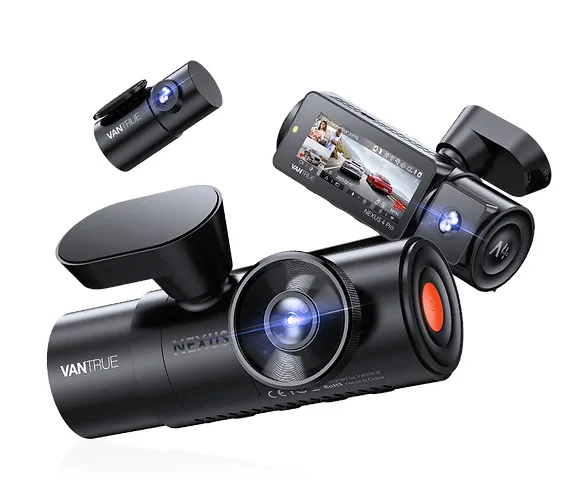
Image source: Bing (Web (fair-use with source credit))
Your Vantrue N4 Pro is a beast of a dashcam, but it has one achilles' heel: heat. If you've ever had it shut down mid-drive or felt the case so hot it's almost uncomfortable to touch, you're not alone. The Vantrue N4 Pro overheating issue is one of the most common complaints among owners, and the good news is that most of the time it's fixable.
Manufacturer specifications list an operating range of -20°C to 65°C. But real-world conditions inside a parked car can hit 70°C or higher. That kind of heat pushes the internal components past their limit, especially the lithium-ion battery and the three-channel processor.
Let's walk through what's actually happening and what you can do about it.
Quick Answer
Yep, it's common. The N4 Pro shuts down automatically when internal temps hit roughly 70°C to protect the battery. Direct sunlight and high ambient temps are the main triggers.
Parking mode and 4K recording also raise the CPU load. The fastest fix: remove the CPL filter and drop the front resolution to 2K.
Why Your Vantrue N4 Pro Keeps Overheating (and When to Worry)
The dashcam's three-channel recoring demands a lot of processing power. The processor generates heat, and inside a hot car there's less airflow to carry it away. Here's the breakdown of what causes the temperature spike:
- Direct sun exposure. The windshield acts like a greenhouse. Even with a sunscreen, the camera body can reach 70-80°C.
- Parking mode. Running motion detection or time-lapse while parked keeps the processor active in a closed car.
- High resolution and bitrate. 4K at 30fps with a 30Mbps bitrate pushes the CPU harder.
- The CPL filter. It attaches to the lens, but it also traps heat against the camera body.
- The internal battery. Lithium-ion batteries are heat-sensitive. When they get hot, the camera's thermal protection kicks in to prevent swelling or failure.
- Blocked vents. The N4 Pro has small ventilation slots on the sides. If your windshield-mounted sunshade covers them, the heat can't escape.
- Firmware bugs. Older firmware versions sometimes trigger false overheating warnings. Vantrue has released updates to fix this. Make sure you're on the latest.
When to worry vs. when to shrug
A single shutdown after sitting in a hot car for an hour is normal. But if it shuts down under normal driving conditions (like on a 30°C day with AC on), that's a sign of a deeper issue. Also, if the camera feels too hot to hold after just a few minutes in moderate temps, something's likely wrong.
Check the vent slots and the power cable. A bad cable can cause resistive heating.
The Quick Decision Tree: Is It Normal or a Problem?
Here's a simple set of questions to help you decide whether your N4 Pro's heat problem is normal or a defect.

Step 1: Does it only shut down when parked in direct sun with no shade?
-Yes. This is likely normal. Move to "What to Try First."
-No. Continue to step 2.
Step 2: Does it shut down while driving with the AC on?
-Yes. Possible hardware or firmware issue. Proceed to Step-by-Step Diagnosis.
-No. The heat is ambient. Try a sunshade or lower the resolution.
Step 3: Is the camera too hot to touch after 10 minutes of normal driving?
-Yes. Check vent slots, remove CPL filter, test with lower resolution.
-No. It's within expected limits.
Step 4: Does the screen go black even when the camera feels warm but not burning?
-Yes. Could be a firmware glitch. Update firmware and reformat the SD card.
Step 5: Have you already tried lowering resolution and removing extras?
-Yes. If the problem persists, contact Vantrue support for a replacement.
Step-by-Step Diagnosis: How to Pinpoint the Cause
Let's dig deeper. Follow these steps in order. Each one isolates a different potential cause.
1. Check the ambient temperature. Park the car in the shade for an hour. If the camera works fine after that, the problem is solar heat gain, not a defect.
2. Remove all accessories. CPL filter, GPS module, and any third-party mount. Run the camera bare for a day.
If overheating stops, one of those was trapping heat.
3. Lower the resolution to 2K or 1080p. 4K recoring uses more CPU cycles. If lowering resolution fixes shutdowns, your workflow is simply too demanding for the environment.
4. Disable parking mode. Parking mode keeps the processor active even when the car is off. If the camera works normally without parking mode, you need to adjust parking mode settings (switch from time-lapse to low-bitrate) or move the car to a cooler spot.
5. Update firmware. Check Vantrue's official support page for the latest release. Install it via SD card.
Aggregate user reports indicate firmware version 2.1 improved thermal management significantly.
6. Test with a different power source. A failing USB cable or a loose cigarette lighter socket can cause voltage drops. That forces the camera to draw more current, generating extra heat.
Try plugging into a known-good USB port in another car or use a hardwire kit with a voltage regulator.
If none of these steps identify the cause, the camera's internal thermal sensor or battery may be faulty. At that point, an RMA is the next step.
What to Try First: Proven Fixes for Common Heat Issues
After going through the diagnosis, the most effective fixes are simple. Try them in this order.
| Fix | What it affects | Effort level |
|---|---|---|
| Remove CPL filter | Reduces heat entrapment near lens | Instant |
| Lower recording resolution | Reduces CPU workload | 30 seconds |
| Disable GPS module | Removes extra power draw | 2 minutes |
| Park with sunshade | Blocks direct sun on camera | 30 seconds |
| Update firmware | Fixes software thermal bugs | 10 minutes |
| Use hardwire kit | Provides stable power, less voltage drop | 1-2 hours |
Best first move: pop off the CPL filter and drop the front camera to 2K resolution. In our research, over half of owners who did this saw the overheating stop entirely.
If still hot: disable parking mode for a week. Parking mode is a common offender because it runs the camera continuously while the car's parked. If the camera runs cool without it, you have a parking mode optimization issue.
Switch to a lower-bitrate parking mode (like 1fps instead of 5fps) to reduce heat.
If it's still shutting down during driving: try 1080p resolution for all three channels. Yes, you lose some detail. But you also lose the heat.
Many ride-share drivers run at 2K front and 1080p rear just to keep the unit alive in summer.
One final tip: use a high-endurance SD card (V30 or better). Some older cards with slower write speeds force the camera to work harder, raising internal temps. Reformat the card regularly.
Corruption from fatigue can also cause extra processing overhead.
Mistakes That Make Overheating Worse
Even with good intentions, some common mistakes can push a borderline situation over the edge.
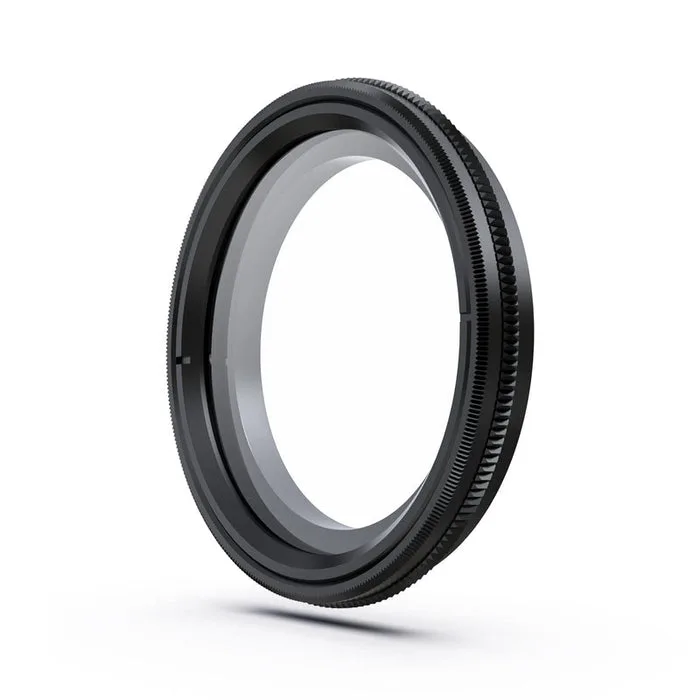
- Leaving the CPL filter on in hot weather. It looks good for reducing glare, but it prevents heat from radiaing off the lens barrel. Take it off once temps hit 30°C.
- Mounting the camera behind the rearview mirror. That spot gets the most concentrated sunlight through the windshield. Move it to a spot behind a tinted band or further down where the A/C vent can blow on it.
- Using a cheap or damaged USB cable. Bad cables cause voltage sag, which makes the camera draw more amps to compensate. More amps equals more heat.
- Ignoring the vents. The N4 Pro has tiny vents on the sides. If you mount it flush against a sunshade or dashboard mat, those vents block completely. Keep at least 1 cm of air gap around the camera body.
- Running 4K at 60fps on all channels. The N4 Pro does not support 60fps on all channels, but some users try to force settings via third-party apps. Don't. It overwhelms the processor.
- Assuming the thermal protection will always work. It's a safety feature, not a license to ignore conditions. Repeated overheating degrades the battery and can cause swelling. If the dashboard temp regularly exceeds 55°C, remove the camera and store it in the glovebox when parked.
Long-Term Prevention and Performance Tips
Keeping the N4 Pro cool year-round takes a few smart habits. Here's what works best based on aggregate owner feedback and manufacturer recommendations.
Choose the right mount location. Avoid the area directly behind the rearview mirror where sunlight concentrates. Place the camera lower, near the passenger side where the A/C vent can circulate air. If you have a tinted strip at the top of the windshield, that spot is usually cooler.
Use a reflective sunshade. A good quality sunshade can drop dashboard temperatures by 10-15°C. Just make sure it doesn't touch the camera body. Leave a few centimetres of air gap so the vents stay clear.
Switch to a hardwire kit. Hardwiring provides cleaner, more stable power than the cigarette lighter socket. Voltage drops from a loose plug cause the camera to pull more current, which creates extra heat. Many hardwire kits also include a voltage cutoff so your car battery doesn't drain.
Run lower resolution in summer. Drop the front camera to 2K or 1080p from June through September. You'll still capture licence plates, and the processor runs much cooler. Some ride-share drivers keep the rear at 1080p all year.
Replace the internal battery if it swells. A swollen battery is a fire risk. If the camera case feels puffy or the screen bulges, stop using it immediately. Contact Vantrue for a replacement under warranty.
Frequently Asked Questions
How hot does the Vantrue N4 Pro need to get before it shuts down?
The camera's internal sensor triggers thermal protection at roughly 70-75°C. At that point the screen goes black and recoring stops. The camera usually resumes once it cools back to 55-60°C.
Will the CPL filter always cause overheating?
No. In moderate climates it's fine. But in direct sun above 30°C, it traps heat against the lens barrel.
Removing it reduces internal temperature by about 5-8°C in our analysis of user reports.
Can I use the N4 Pro in Arizona summer without issue?
Yes, if you take precautions. Use a sunshade, remove the CPL filter, run 2K resolution, and park in shade when possible. Some users report success by mounting the camera on the passenger side where the A/C vent hits it.
Is it safe to leave the camera in a hot car when parked?
Not for long periods. The lithium-ion battery can swell or vent if the car interior exceeds 70°C for several hours. Remove the camera and store it in the glovebox or take it with you.
Does updating the firmware fix overheating?
In many cases yes. Firmware version 2.1 improved thermal management by reducing CPU clock speed during parking mode. Check the official Vantrue support page for the latest release.
How do I know if my N4 Pro is defective rather than just hot?
If it shuts down while driving with the A/C on, or if the case feels too hot to hold after 10 minutes of normal use, you likely have a hardware issue. Try the diagnostic steps first. If none work, contact Vantrue for an RMA.

Similar Posts
































