Thinkware U3000 Battery Problem

If your Thinkware U3000 dash cam is showing a "battery low" warning or shutting off too soon in parking mode, you are not alone. The Thinkware U3000 battery problem is one of the most common complaints we hear from owners. But here is the surprising part.
The U3000 does not have a traditional battery. It uses a supercapacitor instead.
Manufacturer specifications confirm the supercapacitor holds only enough charge to save the last video file and shut down cleanly. It does not power the camera for hours of parking mode. That job comes from your car's electrical system via the hardwiring kit.
Understanding this architecture is the key to diagnosing your issue.

Quick Answer
The Thinkware U3000 battery problem is almost never a dead battery. The U3000 uses a supercapacitor, not a lithium cell. Your issue is likely a wiring fault or wrong voltage setting.
Check your hardwiring connections and voltage cutoff first.
How It Really Works: Why the U3000 Doesn't Have a Traditional Battery
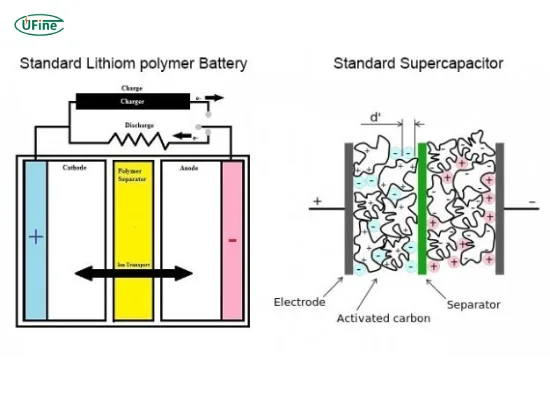
The U3000 stores energy in a supercapacitor, not a rechargeable battery. Supercapacitors charge and discharge much faster than lithium cells. They also handle extreme heat without swelling or catching fire.
That is why Thinkware chose them for parking mode surveillance.
But here is the trade-off. A supercapacitor holds very little energy. It can save the last file and shut down.
It cannot run the camera for hours by itself. That means the U3000 relies entirely on your car's battery when parked. If the hardwiring kit or car battery is weak, the camera will shut down early.
In our research, most "battery problem" complaints trace back to one of three things. The voltage cutoff setting is too high. The hardwiring kit is poorly connected.
Or the car battery itself is old. The supercapacitor is rarely the culprit. A structured troubleshooting process, similar to what you would use for other connected gear, can help isolate the root cause quickly.
The Decision Tree: Diagnose Your Exact Problem
Branch 1: Unit Won't Turn On at All
If your U3000 shows no lights, no beeps, and no response, start with the power source. Check the fuse tap connection. Use a multimeter to confirm the hardwiring output has 12V.
If the power is dead, inspect the fuse. If the power is live, the camera unit itself may need service. This kind of power-loss diagnosis mirrors the steps you would take for other equipment.
Branch 2: Parking Mode Stops Too Early
If parking mode runs for only a few hours, the voltage cutoff setting is likely too high. Open the Thinkware app or camera menu. Lower the cutoff from 12.4V to 12.0V or 11.8V.
Also check your car battery health. A weak battery will trigger the cutoff sooner. Many users find that 12.0V gives a good balance between protection and runtime.
Branch 3: "Battery Low" or Voltage Warning Messages
A "battery low" warning on the U3000 means the camera detects the input voltage dropping below the cutoff threshold. This is normal when the car is off. If it happens immediately, your cutoff is set too high.
If it happens after several hours, your car battery is discharging normally. The warning is the camera protecting your car battery, not a sign of a defect.
Branch 4: Unit Runs Hot or Shuts Down in Heat
The U3000 has thermal protection. In direct sunlight, it may shut down to prevent damage. This is normal and not a defect.
Park in the shade or use a sunshade. If it shuts down indoors, the unit may have a fault. The supercapacitor handles heat better than lithium batteries, but the camera's processor still needs cooling.
Common Mistakes to Avoid That Make Everything Worse
One common mistake is confusing the supercapacitor with a replaceable battery. Some users try to replace it, but the U3000 has no user-serviceable battery. Attempting to open the unit voids the warranty.
Do not go down that road.
Another error is setting the voltage cutoff too high. At 12.4V, parking mode runs only briefly. Most users find 12.0V or 11.8V works better for their car.
Experiment with the settings to find the sweet spot.
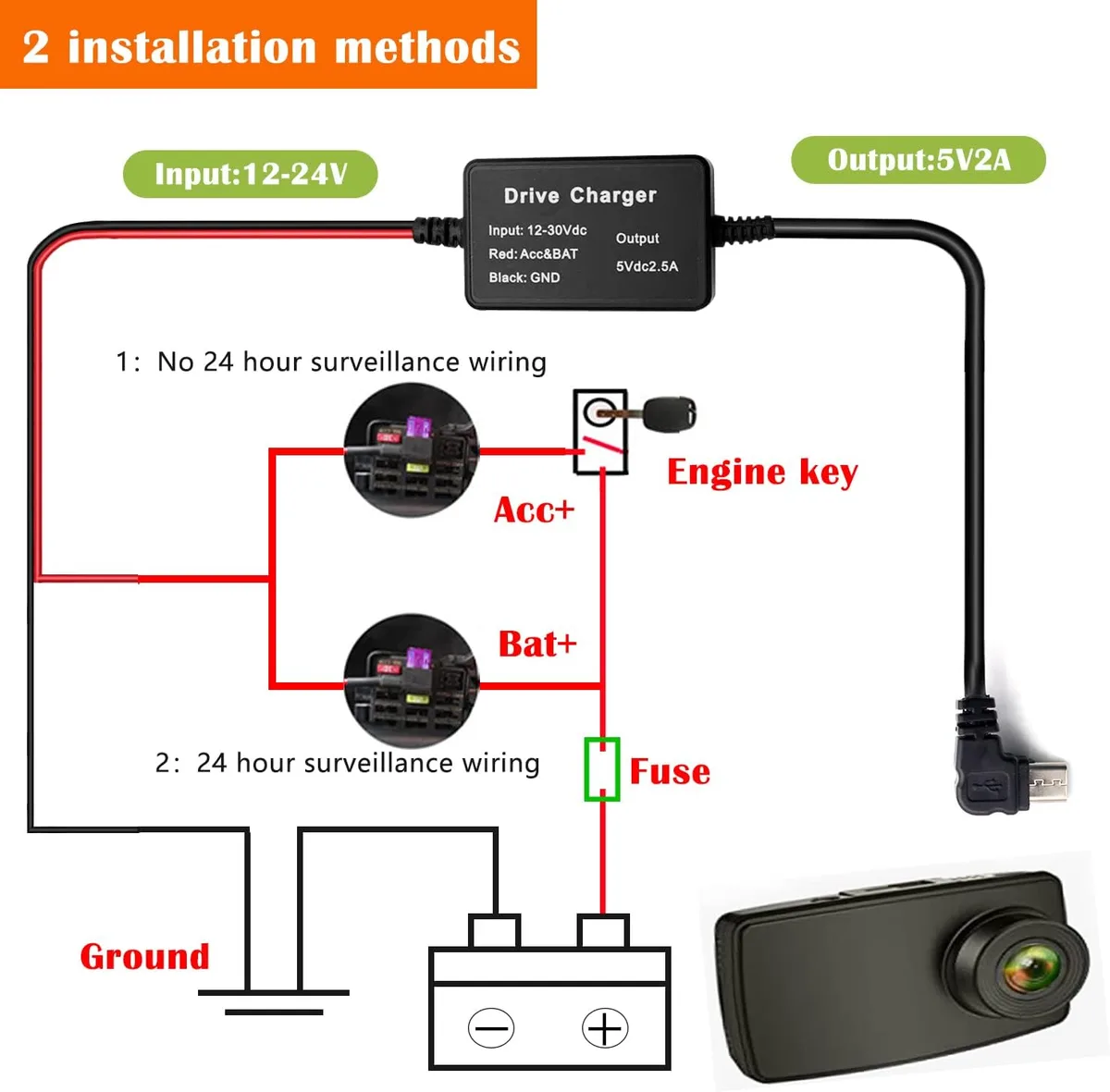
Poor wiring is another culprit. A loose ground or wrong fuse tap can cause intermittent power. Always double-check connections.
Update the firmware too. Older firmware versions had bugs that caused false warnings. The Thinkware support site lists the latest firmware and installation guides.
Finally, do not blame the camera for a weak car battery. If your car struggles to start, the battery is the issue, not the dash cam. Address that first before troubleshooting the U3000.
When to Replace vs. When to Repair
If the camera is under warranty, contact Thinkware support. They may offer a replacement if the unit is faulty. If the warranty is expired, inspect the hardwiring kit first.
A faulty kit is cheaper to replace than the whole camera.
You only need a new U3000 if the supercapacitor itself fails. Signs of supercapacitor failure include the camera refusing to power on even with a known good power source. Aggregate reviews report this is rare.
Most issues are solved with wiring adjustments.
If the car battery is old, replace that first. A fresh battery often resolves parking mode problems. Only consider a new dash cam if all other fixes fail.
The U3000 is a reliable unit when properly installed and configured. Some installers have run into similar problems with other gear, so check your connections carefully.
Safety & Warnings: Protecting Your Car Battery and Your Dash Cam
The most important rule with the U3000 is never let parking mode drain your car battery completely. That is why the voltage cutoff exists. If you set it too low, your car may not start.
If you set it too high, parking mode stops early.
| Voltage Cutoff Setting | Runtime (Typical) | Risk Level |
|---|---|---|
| 12.4V | 2 to 4 hours | Safest |
| 12.0V | 8 to 12 hours | Balanced |
| 11.8V | 12 to 24 hours | Risky |
| 11.6V | 24+ hours | Not recommended |
Stick with 12.0V for most vehicles. That gives you solid runtime without leaving you stranded. If you drive a hybrid or EV with a larger auxiliary battery, 11.8V is usually safe.
Heat is another concern. The U3000 handles temperatures up to about 80°C (176°F) thanks to the supercapacitor. But the camera's processor still generates heat during recording.
If the unit feels hot to the touch, it may shut down to protect itself. That is normal behavior, not a defect.
One more warning. Hardwiring installation requires working with your car's fuse box. If you are not comfortable with electrical work, have a professional install it.
Incorrect wiring can damage the camera or your vehicle's electrical system. These issues are not unique to the U3000, so take the same precautions you would with any dash cam installation.
Finally, keep the firmware updated. Thinkware releases updates that fix bugs and improve voltage management. Outdated firmware can cause false warnings or poor performance.
Check the official Thinkware support page every few months.
Frequently Asked Questions
Does the Thinkware U3000 have a replaceable battery?
No. The U3000 uses a supercapacitor, not a lithium-ion battery. There is no user-serviceable battery inside.
If you see a "battery low" warning, it refers to the input voltage from your car, not the camera's internal storage.
Why does my U3000 shut off after a few hours in parking mode?
The voltage cutoff setting is likely too high. Lower it from 12.4V to 12.0V in the camera menu. Also check your car battery health.
A weak battery will trigger the cutoff sooner. This is a common issue with many dash cams.
Can a supercapacitor fail?
Yes, but it is rare. Supercapacitors last much longer than lithium batteries. Signs of failure include the camera not powering on even with a known good power source.
If that happens, contact Thinkware support for warranty service.
Will the U3000 drain my car battery overnight?
It can if you set the voltage cutoff too low or your car battery is old. At the 12.0V setting, the camera stops recording before the battery drops to a dangerous level. Most modern cars with a healthy battery handle this without issues.
How do I update the firmware on my U3000?
Download the latest firmware from the Thinkware support website. Copy it to a microSD card formatted in the camera. Insert the card and power on the unit.
The camera will update automatically. Follow the on-screen instructions.
What should I do if the camera still has problems after troubleshooting?
Try a factory reset first. If that does not work, inspect the hardwiring kit for damage. A faulty kit is cheaper to replace than the whole camera.
If the issue persists, contact Thinkware support. The unit may need service.
Final Recommendation
The Thinkware U3000 battery problem is almost always a setup issue, not a hardware failure. Start with the voltage cutoff setting. Lower it to 12.0V if you need more parking mode runtime.
Check your hardwiring connections with a multimeter. Update the firmware.
If these steps do not resolve the issue, inspect the hardwiring kit. A replacement kit is inexpensive and easy to swap. Only consider a new dash cam if the supercapacitor itself has failed.
That is rare.
The U3000 is a reliable dash cam when properly installed. The supercapacitor design means you will not need to replace a battery every few years. Just get the wiring right and the settings dialed in.
That is the whole secret.

Similar Posts
































