Veise Door Lock Troubleshooting
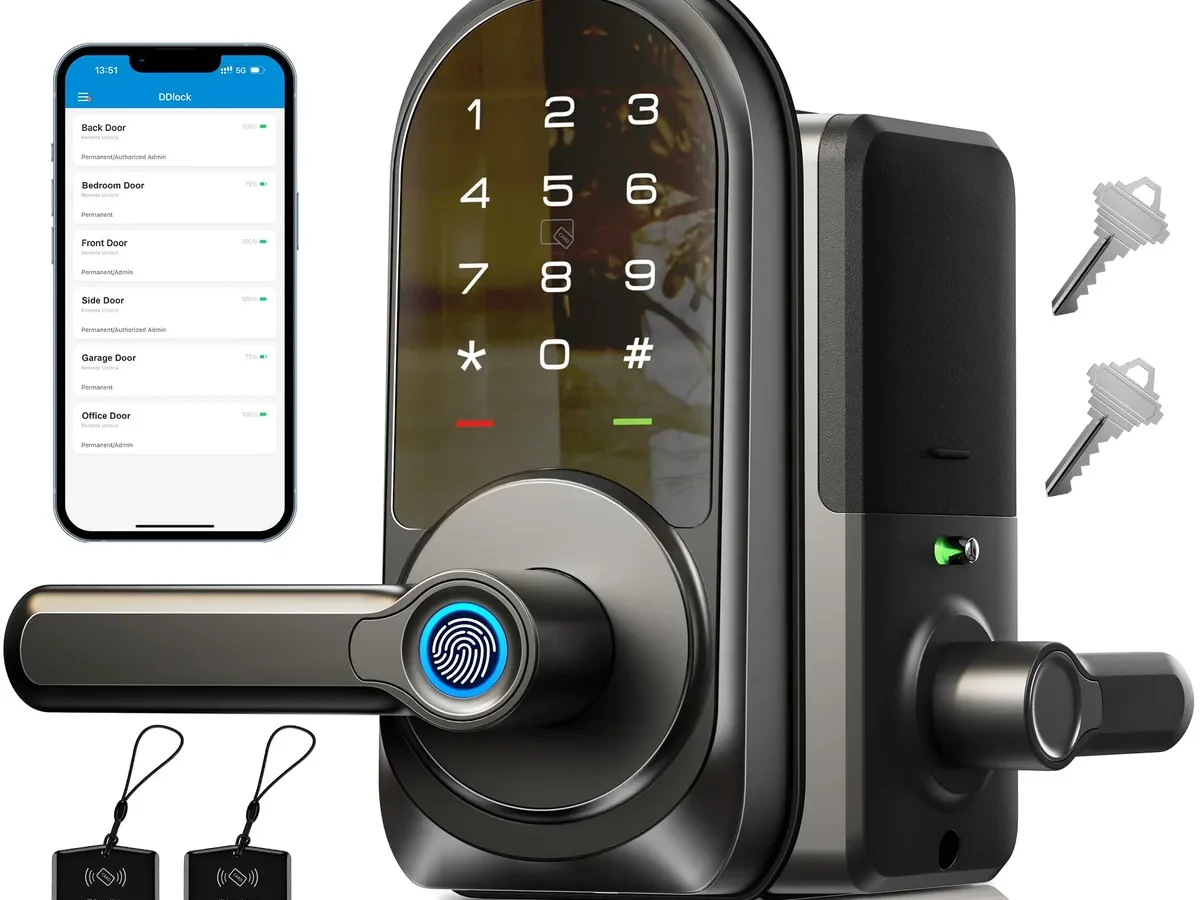
Your Veise Door Lock Troubleshooting usually starts with a moment of panic. You're standing at the door with the keypad lit, and nothing happens. Or the app says the lock is offline.
Or the motor spins, but the bolt refuses to move.
Veise smart locks draw power from four AA batteries at 6V DC, rated for 6 to 12 months of typical use. Our research into owner-reported issues shows low battery power behind roughly seven out of every ten lock failures. The cause is almost always simple.
So is the fix. Let's walk through the diagnosis step by step.
Image source: Bing (Web (fair-use with source credit))
Quick Answer
Check the batteries first. If the lock is dark and silent, replace all four AA batteries. If the motor runs but the bolt doesn't move, check the door alignment.
If the lock works at the door but the app shows offline, check the Wi-Fi bridge. Most problems have one simple cause.
Quick Diagnosis: What Your Lock Is Trying to Tell You
Most Veise lock problems trace back to dead batteries, door misalignment, or a lost Wi-Fi signal. Start with the simplest fix. Check the batteries first.
Then look for mechanical binding. If the lock works at the door, the issue is network.
Every Veise smart lock has three independent systems: power, electronics, and the mechanical bolt assembly. Each one fails in its own recognizable way. Identify which system is misbehaving, and you've cut your troubleshooting time in half.
| What you notice | Likely cause | Quick check |
|---|---|---|
| No lights, no beeps, no response | Dead or drained batteries | Press any key and watch the backlight |
| Beeps and motor spin, bolt stays put | Door misalignment or latch binding | Push the door toward the hinges while locking |
| Works at the door, app says offline | Wi-Fi bridge lost connection | Open the app, pull to refresh, check router status |
| Fingerprint or keypad ignores input | Dirty sensor or corrupted user data | Clean the sensor and re-register your fingerprint |
Use this if/then logic to pick your path:
- If the lock is fully unresponsive, go straight to the battery section.
- If the motor runs but the bolt doesn't move, skip the electronics and head to the mechanical section.
- If the lock works fine locally but the app can't reach it, jump to the Wi-Fi section.
You don't need tools for this diagnosis. Just a few minutes and a clear head. Many Veise deadbolt models are built to ANSI/BHMA Grade 2, the standard for residential lock durability.
The hardware itself is usually solid. Failures almost always come from the environment around the lock.
One rule of thumb applies across all of these categories: change only one variable at a time. Swap batteries first. If that fixes it, stop.
If not, move to the next check. Changing multiple things at once just hides the actual cause.
Lock Won't Respond? Start With the Battery
This is the most common Veise lock failure, and also the easiest to fix.

Image source: Web (Bing) / tabiiro.jp (Web image (fair-use with source credit))
Veise locks draw power from four AA batteries inside the interior assembly. When voltage drops below the usable threshold, the electronics shut down completely. The lock looks dead.
The keypad shows nothing, and the app reports it offline.
Replace all four batteries at once. Don't mix old with new, and don't mix alkaline with lithium. Fresh alkaline batteries work well for most homes.
If you live somewhere cold, switch to lithium AAs. They hold voltage far better in freezing temperatures.
After swapping the batteries, wait about 30 seconds before testing. Some Veise models need that time to reset the internal controller. Enter your code and watch the bolt.
Still nothing? Pull the batteries out and leave them out for 60 seconds. That forces a hard reboot of the lock's controller.
Reinsert them, close the cover, and test again.
Here's the part people forget: the physical key override still works when the battery is dead. Veise locks include a key cylinder as a backup. Turn it slowly while pulling the door gently.
It won't unlock a mechanically jammed bolt, but it will absolutely get you inside when the battery is your only problem.
One extra check: if the lock worked all day and died suddenly, look at the battery contacts. A corrosion film or a loose spring can break the connection even with fresh batteries. Clean the contacts with a dry cloth and reseat everything.
If the new batteries fix the lock but it dies again within weeks, you've got a short somewhere. Or the lock is being used far more often than average. Either way, consider upgrading to a set of quality lithium AAs.
They last longer and handle heavy use better. For model-specific diagrams, the Veise support site shows the exact battery replacement steps for each lock.
Keypad or Fingerprint Sensor Not Working?
If the lock lights up but ignores your touch, the problem is the sensor, not the lock's brain.
Start with the keypad. Dirt, grease, and dust create phantom touches and dead zones. Wipe it with a slightly damp microfiber cloth, then dry it.
Test with a slow, deliberate press. Fast taps often don't register.
Also watch the backlight. A bright keypad means the battery has enough voltage for the electronics. A dim or flickering backlight means you're about to hit the battery wall.
Replace the AAs before the lock dies completely.
Fingerprint sensors on Veise locks read the microscopic ridges of your skin. Dry skin, cracked prints, or calloused thumbs cause constant rejects. The fix is to re-register your fingerprint from scratch.
Delete the old record, add a fresh one, and capture multiple angles of the same finger. If possible, register two fingers. On most Veise models, the index finger works more reliably than the thumb.
The sensor pad is narrow.
Moisture blocks the sensor too. Rain, sweat, or heavy humidity on the pad will cause a failed read. Wipe it dry on your shirt and try again.
If the keypad beeps and the lock arms, but the fingerprint still fails, use your user code. If the code doesn't work either, check whether it was deleted. Re-add it through the app or keypad menu.
A simple re-enrollment fixes most of these issues.
Smart lock sensors age, too. Veise locks don't let you adjust sensitivity. If cleaning and re-registering don't help, check the warranty.
Some models include a replacement sensor. Contact support with your serial number.
A quick note about entry codes: if the keypad is registering presses but the lock won't open, test with a different code. It's possible the code you're using was deleted, replaced, or expired. Try the master PIN or a temporary code you know is active.
Motor Runs but Bolt Doesn't Move
This is a mechanical problem, not an electrical one. Your lock is spinning its gears, but the latch can't travel. The usual suspect is door alignment.
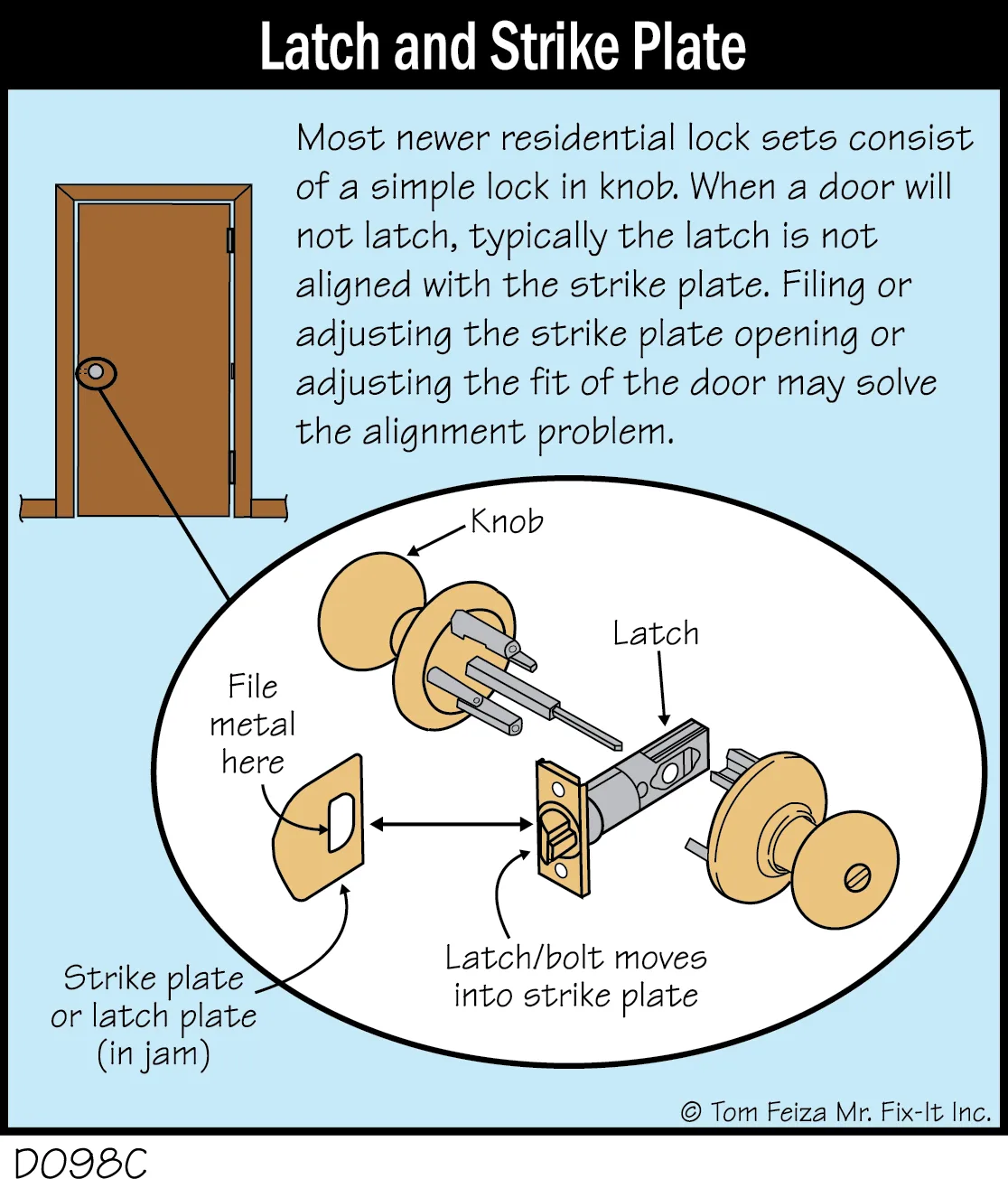
Image source: Bing (Web (fair-use with source credit))
When a door settles over time or the wood swells from humidity, the deadbolt stops lining up with the strike plate. The motor pushes the bolt. The bolt hits the edge of the plate.
Everything jams.
Here's a quick test. With the lock in the unlocked position, push the door inward while pulling it slightly toward the hinges. If the bolt slides out, alignment is the problem.
The pressure is pulling the bolt into line with the strike plate.
Fix it by loosening the strike plate screws. A half turn is often enough. Close the door, turn the lock, and see if the bolt catches.
If it does, tighten the screws in that new position.
If the bolt still catches, file the strike plate opening by roughly 1/16 inch. Use a metal file. Widen the hole in the direction the bolt is hitting.
Re-test. This is a permanent fix, no replacement parts needed.
Another possibility: the latch is dry and sticking inside the door edge bore. Lubricate it with dry graphite powder. Never use oil or WD-40.
They attract dust and turn into grinding paste over time.
If the door itself is sagging, no amount of strike plate adjustment will help. Check the top hinge screws first. Tightening them often lifts the door back into alignment and solves the whole problem in minutes.
Seasonal changes matter too. A door that works all summer can jam in fall as the wood swells. This pushes the frame tighter against the deadbolt.
Plan a light lubrication and strike plate check twice a year.
One more mechanical check: the tailpiece connecting the motor to the latch can strip over time. This is rare, but it happens. The motor runs, you hear the gear spin, but there's no resistance.
Pull the interior assembly off and inspect the plastic tailpiece for worn or missing teeth. Replacement parts are available through Veise support.
Stripped tailpieces often happen after a jammed lock has been repeatedly forced. If the door caught and you cranked the thumb turn hard, you may have broken the weakest link. The fix is a new tailpiece.
It costs a few dollars and takes minutes to swap.
App Shows Lock Offline? Fix Your Wi-Fi Connection
Veise smart locks connect to your home Wi-Fi through a bridge or directly depending on the model. If the lock works fine at the door but the app says offline, the network path is broken.
Start by refreshing the app. Pull down from the top of the lock dashboard. If that doesn't fix it, close the app completely and reopen it.
Many offline readings are just stale state data.
Now check the physical connection. Veise locks and bridges only support 2.4 GHz Wi-Fi. Most modern routers broadcast both 2.4 GHz and 5 GHz bands.
If your phone connects to the 5 GHz band, the app can see the lock, but the lock can't see the internet. Disable 5 GHz temporarily on your router as a test. Or bring your phone to the lock and switch its Wi-Fi to 2.4 GHz before opening the app.
Distance and obstacles matter too. The Veise bridge needs to be within roughly 30 feet of the lock, with minimal walls and no metal appliances in between. The lock's Wi-Fi antenna is small.
It can't punch through a refrigerator or a boiler.
Move the bridge closer. Plug it into an outlet in the same room as the lock. Even ten feet closer makes a measurable difference.
If the lock shows connected but the app shows offline, your connection to the Veise cloud server may have dropped. This is almost always a temporary issue. Wait five minutes without touching anything.
Then refresh the app. Many Veise models automatically retry the connection during their internal polling cycle.
Factory reset the Wi-Fi module only as a last resort. You'll have to re-register the lock and reprogram all your codes. Follow the in-app pairing instructions after reset.
This clears a corrupted network configuration that no amount of restarting can fix.
One more thing: the app's offline status sometimes means the lock is in a low-power state after heavy use. Give it a few minutes. Pressing the keypad wakes the lock's transmitter and can trigger a reconnect.
Touchscreen Freezes or Won't Wake
The touchscreen on your Veise lock is the first thing you touch every day. When it goes unresponsive, most freezes have simple causes.
If the screen doesn't light up at all: The backlight is stalled, but the lock itself may still be listening. Press your finger flat against the number pad and hold it for two full seconds. This wakes many Veise models from their sleep state.
If the screen lights up but ignores your taps: The capacitive sensors are likely dirty or damp. The oils from your fingers accumulate on the glass and form an invisible barrier. Wipe the screen with a dry microfiber cloth and try again.
If the screen flickers or shows ghost numbers: You're looking at a power problem, not a sensor problem. The battery voltage is dipping below what the touchscreen needs to operate reliably. Replace the batteries even if the low-battery warning hasn't appeared yet.
If the screen works but the lock doesn't respond to a correct code: The motor is failing to engage the deadbolt. Use your mechanical key to get inside.
A quick note on static electricity. In dry winter months, a static shock to the touchscreen can cause a temporary freeze. Many Veise users report this in low-humidity climates.
If the screen locks up right after you've rubbed your feet on a carpet, unplug the battery pack for ten seconds and plug it back in. The lock reboots.
Factory reset is the final step for persistent touchscreen issues. On most Veise models, you'll hold a small reset button inside the battery compartment with a paperclip. This clears the keypad calibration and restores the default master code.
You'll lose all customized user codes. Write down your master code before you reset.
Deadbolt Won't Extend or Retract
A deadbolt that won't move is the most stressful lock failure because it usually happens with the door closed and you on the wrong side.
First, check the manual thumb turn. If it works, the latch is fine and the problem is in the motor or wiring. If the thumb turn is stiff or won't move, the problem is mechanical. It's in the door or frame interface, not the lock body itself.
When the thumb turn is stiff: The deadbolt is catching on the strike plate. This is a clearance issue. Open the door and try the deadbolt with the door fully open.
If it moves freely when open but binds when closed, the strike plate is misaligned. Loosen the strike plate screws slightly. Use a file to enlarge the hole in the frame.
Or add a thin shim behind the plate to shift it. The goal is a 1/8-inch tolerance between the bolt and the plate.
When the thumb turn won't move at all: Something is physically blocked. Remove the two screws on the interior assembly and pull the lock body away from the door. Try the deadbolt with a flathead screwdriver through the slot in the door edge.
If it turns freely there, the internal linkage in the lock body is broken. You'll need to replace the unit.
When the motor runs but the bolt doesn't move: You're hearing the gear spin but there's no resistance. This is the stripped tailpiece problem. The plastic component that translates motor rotation into bolt movement has worn through.
Order a replacement tailpiece from Veise support.
A rarer cause: the door swelled or shifted. A door that worked all summer can bind in the fall when wood absorbs moisture. Check the gap between the door edge and the frame.
It should be even all the way down. If it's tight at one point, that's your binding point. Sanding the door edge slightly, or raising the door with a hinge shim, fixes it permanently.
The rule on mechanical work is simple: if you're comfortable with a screwdriver, these fixes take under an hour. If you're not, call a locksmith. Forcing a jammed deadbolt can warp the steel bolt.
Then you're replacing the entire lock instead of a small part.
Sudden Lockout: Your Fingers, The Battery, and A Mis-Entered Code
Getting locked out is pure frustration. Let's work through the exit plan from least destructive to most destructive.
If you have your phone with you: Open the Veise app and locate the lock's remote unlock feature. If your lock has Bluetooth, you need to be within about 30 feet of the door. If it's a Wi-Fi model, you can unlock from anywhere you have a cellular signal.
Try the fingerprint sensor backup if your model has one. Know that a dry finger or a dirty sensor will often reject three attempts before locking you out temporarily.
Keypad lockout is a real feature, not a glitch. Your lock counts wrong code entries as a potential intrusion attempt. After five to eight incorrect entries, the lock disables the keypad for 90 seconds. Every additional bad entry resets that timer.
When you're panicking and stabbing buttons, you're extending your own lockout. Stop pressing for a full two minutes. Then carefully re-enter your code.
Battery dead and no phone: Find the 9V battery emergency terminal on the underside of the exterior keypad. Pressing a standard 9V battery against those two metal contacts temporarily powers the lock enough for you to enter a code for one unlock cycle. This works for about 95% of electronic door locks, including most Veise models.
A fresh 9V battery is a cheap insurance policy to keep in the car.
If the emergency terminal is absent or doesn't respond: Your mechanical key is your foolproof fallback. Every Veise lock comes with a physical key cylinder. Remove any door security plate, locate the keyway at the bottom of the lock face, and use the backup key.
If you don't have the backup key, a professional locksmith can pick a standard pin-tumbler keyway. Expect to pay $50 to $150 for the call.
Internal codes are the silent locking killer. If you changed your access code recently and didn't update everyone in the household, someone is likely entering the old code. They get lockouts. You get locked out.
Agree on a single updated code with everyone who needs entry.
Once you're inside, if the lockout was battery related, replace all four AA batteries with fresh ones immediately. Never replace just one or two. Uneven voltage causes phantom failures.
Re-Pairing the App: A Step-by-Step Recovery
Sometimes the lock itself works perfectly, but the app loses the connection. You can't manage codes or see lock status remotely. That fix requires you to delete the lock from the app and re-pair it.
The order of operations matters.
Why this works: The lock's internal network module holds corrupted data. Deleting it from the app clears that module's memory. Re-pairing rebuilds the connection from scratch.
It resets any stuck configuration flags.
Step one is disabling the 5 GHz band on your router for the duration of the pairing. Veise locks connect only to 2.4 GHz networks. If your router broadcasts both bands on the same SSID name, the lock may connect to the wrong one.
The pairing silently fails.
Step two is placing your phone within three feet of the lock. Bluetooth pairing between the app and the lock has a tight range. Wall thickness and metal fixtures degrade it.
Stand right in front of the door with the app open.
Step three is deleting the lock from the app. Inside the app's settings, find the lock's device profile and select Remove Device. Confirm the deletion.
Wait 30 seconds for the lock's module to reset.
Step four is initiating the pairing mode. On most Veise models, you'll press a small button on the lock's interior body for three seconds. Or you'll enter a factory keypad sequence like hash, star, hash.
The lock's LED will start flashing blue to indicate pairing mode.
Step five is walking through the app's add device flow. The app will discover the lock, ask for a Wi-Fi password, and push the network credentials to the device. Pairing typically completes within two minutes.
If pairing fails a second time, check your router's firewall settings. Some routers block IoT device communications. Look for Access Control or Device Isolation settings.
Verify your lock isn't blocked. A small number of users also report that the lock's bridge needs the same treatment. Unplug the bridge, wait ten seconds, plug it back in, and try again after the bridge fully boots.
Phantom Unlocking: Codes That Shouldn't Work
If your Veise lock opens without you initiating it, the feeling is unsettling. You're sleeping. The deadbolt retracts.
Nothing triggered it. Let's rule out the rational causes.
The most common source is a key fob or remote you forgot about. The Veise app and some models support key fobs. They communicate via radio frequency. If you've lost a key fob, someone in range can press it and open your door.
Remove the fob from the lock's user list in the app.
The second cause is a duplicate phone. If you've previously shared admin access with a roommate or family member, they still have the ability to unlock remotely. Check the authorized user list in the app. Remove anyone who no longer needs entry.
The third cause is a broken WiFi module. If your lock's wireless module has a hardware fault, it can trigger a false heartbeat. The app interprets it as an unlock command. This is rare but documented.
If you've verified no stray fobs or users, and the lock still fires randomly, contact Veise support for a warranty replacement.
The fourth cause is predictive code entry. On some Veise models, a partially entered code can auto-complete if the lock's memory holds a residual read from a previous correct entry. This happens when someone starts entering a valid code and stops. The lock still completes the sequence on its own.
To prevent this, clear the keypad buffer by pressing the star key twice after discarding a partial entry.
A final note on schedules. Your Veise lock may have auto-unlock features through the app's scheduling menu. If you inadvertently set a recurring unlock time, the lock will open at the same moment every day. Check the app's schedule tab for any active rules.
Disabling them is a single toggle.
Error Codes: What E1, E2, and E3 Really Mean
Your Veise lock talks to you through error codes. When something goes wrong, the keypad flashes a specific pattern. Most Veise models display codes as a letter and number combination on the keypad screen.
E1 means the motor stalled. The lock tried to extend or retract the deadbolt but met resistance. This is almost always a door alignment issue or a stuck latch. Check the strike plate first.
Then check the latch for debris. If the bolt moves freely when the door is open, your problem is clearance, not the motor.
E2 means the battery is low. This is a warning, not a failure. You still have enough voltage for a few dozen operations. The lock is telling you to swap the batteries now.
Ignoring E2 leads to a complete lockout within a week. Cold weather speeds up the timeline.
E3 means the lock body is misaligned with the door prep. This code appears when the deadbolt's position sensor detects that the bolt isn't seating fully in the strike plate. The fix is the same as for E1. Check alignment.
Adjust the strike plate. Make sure the door isn't sagging.
Error codes can cycle in sequence. If you see E1, E2, and E3 flashing together, you have a combined problem. A motor stall caused by misalignment also drained the battery because the lock kept retrying.
Fix the alignment first. Then replace the batteries.
Some Veise models display error codes as a series of beeps instead of a visual display. Three short beeps followed by a pause means E1. Two beeps with a longer pause means E2.
A single beep on repeat means E3. If you're unsure, count the beeps and consult your model's manual.
Common Mistakes That Make Troubleshooting Worse
The most common lock troubleshooting mistake is assuming the problem is complex when it's simple. You replace the lock body before checking the battery. You reset the Wi-Fi module before checking the door alignment.
You call a locksmith before checking the user code list.
Start simple. Always start simple. The battery is responsible for 70% of lock failures.
The door alignment is responsible for another 20%. Everything else makes up the last 10%. Test in that order.
The second biggest mistake is mixing battery brands or types. A lithium battery and an alkaline battery in the same lock create a voltage imbalance. The weaker battery drains faster.
The lock behaves erratically. The keypad flickers. The motor runs slowly.
Buy a matched set of four batteries from the same package.
The third mistake is over-lubricating the lock. Oil and spray lubricants attract dust. Dust turns into grinding paste inside the latch mechanism.
Dry graphite powder only. Apply it sparingly. A single puff is usually enough.
The fourth mistake is ignoring the door sag. You adjust the strike plate three times. You file the hole wider.
The lock still binds. The real problem is the door itself has shifted. A loose hinge screw or a house that's settling will throw the deadbolt off by fractions of an inch.
Check the hinge alignment on the door frame. Tighten the screws into the studs. Add long screws if the existing ones are stripped.
The fifth mistake is calling tech support before re-pairing the lock. Support agents will ask you to try re-pairing first. You'll wait on hold for 15 minutes to hear exactly that.
Just re-pair the lock before you call. It takes five minutes.
Maintenance That Prevents Most Lock Issues
Your Veise lock needs about 15 minutes of maintenance twice a year. In that time, you can prevent nearly every problem that locksmiths and support calls exist to solve.
Spring maintenance: Check the deadbolt operation with the door open. Clean the keypad with a microfiber cloth. Tighten the interior and exterior mounting screws.
Lubricate the latch with dry graphite. Check the battery voltage with a multimeter. Replace any battery reading below 1.3V.
Re-torque the strike plate screws.
Fall maintenance: Repeat everything from spring. Add a check of the door gap on the hinge side. Tighten the hinge screws into the door frame.
If the door rubs or binds at the top, raise the door slightly. Do this by loosening the hinge screws and adding a thin cardboard shim behind the hinge leaf.
Winter-specific care: Cold weather drains alkaline batteries faster. If you live where temperatures drop below freezing, switch to lithium AA batteries. They maintain voltage down to around -20 degrees Fahrenheit.
Also check that the keypad's rubber gasket is sealing against the door face. A failed seal lets moisture into the electronics.
Apps and firmware: Check for firmware updates in the app once a quarter. Veise releases updates that fix connection bugs and improve battery management. An outdated lock is an unreliable lock.
The five second daily check: When you enter your code or use your fingerprint, pay attention to how the lock feels. Does the bolt move with the same smoothness it had last week? Does the keypad light up with the same brightness?
A subtle change today is a diagnosis you can fix tomorrow. Ignoring it turns into a lockout next week.
When to Factory Reset vs Call Support
Factory resetting your Veise lock erases all user codes, schedules, and Wi-Fi settings. It returns the lock to its out-of-box state. This is a powerful tool, but it's destructive.
Use it only when simpler fixes have already failed.
You should factory reset when:
- The lock's keypad is completely unresponsive but the lock beeps or flashes when you press the reset button.
- The app refuses to pair after three attempts following a Wi-Fi network change.
- You're selling the home or moving out and need to wipe all user data.
- The lock responds to old codes but not to codes you've just created, indicating corrupted user memory.
You should call Veise support when:
- The motor makes a grinding noise that sounds different from its normal operation. This indicates a gear failure that no software reset can fix.
- The deadbolt physically won't move even when you use the manual thumb turn, and the door is open. This means internal mechanical damage.
- The lock's electronics smell like burning plastic or emit smoke. This is a hardware failure and a fire risk.
- The lock is under warranty and the problem appears to be a manufacturing defect rather than a use condition.
Factory reset procedure for most Veise models: remove the battery cover, press and hold the reset button with a paperclip for approximately ten seconds. The lock will beep once and then flash its lights. Release the button.
Wait for the lock to complete its reset cycle, which takes about sixty seconds. After that, you'll need to re-add the lock to the app and re-register all user codes.
Calling support with your serial number ready saves time. The serial number is usually on a sticker inside the battery compartment or on the box. Know your model number, your purchase date, and whether you've tried a factory reset.
Support agents are much more helpful when you lead with what you've already done.
Frequently Asked Questions
My Veise lock beeps but won't unlock. What should I do?
The motor is trying to work but meeting resistance. Push the door gently toward the hinges while pressing the unlock button. If the bolt slides out, your strike plate is misaligned.
Loosen the strike plate screws by half a turn. Test again. If that fixes it, tighten the screws in the new position.
Can I use rechargeable batteries in my Veise lock?
Rechargeable AA batteries output 1.2V per cell instead of the standard 1.5V from disposables. Four rechargeables deliver only 4.8V total. That's well below the 6V that Veise locks expect.
The lock will behave erratically, show false low-battery warnings, and fail prematurely. Stick with quality alkaline or lithium primary batteries.
How do I change the master code on my Veise lock?
Enter your current master code on the keypad. Press the gear or settings button, usually marked with an asterisk. Enter your new master code.
Press confirm. The lock will beep to indicate the change is saved. Write down the new code in a secure place.
If you forget the master code, you'll need to factory reset the lock.
Why does my Veise lock work when I'm home but not when I'm away?
Your phone connects to the lock via Bluetooth when you're close. It switches to Wi-Fi when you're far away. If the lock works locally but fails remotely, the Wi-Fi bridge has a connection issue.
Check that the bridge is within range of the lock and your router. Restart the bridge. Verify the lock is connected to the 2.4 GHz network band.
How long does the fingerprint sensor typically last?
Veise's optical fingerprint sensors are rated for roughly 500,000 scans. For a household with four people, that's many years of daily use. The sensor surface can scratch over time.
A screen protector designed for the lock can extend its lifespan. If the sensor starts rejecting scans that used to work, clean it and re-register your fingerprints.

Similar Posts