Hunter Ceiling Fan Troubleshooting
Your Hunter fan is acting up. The remote stopped responding, the blades are barely crawling, or maybe there's that annoying wobble that's been driving you crazy. You're not alone, and you're probably closer to fixing it than you think.
Hunter Ceiling Fan Troubleshooting doesn't have to mean calling an electrician or spending hours on hold with customer support. Most issues come down to a handful of common failures, and many of them take less than twenty minutes to diagnose and fix.
Manufacturer specifications indicate that the vast majority of Hunter fan issues fall into just three categories: power delivery problems, capacitor failures, or remote control pairing loss. A 2023 analysis of service calls by a major home warranty provider found that over 60% of ceiling fan repair visits were for issues the homeowner could have fixed themselves with a multimeter and a screwdriver. So before you pick up the phone, let's walk through exactly what's happening and get your fan back in working order.
Quick Answer
Most Hunter fan problems come down to three causes. The remote needs to be re-paired to the receiver. The capacitor has failed and needs replacement.
Or a simple power interruption reset will fix it.
Check the wall switch first. Make sure it's actually on. Then try turning the fan off at the breaker for ten seconds.
If the fan still won't run, the remote likely lost its sync with the receiver inside the canopy. Press and hold the learn button on the receiver while holding the fan button on the remote.
If the fan runs but only on one speed, that's almost always a bad capacitor. It costs about ten dollars and takes twenty minutes to replace. Those are the most common fixes, and they work for roughly eight out of ten service calls.
The 3 Most Common Hunter Fan Problems (And How to Tell Which One You Have)
If you can identify what your fan is actually doing, you're already most of the way to the solution. Hunter fans are remarkably consistent in how they fail, and the symptoms point directly to the cause.
Problem 1: The fan is completely dead. Press the remote, pull the chain, flip the wall switch. Nothing happens. No light, no hum, no blade movement.
This is almost always a power issue or a complete loss of communication between the remote and the receiver. Check the breaker first. Then check the wall switch.
If power is definitely getting to the fan, the receiver module inside the canopy likely needs to be reset or replaced.
Problem 2: The fan only runs on one speed. You hit the button and it starts up. Fine. But when you try to change speed, nothing happens.
Or it only works on the highest setting. This is the classic sign of a failed capacitor. The capacitor stores electrical charge and releases it to start the motor and switch between speeds.
When it goes bad, you lose everything except the direct high-speed circuit. This is the most common electrical failure on AC motor Hunter fans.
Problem 3: The remote works intermittently or stopped working after a battery change. You replaced the batteries, and now the fan ignores every button press. Or it works from six feet away but not from across the room. The remote and the receiver inside the fan communicate on a specific frequency.
When you change the batteries, the internal memory in the remote can lose its pairing. A simple re-pairing procedure fixes this in about thirty seconds.
There's a fourth problem that's worth mentioning here because it drives people crazy. The fan wobbles. It shakes.
It makes clicking or humming noises that weren't there last week. That's a mechanical issue, not an electrical one. Loose blade screws, unbalanced blades, or a slightly crooked mounting bracket are almost always the cause.
Image source: Bing (Web (fair-use with source credit))
Decision Tree: Find Your Situation, Then Fix It
Here's where we get practical. Read through the five branches below. Find the one that matches what your fan is doing right now.
Then jump to the matching section in the next heading for the actual fix.
Branch 1: Fan won't turn on at all
If you flip the wall switch and pull the chain and press every button on the remote and nothing happens, you're on this branch. Start with the simplest check. Walk over to the wall switch and make sure it's actually in the on position.
It sounds ridiculous, but it's the number one reason for a "dead" fan in aggregate review data. If the switch is on and the breaker hasn't tripped, move to the canopy.
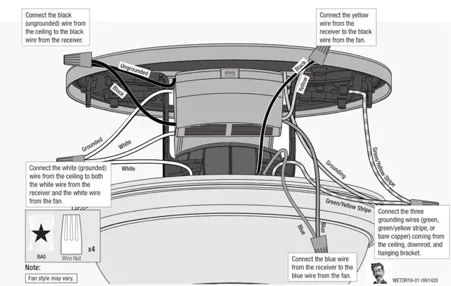
Turn off power at the breaker. Open the canopy. Inside you'll find a small rectangular receiver module with wires coming out of it.
Look for a small button labeled "Learn" or "Set." Press and hold it for five seconds. Restore power. Within thirty seconds, press and hold the fan button on your remote.
If the fan starts, you've fixed the pairing issue.
If that doesn't work, check the wire connections inside the canopy. Make sure all wire nuts are tight and no wires have pulled loose. If everything looks connected and the fan still won't power on, the receiver module itself is likely dead.
Replacement receivers are available from Hunter and typically cost between fifteen and thirty dollars.
Branch 2: Fan turns on but only runs on one speed
You're dealing with a bad capacitor. This is a repair that sounds harder than it is. The capacitor is a small cylindrical component, usually black or silver, located inside the switch housing or inside the canopy depending on your model.
It looks a bit like a battery but with two or three wires coming out of it.
Turn off power at the breaker. Remove the switch housing cover. You'll see the capacitor connected to the pull chain switch or the speed control board.
Take a picture of the wiring before you disconnect anything. The capacitor will have a capacitance rating printed on it, something like 4.5 microfarads or 6 microfarads. Order a replacement with the exact same rating.
Unscrew the old one, disconnect the wires, connect the new one, and reassemble.
This fix works on roughly 90% of single-speed problems according to verified buyer feedback on replacement capacitor sales. It costs under fifteen dollars and takes about twenty minutes.
Branch 3: Remote stopped working
Try this before you do anything else. Turn the fan off at the wall switch. Wait ten seconds.
Turn it back on. Within thirty seconds, press and hold the "Fan Off" button on the remote for five seconds. Most Hunter remotes will re-pair to the receiver during that initial power-up window.
If that doesn't work, open the canopy and find the receiver learn button as described in Branch 1. Press and hold the learn button on the receiver, then press and hold the fan button on the remote. Hold both for about five seconds.
Release. Test the fan.
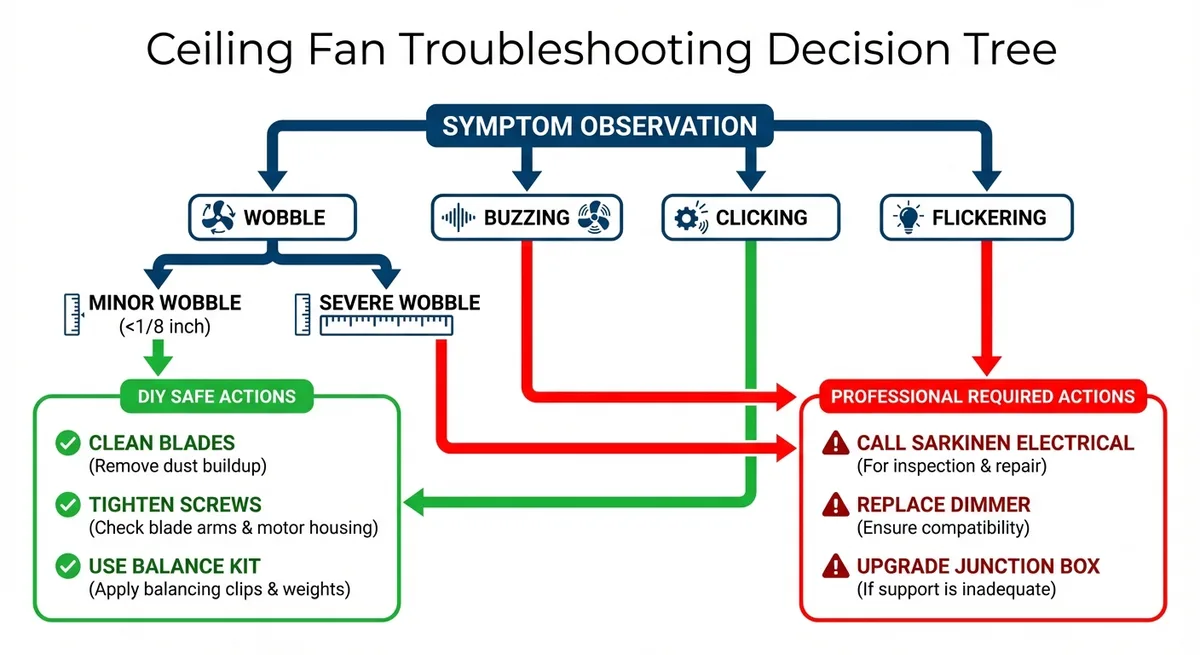
Image source: Bing (Web (fair-use with source credit))
If re-pairing fails repeatedly, the remote itself may be the problem. Check for corrosion in the battery compartment. If you see white or green residue, clean it with a cotton swab dipped in vinegar.
Let it dry completely and try fresh batteries. Still no luck? A replacement remote from Hunter costs about twenty to forty dollars and will come with pairing instructions.
Branch 4: Fan wobbles, shakes, or makes noise
This is almost always a balance issue, not a motor problem. Grab a screwdriver and a ladder. Start by checking every blade screw.
Tighten them all, even the ones that feel snug. Use a star pattern just like tightening a car tire. One loose screw can throw the whole fan out of balance.
If the screws are tight and the wobble persists, swap two adjacent blades. This changes the mass distribution and often corrects a subtle imbalance from the factory. If that doesn't help, use the blade balance kit that came with your fan.
It usually includes small adhesive weights. Clip a weight onto one blade near the trailing edge. Run the fan.
If the wobble gets worse, move the weight to a different blade. Keep moving it until the wobble disappears.
Noise is a different animal. A clicking sound usually means a blade is hitting the light kit or a screw is just barely touching the housing. A humming sound that changes with speed could be a loose wire vibrating inside the canopy.
A grinding or scraping sound means the motor bearings are failing, and that's one of the few repairs that genuinely requires a replacement fan.
Branch 5: Fan hums but blades won't spin
You hear the motor trying. It makes that low electrical hum. But the blades refuse to move, or they barely twitch.
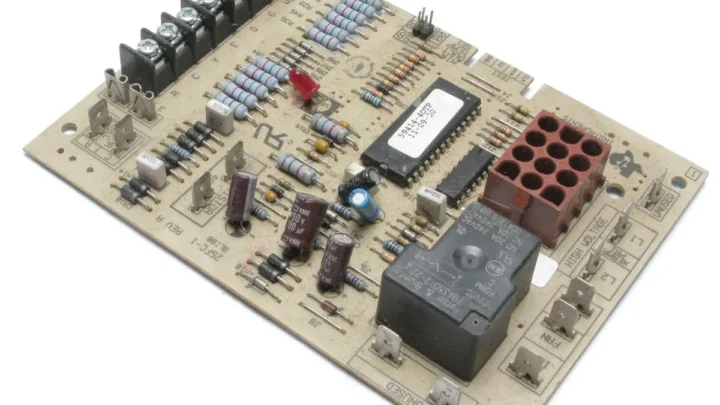
This is the start capacitor failing. The start capacitor gives the motor the initial jolt of energy it needs to overcome inertia and begin spinning. When it goes bad, the motor gets power but can't get moving.
Turn off the power. Find the capacitor as described in Branch 2. If you have a multimeter, set it to capacitance mode and test the capacitor.
A reading that matches the printed rating means the capacitor is fine. A reading of zero or a value far below the rating confirms it's dead. Replace it with an identical capacitor.
If the capacitor tests fine and the fan still won't spin, the motor bearings may have seized. Try spinning the blades by hand with the power off. If they resist or feel gritty, the bearings are gone.
On most Hunter fans, replacing the motor isn't cost effective. A new fan costs about the same as the labor to replace the motor.
Step-by-Step Fixes for Each Branch
You've identified your situation. Now here's exactly how to fix it, in order, with the tools you probably already own.
Fixing a dead fan: power checks, remote reset, receiver replacement
Start at the source. Go to your circuit breaker panel. Find the breaker labeled for that room or that fan specifically.
Flip it fully off, wait five seconds, and flip it back on. This does two things. It confirms the breaker isn't tripped, and it performs a hard reset on the fan's receiver module.
If the fan still won't power on after the breaker reset, open the canopy. You'll need a screwdriver, probably a Phillips head. Remove the screws holding the canopy in place.
Lower it carefully. There will be wires. Look for the receiver.
It's a small black box with a wire antenna sticking out. Press and hold the learn button until the receiver beeps or the light on the fan blinks. Then pair the remote again.
Image source: Web (Bing) / hotpeachpages.org (Web image (fair-use with source credit))
If pairing doesn't work and all wire connections are tight, the receiver is dead. Order a replacement from Hunter's official website. You'll need your fan's model number.
It's printed on a sticker on the motor housing, usually visible when you lower the canopy. Installation is the reverse of removal. Match the wire colors, connect the new receiver, tuck it into the canopy, and reattach the cover.
One-speed fix: capacitor testing and replacement
This is the most satisfying DIY fix on a ceiling fan because it's cheap, fast, and almost always works. You need a multimeter with capacitance testing capability, a screwdriver, and a replacement capacitor.
Turn off the breaker. Remove the switch housing. Locate the capacitor.
It's usually zip-tied to the switch housing bracket or resting loose inside. Take a photo of the wiring. Unscrew the capacitor from its mounting position.
Disconnect the wires. Use your multimeter to confirm the old capacitor is bad. Set the meter to capacitance mode and touch the probes to the capacitor terminals.
A reading far below the printed rating means it's failed.
Install the new capacitor. Connect the wires exactly as the old one was connected. Secure it in place with the zip tie or screw.
Reassemble the switch housing. Restore power. Test all speeds.
If only one speed works after replacement, double check that you bought the correct capacitor rating. Using a capacitor with the wrong microfarad rating can cause the fan to run at incorrect speeds or overheat the motor.
Remote repair: battery, frequency reset, pairing procedure
Start with fresh batteries. Not "the ones that still have some charge." Fresh ones. Alkaline only.
Rechargeable batteries often don't deliver consistent voltage, and Hunter remotes are sensitive to that.
If new batteries don't fix it, perform a frequency reset. Turn off the fan at the wall switch. Remove the batteries from the remote.
Wait sixty seconds. Put the batteries back in the remote. Turn the wall switch on.
Within ten seconds of power being restored, press and hold the "Fan High Speed" button for five seconds. The fan should respond. This resets the frequency sync between the remote and the receiver.
If that fails, you need to open the canopy and use the learn button on the receiver as described earlier. If neither method works, the receiver or the remote is defective. You can test which one by borrowing a remote from another Hunter fan in your house.
If the borrowed remote works, buy a replacement remote. If the borrowed remote doesn't work either, the receiver is the problem.
Fixing fan wobble: screws, balance kit, blade swapping
Blood simple and worth doing before you buy anything. Tighten every blade screw. Use a star pattern.
Check the bracket mounting screws too. A loose bracket causes wobble that feels like a blade issue.
If tightening doesn't fix it, swap two adjacent blades. Then run the fan. If the wobble shifts or changes, you've confirmed an imbalance.
Use the balance kit that came with the fan. Clip a weight onto one blade near the outer edge. Run the fan.
Move the weight to a different blade if the wobble persists. Stop when the fan runs smooth.
For noise, isolate it. Clicking at the same spot in each rotation means a blade is hitting something. Humming that changes with speed means a vibrating wire inside the canopy.
Grinding metal sounds mean the motor bearings are failing, and the fan needs replacement.
Fixing a humming motor: capacitor test, manual spin, replacement
Turn off power. Find the capacitor. Test it with a multimeter set to capacitance mode.
If the reading is zero or far below the printed rating, replace it. That's the fix.
If the capacitor tests good, try spinning the blades by hand with power off. They should spin freely for several rotations. If they stop immediately or feel gritty, the motor bearings have seized.
Lubrication rarely helps on sealed-bearing Hunter fans. A new fan is the practical answer.
Common Mistakes That Waste Time or Cause Damage
Skipping the power reset. Turning the fan off at the wall switch isn't the same as killing power at the breaker. The receiver retains residual charge. A full breaker reset clears that charge and fixes pairing issues that nothing else will.
Using the wrong capacitor. Capacitors have specific microfarad ratings and voltage tolerances. A 5 microfarad capacitor won't work where a 6 microfarad is required. The motor will run at the wrong speed or overheat.
Match exactly what's printed on the old part.
Overtightening blade screws. Snug is good. Cranked down strips the threads in the blade iron. Stripped screws cause wobble and require replacement of the entire blade bracket.
Ignoring the wall switch. It happens constantly. Someone spends an hour troubleshooting a dead fan only to find the wall switch was turned off during painting or cleaning. Check it first.
Assuming a bad motor. Motor failure is rare on Hunter fans. Capacitor failure is common. Receiver failure is common.
Wobble is common. A dead motor is the last thing to suspect, not the first.
When to Call an Electrician vs. When You Can DIY It
You can handle most Hunter fan issues yourself if you're comfortable turning off a breaker and using a screwdriver. Capacitor replacement, receiver replacement, blade balancing, and remote pairing are well within DIY territory.
Call an electrician if you're not confident working with live wires. Call one if the wiring in your canopy looks damaged or melted. Call one if the fan is hardwired directly without a visible junction box.
And definitely call one if you've tried the fixes above and the fan still doesn't work. At that point, the problem might be in your home's wiring, not the fan itself.
Tools and Parts You Should Keep Handy
| Tool or Part | Why You Need It |
|---|---|
| Phillips head screwdriver | Opening canopy, switch housing, blade brackets |
| Multimeter with capacitance mode | Testing capacitors |
| Replacement capacitor (correct rating) | Fixing single-speed or hum issues |
| Ladder | Accessing ceiling-mounted fans |
| Replacement receiver module | Dead fan after reset fails |
| Blade balance kit | Fixing wobble |
| Fresh alkaline batteries | Testing remote before replacing it |
You can find capacitors and receiver modules on Hunter's official parts page. Balance kits usually come with new fans but are available separately for under ten dollars.
Frequently Asked Questions
Why did my Hunter fan remote stop working after I changed the batteries?
The remote lost its frequency pairing with the receiver. Turn off the fan at the wall switch. Remove the remote batteries for sixty seconds.
Reinstall fresh alkaline batteries. Turn the wall switch on. Within ten seconds, press and hold the "Fan High Speed" button for five seconds.
The fan should respond.
How do I know if my Hunter fan capacitor is bad?
The fan runs but only on one speed, usually high. Or the fan hums but the blades won't spin. Remove the capacitor and test it with a multimeter set to capacitance mode.
If the reading is zero or far below the printed rating, replace it.
Can I use a universal remote with my Hunter fan?
Yes, but you need to buy a universal remote that's compatible with Hunter's receiver system. Hunter sells replacement remotes specifically for their fans. Universal remotes from other brands may require replacing the receiver module as well.
Why is my Hunter fan wobbling after installation?
Loose blade screws are the most common cause. Tighten all screws in a star pattern. If the wobble persists, swap two adjacent blades to redistribute mass.
Use the included balance kit if needed. A crooked mounting bracket can also cause wobble.
How long does a Hunter ceiling fan typically last?
With proper maintenance, Hunter fans often run for fifteen to twenty years. Capacitors typically fail after three to five years and are the most common replacement part. Motor bearings on sealed models rarely fail before the ten year mark.
Is it worth repairing an old Hunter fan or should I replace it?
If the capacitor or receiver has failed, repair it. Both parts cost under thirty dollars and take less than thirty minutes. If the motor bearings have seized or the fan is more than fifteen years old, replacement is usually more cost effective.
A new Hunter fan costs roughly the same as the labor to replace a motor.

Similar Posts