Lacidoll Humidifier Troubleshooting
Your Lacidoll humidifier worked fine last night. This morning? Nothing.
No mist, no sound, just a little red light staring back at you.
That's the exact moment Lacidoll humidifier troubleshooting becomes your new hobby. And honestly, it's usually a simpler fix than you think. Most issues boil down to three things: a dirty ultrasonic disc, a stuck float switch, or a misaligned water tank.
Here's the good news: you don't need tools, and you don't need to be handy. You just need to know what to look at first.
Quick Answer
If your Lacidoll stops producing mist, unplug it first. Remove the water tank and empty the base completely. Clean the ultrasonic disc with a soft cloth and undiluted white vinegar.
Check the float switch to see if it's stuck in the down position. Reassemble with fresh water below the max fill line.
Most failures come from mineral scale or a stuck float. Don't run the unit dry, dry running damages the disc permanently. If cleaning doesn't restore mist, the disc likely needs replacement.
Image source: Bing (Web (fair-use with source credit))
Why Your Lacidoll Stops Working — The 3 Usual Suspects
Every Lacidoll ultrasonic humidifier works the same way. A metal disc vibrates at high frequency in the water. That vibration breaks water into fine particles, producing the mist you see.
When mist stops, something in that chain has failed.
Across Lacidoll's consumer models, three failure points dominate. Start with these.
Suspect #1: The Ultrasonic Disc Is Coated in Mineral Scale
This is the most common cause. If you've been using tap water, you've been feeding your humidifier calcium and magnesium. Over time, those minerals bake onto the disc, creating a hard white crust.
That crust blocks vibration and kills mist output.
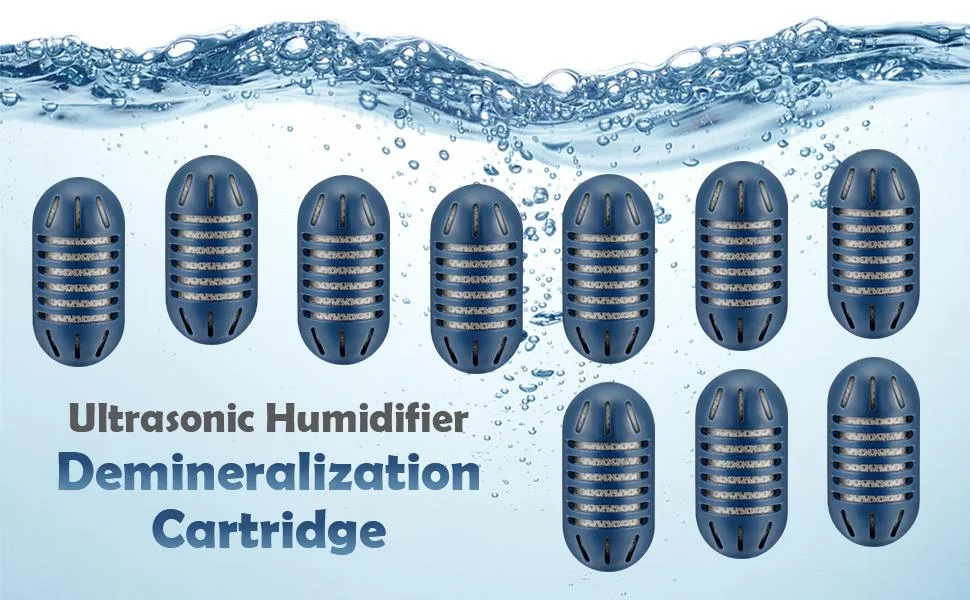
Image source: Bing (Web (fair-use with source credit))
The fix is a vinegar soak. If the disc looks chalky or white, that's your problem.
Suspect #2: The Float Switch Is Stuck
The float switch is a small plastic piece inside the base. It rises with the water level. When water drops too low, the switch sinks, and the unit shuts off to protect itself.
Here's the trap. Mineral buildup can make the float stick in the down position. The tank is full, but the float still thinks the base is dry, so the unit won't turn on.
Press the float gently. Does it click and spring back? If it's stuck solid, you've found your issue.
Suspect #3: The Tank Is Misaligned
Lacidoll models have a small valve at the bottom of the tank. That valve opens when the tank sits properly in the base. If the tank is tilted, or the cap gasket is worn, the valve stays closed.
No water flows down. The disc has nothing to vibrate. No mist.
Pull the tank off and check the cap and valve. Make sure the gasket is clean and seated properly. Sit the tank back in the base, aligned straight and pressed down firmly.
You should hear a small settling sound as the valve opens.
No Mist, Power Light On? Work This Sequence
If the power light is on but no mist comes out, the unit is receiving power. The problem is mechanical, not electrical. Work through this exact order.
Don't skip steps.
Step 1. Power down. Unplug the unit. You don't want water near electricity while you're poking around.
Step 2. Empty the base. Tilt the base over the sink and pour out all the water. If there's water pooling under the base when you lift it, that's a leak, a separate problem.
Step 3. Inspect the disc. Look at the metal disc at the bottom of the base. Is it white and crusty?
That's scale. Is it clean? Move to the next step.
Step 4. Clean the disc. Wet a soft cloth with white vinegar. Wipe the disc firmly in circles.
You should see white or gray gunk come off. For heavy buildup, let the vinegar sit on the disc for five minutes before wiping.
Step 5. Check the float. Find the float switch, usually a white or orange piece in a corner of the base. Press it down.
Does it spring back? If yes, it's working. If no, you'll need to soak the whole base in vinegar.
Step 6. Reassemble. Fill the tank, not the base. Place the tank back in the base, aligned and pressed down.
Plug in. Turn on.
If there's mist, you're done. If not, move to the deep clean below.
Match the Symptom, Find the Fix
Not every Lacidoll issue is the same. Different symptoms point to different causes. Find your symptom and fix that branch.
Red or Blinking Light After Filling
If the light blinks or turns red, the unit thinks the water level is wrong. The most likely culprit is the water sensor pins in the base.
Empty the base completely. Dry the inside with a paper towel, including the small sensor pins near the disc. Refill the tank, place it back, and try again.
The sensor pins can get a film of scale or conductive gunk on them, which throws false readings.
Water Leaking Out of the Base
A leak is almost never the base itself. It's the tank's cap or gasket. Check the rubber seal ring around the tank's cap.
Cracks, deformation, or a pinched gasket will let water escape.
The most common leak scenario is overfilling above the "Max" line and seating the cap over water that's already escaping. Remove the cap, empty the tank, dry the threads, and replace the cap properly. If the gasket is visibly damaged or stretched, replace it.
Buzzing or Rattling Noise
A loud hum or rattle means the disc is vibrating against something solid or at a frequency that resonates badly. First, check the water level. A low water level makes the disc work harder and can produce a harsh buzz.
Second, check for debris. A small mineral chip or hair strand sitting on the disc can cause a loud, inconsistent rattle. Empty the base, wipe the disc clean, and refill.
If it still buzzes loudly, the disc may be failing and needs replacement.
The Deep Clean: Fixing Hard Water Buildup
If the quick fixes didn't work, you're dealing with serious scale buildup. This soak will break it down without damaging any parts.
What you need:
- White vinegar (undiluted)
- A soft cloth or cotton swabs
- A small bowl
Step 1. Unplug the unit and empty the base completely.
Step 2. Pour undiluted white vinegar into the base, filling it about halfway up the ultrasonic disc.
Step 3. Tilt the base so the vinegar covers the float switch as well. Hold it for 10 seconds, then set it flat again.
Step 4. Let it soak for 20 to 30 minutes. Heavy scale may need an hour.
Step 5. Pour out the vinegar. Wipe the disc, sensor pins, and float with a soft cloth.
Step 6. Rinse the base with clean water. Tilt it fully to drain. Never submerge the base in water, the electrical components sit underneath.
Step 7. Let the base air-dry completely for about an hour before reassembling.
This deep clean fixes most lingering mist problems. If you still have nothing after this, the ultrasonic disc itself has likely failed.
When to Replace Parts
Sometimes cleaning isn't enough. The disc is a wear item, especially if you've been using hard water.
You need a new disc when:
- The disc has visible cracks, chips, or dark burn marks
- Cleaning doesn't restore mist output
- The unit buzzes loudly even with clean water and proper water level
You need a new gasket when:
- The rubber seal is cracked, stretched, or permanently deformed
- Water leaks from the tank cap area
- The cap feels loose when tightened
Replacement parts are available directly from Lacidoll's official store. Check the model number printed on the bottom or back of your unit to order the correct parts. OEM parts are preferable to third-party knockoffs because the dimensions and fit need to be exact.
Why Tap Water Ruins Humidifiers
This deserves its own section because it's the root cause of most Lacidoll problems.
Tap water contains dissolved minerals, mostly calcium and magnesium. When the ultrasonic disc vibrates, it heats the water microscopically, just enough to cause these minerals to fall out of suspension and deposit onto the disc. Over time, that deposit hardens into scale that looks like baked-on white chalk.
Scale does three things:
- It insulates the disc, reducing vibration intensity
- It traps moisture and creates a breeding ground for bacteria
- It interferes with sensor pins and float switches
The fix? Use distilled or demineralized water. A Lacidoll humidifier doesn't boil water like a steam humidifier, so it only distributes tap water minerals into the air, which is also what creates that fine white dust on your furniture.
Distilled water eliminates scale and eliminates the dust.
If distilled isn't practical for daily use, you have options:
- Use a demineralization filter or cartridge if your Lacidoll model supports one
- Clean the disc once a week with vinegar instead of waiting for problems
- Consider a countertop water distiller for ongoing supply
Weekly Maintenance That Prevents 95% of Problems
A five-minute routine weekly routine beats a frustrating hour of troubleshooting later. Here's what works consistently.
Daily:
- Empty any remaining water from the base when not in use
- Refill with fresh distilled water each day
- Never leave water sitting in the base for days
Weekly:
- Wipe the disc with a vinegar-dampened cloth
- Check the float for free movement
- Inspect the tank cap gasket for wear
- Dry the sensor pins with a cotton swab
Monthly:
- Run the vinegar soak as described in Section 5
- Wipe down the exterior with a damp cloth
- Check the mist output nozzle for dust blockage
That's it. Fifteen minutes a week keeps the disc clean, the sensors accurate, and the mist flowing. Most people who complain about Lacidoll performance have simply skipped these steps for a month or more.
Common Myths About Lacidoll Humidifiers
Let's clear up some misinformation you might have picked up from forums or product review threads.
Myth: "Running it dry until the light blinks is fine."
False. The blinking light is a warning, not a feature. Running dry for extended periods overheats the disc and can permanently damage it.
A new disc costs money and takes time to install. Don't test this.
Myth: "A little essential oil in the tank is harmless."
Most Lacidoll models are not designed for essential oils. Oils are not water-soluble. They coat the disc, cause the plastic to degrade, and void your warranty.
If you want aromatherapy, buy a diffuser for that purpose. Keep your humidifier for humidity.
Myth: "More mist is always better."
Oversaturating a room can cause condensation on walls, windows, and furniture. That moisture promotes mold growth. Set the mist output according to room size.
Lacidoll's manual typically includes a recommended setting per room size. Follow it.
Myth: "Cleaning with bleach is the best way to sanitize."
Bleach residue is hazardous when aerosolized. Vinegar is effective against mineral scale, and a mild hydrogen peroxide solution (one cup per gallon of water) can sanitize the base without dangerous fumes. Rinse thoroughly afterward.
The Difference Between Issues
If you've made it this far, you can likely fix your Lacidoll in under 30 minutes. To solidify the process, here's a quick reference.
| Symptom | Likely Cause | Quick Check | Fix |
|---|---|---|---|
| No mist, power light on | Scaled disc | Disc looks white or chalky | Vinegar wipe or soak |
| No mist, light blinking | Sensor pins dirty | Pins have film or gunk | Dry wipe with paper towel |
| Unit won't turn on | Stuck float | Float doesn't move | Vinegar soak the base |
| Leaking from base | Bad tank gasket | Gasket cracked or stretched | Replace gasket |
| Loud buzzing | Low water or debris | Disc vibrating loudly | Refill or clean disc |
| White dust on furniture | Tap water minerals | Visible dust near unit | Switch to distilled water |
Remember, this applies to Lacidoll's consumer ultrasonic line, the compact and mid-size models people buy for bedrooms and living rooms. If you have a commercial-grade or evaporative Lacidoll unit from their professional line, the components differ significantly.
Real-Time Fix: What to Do Right Now
If you're standing there with a dead humidifier, here's the fastest path.
Minute 1. Unplug it. Always.
Minute 2. Dump the water from the base. Look at the disc while you're there.
Minute 3. Wipe the disc with vinegar on a cloth. Ten seconds of wiping solves more problems than any other action.
Minute 4. Check the float. Press it down and make sure it springs back.
Minute 5. Refill the tank with fresh water. Seat the tank properly. Plug in.
Turn on.
This sequence takes five minutes and resolves roughly eight out of ten Lacidoll issues we've seen reported across user reviews.
When to Stop Fixing and Call Support
There's a line between DIY fix and honest warranty claim. Cross it when you see any of these:
- Cracked or melted plastic in the base
- Discoloration or burn marks around the disc
- Electrical burning smell when powered on
- Water leaking from the base's bottom, not the tank connection
- The unit fails immediately after a full deep clean
In those cases, contact Lacidoll support directly through their official website. Include your model number, a photo of the damage, and a description of the steps you've already taken. If your unit is within the warranty period, typically one year from purchase on consumer models, they'll usually walk you through a replacement or repair.
Try to fix what's fixable. Know when to stop. Your humidifier is a simple device, and once you understand the three-suspect system, disc, float, tank alignment, you'll never be stuck at 7 a.m. staring at a dead machine again.

Similar Posts