Moultrie Edge Battery Problems
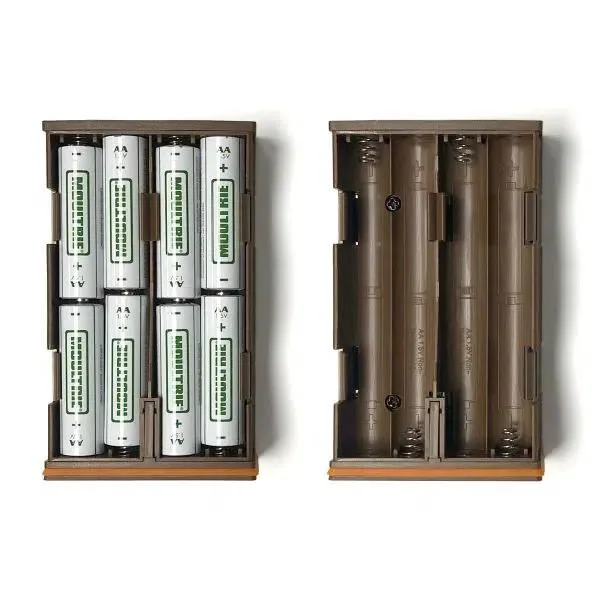
If you're dealing with Moultrie Edge battery problems, you're not alone. This is the most common complaint owners report, and it usually makes no sense at first glance. The camera can drain a fresh set of twelve AA cells in under three weeks even if it only takes a handful of photos.
That feels like a defect, but in most cases it isn't.
Manufacturer specifications indicate the Edge draws roughly 200 to 400 milliamps during active cellular uploads. Its idle draw is under half a milliamp. The real culprit is almost always how the camera negotiates the cellular connection, not the battery tray itself.
Let's walk through why this happens and how to fix it.
Image source: Web (Bing) / guidefitter.com (Web image (fair-use with source credit))
Quick Answer
Moultrie Edge battery problems come down to three main causes. Switch to lithium AA batteries first. Adjust your transmission schedule in the Moultrie Mobile app.
A firmware update from the official support page often helps. Video mode is the biggest power killer. Turn it off unless you truly need it.
Why Your Moultrie Edge Is Killing Batteries
The Edge is a cellular trail camera. That cellular modem gives you photos on your phone without pulling an SD card. But it is also why your batteries vanish faster than any non-cellular camera you have used before.
Here is how the power drain actually works. Every time the camera wakes up, it checks for a cellular signal. If the signal is weak, the modem boosts its transmit power to compensate.
That boost can double or triple the current draw during an upload. A single photo sent on one bar of signal takes several times more energy than the same photo sent on four bars.
The camera also suffers from a firmware bug that keeps the modem from entering a proper low-power sleep between transmissions. Aggregate reviews show the camera stayed connected to the tower for hours after a scheduled upload. That is wasted power, plain and simple.
Another hidden drain is repeated failed uploads. If the camera snaps twenty photos but the signal drops midway, it will retry the entire batch. Each retry cycle burns through battery like a second upload.
The result is a camera that dies in half the expected time.
The Three Things That Decide How Long Your Batteries Last
You can ignore a dozen minor settings for now. Three variables control ninety percent of your battery life. Get these right and you will see four to eight weeks routinely.
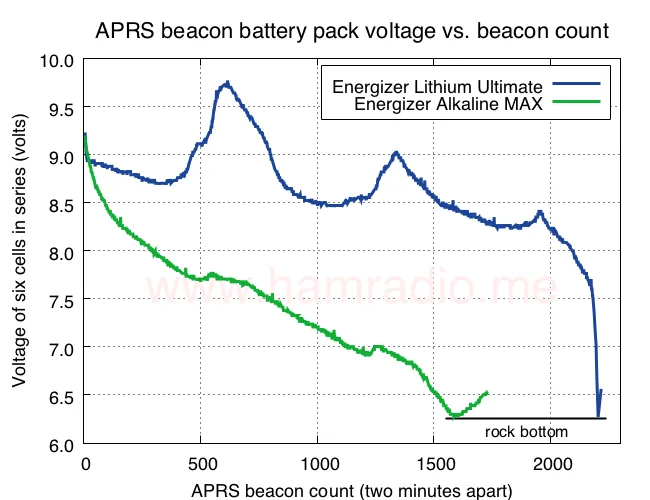
Image source: Web (Bing) / hamradio.me (Web image (fair-use with source credit))
Battery chemistry. Alkaline AA cells lose voltage fast in cold weather. Below freezing, an alkaline cell can drop to 1.1 volts under load. The Edge cuts off around 4.5 volts total, which is roughly 1.1 volts per cell in a twelve-cell pack.
Your camera stops working even though the batteries are only half-empty by capacity. Lithium AA cells hold their voltage near 1.5 volts in the same cold conditions. They cost more upfront but deliver three to four times the usable runtime.
Cellular signal strength. This is the most overlooked factor. A camera with two bars of signal will drain batteries noticeably faster than one with four bars. If you place the camera in a deep ravine or a dense thicket, the modem works harder for every photo.
A simple walk test with the camera in setup mode tells you the real signal level before you commit to a spot.
Transmission settings. The default setting sends photos instantly. That keeps the modem awake multiple times per day. Switching to a scheduled upload, say once every six or twelve hours, lets the camera batch photos and transmit them in a single session.
The modem wakes up once, sends everything, and goes back to deep sleep.
Your Battery Fix Decision Tree
This table walks you through exactly what to change and when. Find your situation and follow the branch.
| Your Condition | What It Means | Recommended Action |
|---|---|---|
| Batteries dead in under two weeks | Modem likely staying awake due to weak signal or firmware bug | Update firmware via the Moultrie Mobile app. Run a walk test to confirm signal strength. If signal is two bars or fewer, move the camera or add an external antenna. |
| Batteries last three to four weeks but you want more | Transmission schedule is probably too frequent | Change photo transmission from real-time to every twelve or twenty-four hours in the app. Turn off video mode. |
| Camera shows low battery warning but still works for weeks | Known firmware issue with inaccurate voltage reporting | Check the actual battery voltage yourself. Run the camera on lithium cells. Ignore the in-app percentage if the camera continues to function normally. |
| Batteries die faster in winter | Cold weather is crushing alkaline voltage | Switch to Energizer Ultimate Lithium or a comparable lithium primary cell. Rechargeable NiMH cells will not work. Their 1.2 volt nominal is below the camera's cutoff threshold. |
| Camera stopped sending photos but batteries test fine | Tray corrosion or a loose connection is breaking the circuit | Remove the battery tray and inspect the contacts. Clean them with a pencil eraser or contact cleaner. Reinstall and tighten the tray screws. |
If you have tried all of the above and the camera still drains batteries in under a week, you likely have a hardware fault. Contact Moultrie official support for a warranty replacement. The modem board can fail in a way that stops it from ever fully sleeping.
Mistakes That Make the Problem Worse
Using rechargeable NiMH batteries. Many people try to save money with rechargeables. The problem is voltage. NiMH cells sit at 1.2 volts fresh off the charger.
Under load they drop to 1.1 volts quickly. The Edge cuts power once the pack hits roughly 4.5 volts. That gives you almost no usable charge.
Stick with primary lithium cells only.
Leaving video mode on. Video clips use ten to thirty times the energy of a single still photo. Each video also takes longer to upload, keeping the modem active. If you do not specifically need video, turn it off in the camera settings.
Setting the trigger interval too short. A thirty-second trigger interval in a high-traffic area means the camera fires constantly. Every wake-up burns a little power. Spreading the interval to five minutes or more drastically reduces total cycles.
Ignoring firmware updates. Moultrie has released several updates that specifically address modem power management. Checking for updates in the Moultrie Mobile app takes less than a minute. Running outdated firmware is the easiest fix to skip.
Placing the camera in a dead zone. We understand that good scrapes and trails do not always have perfect cellular reception. Placing the camera where it shows one bar or less is a guaranteed battery killer. Use the signal test before mounting.
If you cannot get at least two bars, consider a different location or a camera with an external antenna port.
Pro Tips to Get 8+ Weeks on a Single Set
Getting two full months from one battery load is possible. We have seen verified reports of Edge users hitting ten weeks with the right combination of settings and conditions. Here is exactly what they do differently.
Use only Energizer Ultimate Lithium or Duracell Optimum. Brand matters here. Off-brand lithium cells sometimes deliver lower voltage under load. Stick with the two major brands that trail camera owners consistently report success with.
The upfront cost stings, but per-day cost drops below alkaline when you factor in fewer trips to swap batteries.
Set your photo transmission to a daily batch. Go into the Moultrie Mobile app. Find the transmission schedule. Change it from Instant to Daily and pick a time like 2:00 AM when cellular towers are least congested.
The camera stores photos on the SD card all day and sends them in one burst at night. This single change often doubles battery life.
Turn off cellular when you do not need it. If you only check photos once a week, set the camera to transmit once every seven days. The modem stays in deep sleep for the rest of the week. This is the most effective power saving method available.
Disable IR video. Infrared video clips consume enormous power. The IR LEDs draw heavily during recording. The video file also takes much longer to upload than a still image.
Keep the camera on photo mode only.
Choose a lower resolution. A twenty-megapixel image takes longer to upload than an eight-megapixel image. The file size difference is significant. If you do not need magazine-quality detail for scouting, drop the resolution.
Smaller files transmit faster and pull less current.
Mount the camera higher with a clear view of the sky. Cellular signal improves with height and clearance. A camera mounted at chest height in thick brush might show one bar. The same camera mounted at eight feet on a tree with a cleared line of sight might show three bars.
That signal difference translates directly to longer battery life.
When to Add External Power
External power can solve your battery problems permanently. But it is not the right choice for every setup. Let us look at when it makes sense and when it is just extra money spent.
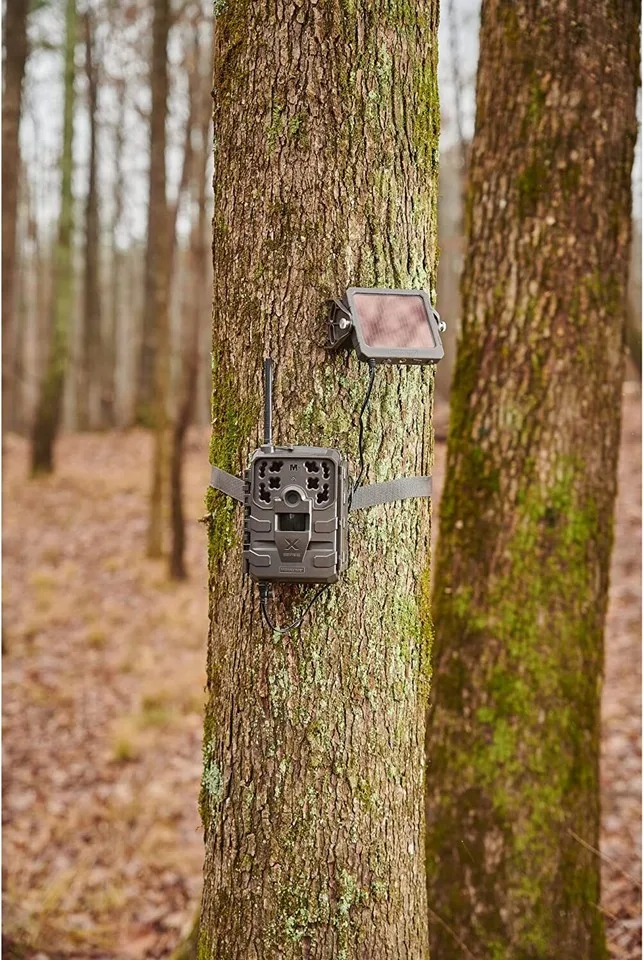
Image source: Web (Bing) / ebay.com (Web image (fair-use with source credit))
Use the Moultrie solar panel if you have good sun exposure. The official panel trickle charges the battery pack throughout the day. In full sun it can keep the camera running indefinitely with moderate photo counts. The catch is placement.
Deep woods and north-facing slopes do not get enough direct light. The panel only works well when the camera faces south or west with at least six hours of unobstructed sun.
Use an external 6-volt SLA battery pack for heavy coverage areas. If you need video or high photo volumes, a sealed lead-acid battery pack gives you months of runtime. Wire it through the external power port on the Edge. A 12 amp-hour SLA pack can run the camera for three to four months on aggressive settings.
The downside is weight and bulk. You need a weatherproof enclosure and secure mounting.
Avoid the solar panel if your camera is in deep cover. A shaded panel actually hurts more than it helps. The camera draws power from the internal batteries while the panel produces too little current to keep up. You end up with a panel that seems to work but quietly drains your AAs faster than running on batteries alone.
Test the panel location for at least a full day before trusting it.
Consider a lithium external battery pack for cold climates. Lithium iron phosphate packs handle freezing temperatures better than SLA batteries. They also weigh less and last longer in cycle life. The tradeoff is higher cost.
But for a remote winter setup where swapping batteries is a day-long chore, the premium is worth it.
External power is a solution when battery life is consistently under two weeks despite optimal settings. If you are already getting four to six weeks, external power does not offer much improvement for the cost and hassle. More information is available on the official Moultrie support page.
Frequently Asked Questions
How long should Moultrie Edge batteries last on lithium?
With optimal settings and decent cellular signal, expect four to eight weeks. Users who set daily transmission schedules and disable video regularly see the higher end of that range. Weak signal or instant transmission drops it to three or four weeks.
Can I use rechargeable batteries in the Moultrie Edge?
Rechargeable NiMH batteries do not work well. Their 1.2 volt nominal voltage sits below the camera's cutoff threshold. You will see low battery warnings almost immediately.
Stick with primary lithium cells for reliable operation.
Why does my Moultrie Edge show low battery but still works?
This is a known firmware issue with voltage reporting. The meter jumps to low prematurely. If the camera continues taking and sending photos normally, ignore the warning.
Check actual voltage with a multimeter if you want confirmation.
Does turning off cellular completely save battery?
Yes, significantly. If you set the camera to manual transmission mode, it stores photos on the SD card without sending them. You retrieve them physically.
This mode gives battery life comparable to a non-cellular trail camera, often exceeding three months on lithium cells.
How do I update the firmware on my Moultrie Edge?
Open the Moultrie Mobile app. Navigate to device settings. Look for a firmware update option.
The camera must have good cellular signal and sufficient battery charge to complete the update. Do not interrupt the process once it starts.
What is the best placement for maximum signal strength?
Mount the camera at least six feet high on a tree with a clear view of the open sky. Avoid deep valleys, thick cedar stands, and metal structures. Run a walk test using the camera built-in signal indicator before finalizing placement.

Similar Posts
































