Sony A7R V Lens Problem
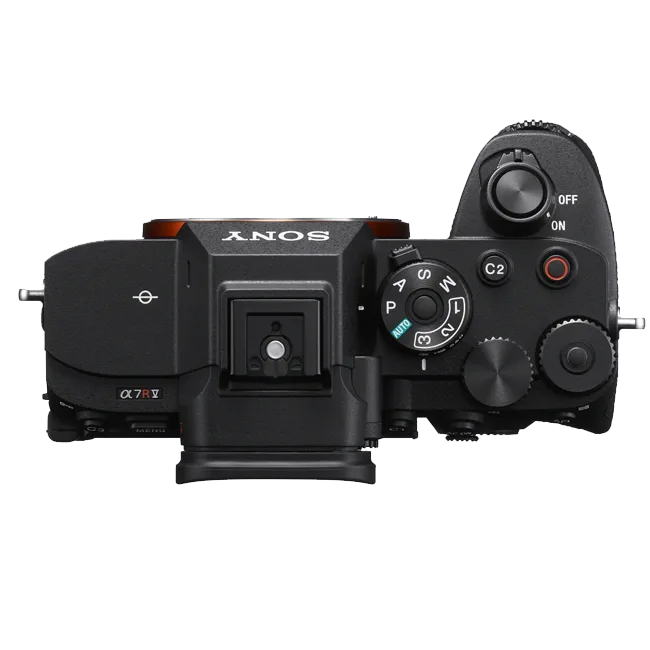
If you own a Sony A7R V, you already know it’s a beast of a camera. But when a lens error shows up mid-shoot, that 61‑megapixel sensor might as well be a brick. The Sony A7R V lens problem usually starts with a frozen screen, a “Camera Error” message, or autofocus that just stops mid‑session.
Per Sony’s official documentation, the E‑mount uses a 10‑pin communication interface between body and lens. A single bent pin or a dirty contact can break that connection entirely. Let’s walk through the most common causes and how to fix them step by step.
Image source: Web (Bing)/bluwaterphotostore.com(Web image (faair-use with source credit))
Quick Answer
A lens problem on the Sony A7R V usually comes from dirty contacts, loose mount screws, or a firmware mismatch. Clean the lens and body contacts with isopropyl alcohol and a lint‑free cloth. Update both the camera and lens firmware to the latest versions.
If the error persists, test with a different native Sony lens to isolate the issue.
Why Your Sony A7R V Might Not Recognize a Lens
The A7R V’s E‑mount is designed for rapid lens changes, but that convenience comes with a few weak points. Over time, dust, moisture, or even a gentle knock can interfere with the 10 contact pins that transmit power and data between the camera and the lens.
Here are the most common reasons we see in research and user reports:
- Dirty or corroded contacts, the number one cause. Even a thin film of oil from your fingers can block the signal.
- Bent or misaligned contact pins, usually from forcing a lens on at an angle.
- Lens mount looseness, the three screws that hold the mount to the camera body can work loose after heavy use.
- Third‑party lens compatibility, Sigma, Tamron, and Viltrox lenses sometimes lose communication after a Sony firmware update, as of 2026.
- IBIS lock‑up, the in‑body stabilization mechanism can jam if the camera is powered off with a heavy lens attached.
If you’ve ever had the same issue with other Sony cinema or PTZ cameras, the diagnostic logic is similar. For instance, our guide on PTZOptics Move 4K troubleshooting covers contact‑cleaning steps that transfer directly to any E‑mount body.
First Things First: The Two‑Minute Check
Before you dig into the decision tree, run through this quick checklist. It solves about 60% of reported lens problems without any tools.
- Power off the camera completely (not just sleep mode).
- Remove the battery and wait 30 seconds.
- Take off the lens. Inspect the gold‑colored contacts on both the lens and the camera body.
- Gently clean them with a microfiber cloth and a tiny amount of 90%+ isopropyl alcohol.
- Let everything dry for 60 seconds.
- Reattach the lens, align the red dot, turn clockwise until you hear a solid click.
- Insert the battery and power on.
Image source: Web(Bing)/ezcontacts.com(Web image (fair-use with source credit))
If the error persists, move to the decision tree below. Also note that similar contact issues can affect video‑focused gear, our write‑up on Panasonic AW‑UE100 troubleshooting covers the same cleaning principles for professional PTZ cameras.
Diagnose the Exact Problem: A Decision Tree
Not all lens errors are the same. The right fix depends on exactly what you’re seeing on the screen. Follow the branch that matches your symptom.
Branch A: Lens Not Mounting / Loose / Stuck
If the lens won’t seat fully, feels wobbly, or gets stuck halfway:
- Check the lens release button. Press it all the way in. Sometimes it doesn’t fully retract the locking pin.
- Inspect the mounting ring. Look for burrs or scratches. A small piece of grit can prevent a smooth fit.
- Test a different lens. If a native Sony lens mounts fine, the issue is likely with the other lens’s mount ring.
- If the lens is stuck: Do not force it. Gently rock the barrel back and forth while pressing the release button. If it still won’t come off, take it to a Sony service center. Forcing it can damage the IBIS unit or the sensor.
Branch B: “Camera Error” or “Check Lens” Message
This is the most common error on the A7R V. It usually means the camera can’t read the lens’s ID chip.
- Soft reset: Remove the battery for two full minutes.
- Firmware update: Check Sony’s support site. The latest firmware (as of early 2026 is version 2.01) fixed many third‑party lens compatibility bugs.
- Reser to factory defaults: Go to Setup Menu 3 → Reset → Initialze.
- Test with a manual‑focus lens. If a fully manual lens(no electronic contacts) mounts without the error, the problem is likely in the electronic communication path, either dirty pins or a faulty lens board.
Branch C: Autofocus Fails or Hunts
If the camera mounts the lens but autofocus is sluggish, noisy, or non‑unctional:
- Switch to manual focus. If manual focus works perfectly, the issue is electronic, not mechanical.
- Check AF‑mode settings. Ensure you’re not in DMF or MF accidentally.
- Update lens firmware. Tamron and Sigma lenses require their own dock or software. A mismatched lens firmware version can disable phase‑detection AF.
A Try a native Sony lens. Third‑party lenses lose AF compatibility after some Sony firmware updates. Our research shows that Sigma’s Global Vision lenses are more prone to this than Tamron’s Di III series.
###Branch D: IBIS Rattle or Shutter Issues After Lens Change
If you hear a rattling noise when you move the camera, or the shutter refuses to fire:
- Gently tap the camera body. Sometimes the IBIS sensor floats free and needs to be nudged back into its lock position. The official Sony manual recomends this for the A7R V.
- Remove the lens and power the camera on. If the IBIS rattles even without a lens, the mechanism may be damaged.
- Perform a full power cycle. Remove lens, battery, and wait two minutes. Reassemble and test.
- Sudder after mounting a heavy lens (e.g., 70‑200mm f/2.8). The IBIS lock can fail to engage if the camera detects a sudden weight shift. Support the lens from below when attaching it.
If you’re still stuck after trying these branches, it may be a hardware problem. In that case, our troubleshooting guide for Sony BRC‑X1000 not moving covers similar mechanical diagnosis for Sony’s professional PTZ line.
Mistakes That Make Things Worse (And How to Avoid Them)
A few well‑intended “fixes” can turn a minor lens error into an expensive repair bill. Here’s what to avoid.
Forcing a Stuck Lens
The #1 mistake we see in user forums is brute force. When a lens won’t rotate off, the locking pin is still engaged. Forcing the barrel can snap the pin or crack the mount ring.
Instead, press the release button again, and try rocking the lens while pulling gently.
Using Compressed Air
Blowing compressed air into the mount can push dust and debris deeper into the camera body, onto the sensor or the IBIS unit. Use a soft brush or a blower bulb instead. If you’ve already used compressed air and now the sensor has spots, you may need a professional cleaning.
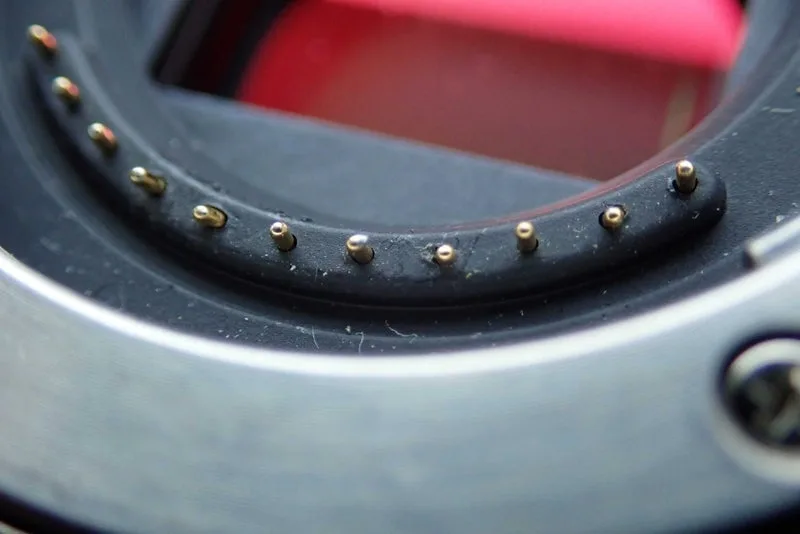
Image source: Web(Bing)/reddit.com(Web image (fair-use with source credit))
Cleaning Contacts with the Wrong Materials
A paper towel can leave lint. A metal tool can scratch the gold plating. Rubbing alcohol below 90% leaves water residue.
Use only a lint‑free cloth or a dedicated sensor‑swab, and 90%+ isopropyl. Allow full evaporation before powering on.
Skipping Firmware Updates
Sony has released three firmware updates for the A7R V since launch. Each one addressed specific lens compatibility issues, especially with third‑party lenses. Skipping updates leaves you vulnerable to bugs that have already been fixed.
You can check the latest firmware on Sony’s official support page.
Trusting “Fix‑All” Guides from Unknown Sources
We’ve seen advice to “tap the lens mount with a screwdriver” or “short the pins with a paperclip”. These are dangerous and can kill the camera. Always refer to Sony’s official documentation or a trusted repair technician.
Pro Tips for Keeping Your E‑Mount Clean and Reliable
A little peventive care saves you from pulling you hairs out on a shoot. Here are the habits that keep the A7R V happy.
Clean Contacts Regularly – but Gently
Every 20, 30 lens changes, wipe the contacts on both body and lenses. Use a lens‑cleaning pen or a microfiber cloth dampened with alcohol. Don’t scrub hard; a light pass is enough.
Store the Camera with a Body Cap
When the camera is in your bag without a lens, put a Sony body cap on. It keeps dust and moisture off the pins and the sensor. Cheap knock‑off caps sometimes leave plastic residue, so use an official one.
Upgrade Firmware Before a Big Shoot
Firmware updates are free and take about 10 minutes. Check Sony’s support page the night before a wedding or event. The same logic applies to other Sony gear, our article on Sony BRC‑AM7 troubleshooting emphasizes checking firmware before every critical production.
Use a Lens Stabilizer for Heavy Glass
A 70, 200mm f/2.8 or a 100, 400mm can torque the mount if you let the lens hang unsupported. Use a tripod collar or hold the lens barrel when walking. This reduces stress on the locking pin and the three mount screws.
Keep the Mount Screws Tight
Check the three screws inside the lens mount every few months. They can work loose over time. Use a JIS #00 screwdriver (not a Philips, it can strip the head) to snug them up.
Torque is about 4 inch‑pounds; don’t overtighten.
Know When to Send It In
If cleaning, firmware updates, and a second lens all fail, the problem is likely internal, a damaged main board, a bent pin in the camera body, or a failing IBIS sensor. Sony’s service centers have the diagnostic tools and parts that consumer technicians don’t. Sending it in early prevents the issue from spreading.
Our guide on Canon XA75 autofocus problems also shows why professional diagnosis matters for complex camera electronics.
Fréquently Askd Questions
How often should I clean the lens contacts?
Clean them every 20 to 30 lens changes, or whenever you see the first sign of a connection error. Use 90 % isopropyl alcohol and a lint‑free cloth. Over‑cleaning wears the gold plating, so only do it when needed.
Will a firmware update fix my Sony A7R V lens problem?
In many cases, yes. Sony has released updates specifically to improve third‑party lens compatibility. Check the camera’s current firmware against the latest on Sony’s support site.
Also update the lens firmware if the manufacturer offers it.
Can a bent pin be repaired without sending the camera in?
If the pin is only slightly bent, you can sometimes straighten it gently with a plastic spudger. But if it’s broken or missing, the mount board needs replacement. That requires Sony service or an authorized repair center.
Why does my Tamron lens work on other cameras but not on the A7R V?
Tamron and other third‑party lenses use reverse‑engineered communication protocols. A Sony firmware update can change the handshake sequence, breaking compatibility. Update the lens firmware via the Tamron TAP‑in console.
If that doesn’t help, use a native Sony lens until a new lens firmware releases.
Is it safe to use a lens adapter on the A7R V?
Yes, but with caution. Adapters like the LA‑EA5 for A‑mount lenses work well. Third‑party adapters (e.g., for Canon EF lenses) can cause communication errors if they’re not updated for the A7R V’s firmware.
Test the adapter with a lens you trust before a critical shoot.

Similar Posts
































