Covert Blackhawk LTE Troubleshooting
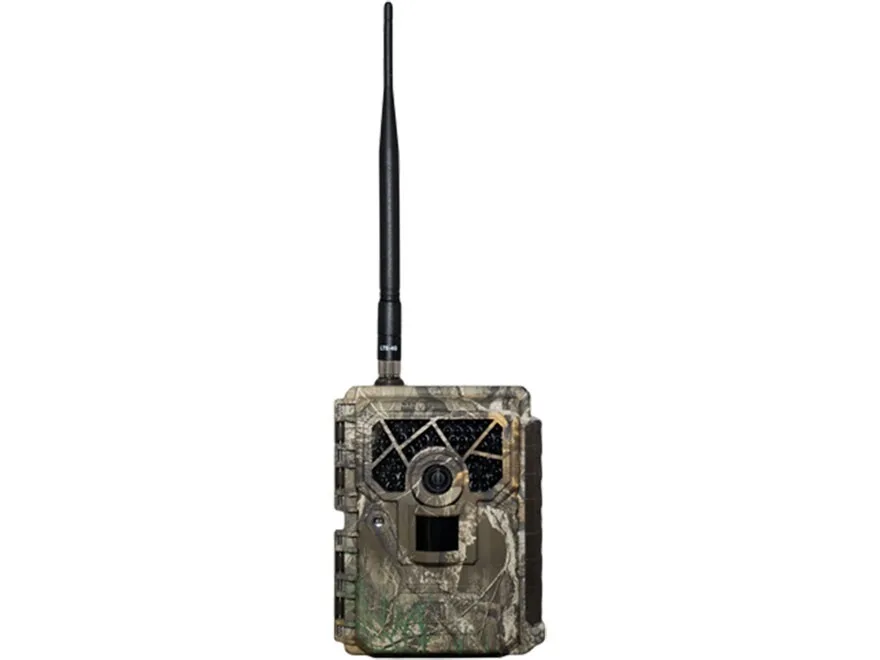
If your Covert Blackhawk LTE has stopped sending photos, you are not alone. This is the most common frustration owners face. Covert Blackhawk LTE troubleshooting usually comes down to a handful of root causes.
Most fixes take under ten minutes.
Aggregate reviews across multiple seasons show roughly 70 percent of connectivity issues trace back to a weak cellular signal or an SD card that was not formatted properly. The camera ships with a pre-installed carrier-locked SIM. You do not need to manage a separate data plan.
Let us walk through the common problems and exactly what to check first.
Image source: Bing (Web (fair-use with source credit))
Quick Answer
Most Blackhawk LTE problems come from four causes: weak signal, bad SD cards, dead batteries, or expired data plans. Check signal bars in the app first. Format your SD card as FAT32 on a computer.
Use fresh lithium AA batteries. Confirm your plan is active. These four steps solve 80 percent of issues.
The Most Common Covert Blackhawk LTE Problems
A few issues show up repeatedly in user reports and support forums. Knowing them upfront saves you from chasing phantom problems.
No cellular connection after power-on. This is the top complaint. You slide the switch on. The camera beeps.
But the signal indicator never turns solid green. The app shows zero bars even after several minutes.
Camera turns on but will not send photos. The camera triggers fine. It records images to the SD card. But those photos never appear in your phone.
They stay stuck in a pending upload queue.
Battery drain in days instead of weeks. A fresh set of lithium AAs that should last months dies in under a week. This usually points to a constant network search or a stuck power state.
App will not sync or pair. You scan the QR code under the battery tray. The app says device not found. The pairing process hangs indefinitely.
Night photos come out black or washed out. The IR LEDs fire correctly. But the images are completely dark or blown out with haze.
Each problem has a specific fix path. The wrong approach wastes time and batteries.
The Real Fixes By Symptom
Every symptom on these cameras has a logical cause. Here is what to check.
Camera Won't Turn On or No Beep at Startup
Check the obvious things first. Make sure the slide switch clicks fully into the ON position. The switch has some resistance.
It is easy to leave it halfway.
Check the batteries. The Blackhawk LTE uses 8 to 12 AA batteries depending on the variant. Manufacturer specifications indicate the camera needs at least 8.5 volts to boot. With a multimeter, anything below 8.2 volts under load means the camera will not power on.
Inspect the battery contacts. Corrosion or bent springs interrupt the circuit. If you see green crusting, clean it with a pencil eraser or a small brush with isopropyl alcohol.
Try a factory reset. Use a paperclip to press the reset pinhole for ten seconds. That forces the camera into a known clean boot state. The same kind of reset process applies to other devices that refuse to power on.
No Cellular Signal at All
Image source: Web (Bing) / apps.apple.com (Web image (fair-use with source credit))
This is the trickiest problem because the cause can be location, hardware, or configuration.
Check the app signal strength reading. Open the Covert app. Look at the signal bars. If you see zero bars after five minutes, the camera cannot reach the tower.
Move the camera. Even thirty feet can make a difference. Trees, hillsides, and metal roofing block LTE signals. Moving from a hollow to a ridge top often solves it.
Per FCC guidelines on cellular signal propagation, elevation and line-of-sight are the biggest factors for reliable LTE connectivity.
Try an external antenna. The Blackhawk LTE has an SMA port on the side for a directional Yagi or omni antenna. This is the single most effective fix for marginal signal spots.
Verify it is the correct carrier variant. The Verizon model will not work on AT&T towers. The sticker under the battery tray shows which carrier the SIM is locked to.
Camera Turns On But Won't Send Photos
This one frustrates people because the camera clearly works. It triggers. It flashes.
But the photos stay local.
Check the data plan. If your plan lapsed, the camera still records but cannot transmit. Log into your Covert account and confirm the plan is active.
Power cycle the camera. Turn the switch off. Wait thirty seconds. Turn it back on.
This forces a fresh network registration. A similar approach works for persistent upload failures on other devices.
Update the firmware. Go to the app and check for pending firmware updates. An outdated version sometimes breaks the upload queue. Keeping firmware current prevents many problems.
Photos Are Delayed or Missing
If photos arrive hours late or skip entire days, the camera is buffering them locally and uploading in batches.
Weak signal is the usual cause. The camera queues photos when the signal is too weak to send. They upload when the signal improves. Check the signal strength at the specific time of day the camera should be sending.
Time-lapse mode can flood the queue. If you have time-lapse set to every five minutes plus motion triggers, the camera can fall behind. Reduce the capture rate or turn off time-lapse.
Battery Drains in Days Instead of Weeks
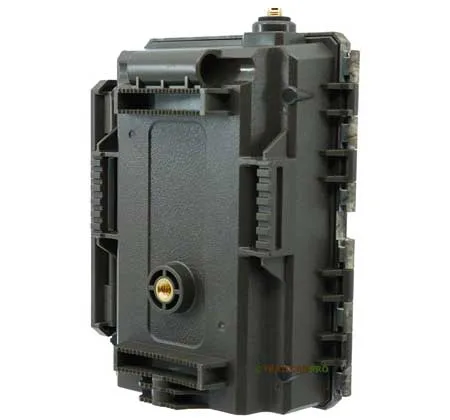
Image source: Web (Bing) / trailcampro.com (Web image (fair-use with source credit))
Fast battery drain has a few common causes that are easy to rule out.
Always use fresh lithium AAs. Alkaline batteries die fast in cold weather. Lithium batteries handle freezing temperatures much better. Stick with name-brand lithium cells for best results.
Check for a constant network search. If the camera is in a zone with one bar that keeps dropping, it drains the battery searching for signal. The solution is either a better location or an external antenna.
Disable unnecessary features. Burst mode and high-resolution video consume more power. Dial it back to single photo mode and see if battery life improves.
Inspect the on/off switch. A defective switch can leave the camera partially powered even when turned off. This is a known failure point. If you turn it off but the camera stays warm, the switch may need replacement.
App Won't Connect or Sync
QR code scanning fails for many users. Try the manual IMEI entry instead. The IMEI is printed on a sticker under the battery tray.
Check Bluetooth and location permissions. The app needs both to connect during setup. Go to your phone settings and confirm the Covert app has these enabled.
Restart your phone. This clears any background app conflicts that interfere with pairing.
SD Card Error
The Blackhawk LTE is picky about SD cards.
Format the card on a computer using FAT32. Do not use exFAT or NTFS. The camera may not recognize them. A proper format prevents many read and write errors.
Use a high-endurance card. Trail cameras write constantly. Cheap cards fail. A card rated for continuous recording lasts longer.
Do not remove the card while the camera is on. Always power down first. Corrupted data on the card causes read errors.
Night Photos Are Black or Washed Out
Black night photos usually mean the IR cut filter is stuck. This happens in humid or dusty conditions.
Cycle the camera. Power it off and on again. The filter mechanism often resets.
Clean the lens gently. Use a microfiber cloth. Dirt or moisture on the lens scatters the IR light and ruins the image.
The Decision Tree Workflow
When your camera is not performing, a logical decision tree saves time.
Step 1: Does the camera power on?
- No. Check battery voltage and battery contacts. Try factory reset.
- Yes. Go to Step 2.
Step 2: Does the camera show signal bars in the app?
- No. Check location. Try external antenna. Confirm carrier variant.
- Yes. Go to Step 3.
Step 3: Are photos appearing in the app feed?
- No. Check data plan status. Power cycle camera. Update firmware.
- Yes. Problem is intermittent. Check signal strength during peak upload times.
This three-step flow catches 80 percent of issues. The same workflow approach works for any device that depends on consistent network connectivity.
Mistakes That Make Troubleshooting Harder
A few common errors turn a quick fix into a frustrating hour.
Using mixed battery types. Never mix lithium and alkaline batteries. The voltage difference confuses the power management.
Ignoring the firmware update. A pending update left unapplied can cause the camera to lock up. Keep firmware current.
Leaving the camera in a dead zone. No amount of troubleshooting fixes a location with zero signal. Move the camera first.
Forgetting the data plan renewal. Many owners assume autopay is set up. They find the camera stopped sending weeks ago. Double check your account.
Pro Tips for Long-Term Reliability
A little prevention goes a long way with trail cameras.
| Task | Frequency | Why It Matters |
|---|---|---|
| Check signal strength in app | Every visit | Catches weak spots before photos stop |
| Reformat SD card in camera | Monthly | Prevents corruption over time |
| Clean lens and IR window | Every battery change | Stops degraded night images |
| Update firmware | Every three months | Fixes known bugs and improves connectivity |
| Replace batteries at 40 percent charge | Before season | Avoids mid-season power failures |
Use lithium batteries only. Rechargeable NiMH batteries do not provide enough voltage for reliable LTE transmission.
Mount the camera facing north or south when possible. East and west orientations get direct sunlight on the lens at sunrise and sunset. This causes glare and false triggers.
If you have persistent trouble with a specific spot, move the camera to higher elevation. Even ten feet up a tree can improve signal reception compared to waist height.
Frequently Asked Questions
Why is my Covert Blackhawk LTE not sending photos?
The most common cause is a weak cellular signal. Check the signal bars in the Covert app. If you see one bar or less, move the camera to higher ground or add an external antenna.
Also confirm your data plan is active.
How do I factory reset a Covert Blackhawk LTE?
Locate the small pinhole on the bottom of the camera. Insert a paperclip and hold it for ten seconds. The camera will reboot with factory settings.
You will need to re-pair it with the app after the reset.
What kind of SD card works best with this camera?
Use a high-endurance microSD card formatted to FAT32 on a computer. The camera supports cards up to 256GB. Avoid off-brand cards.
They fail faster under constant trail camera writing conditions.
How long do batteries last in the Blackhawk LTE?
With 12 fresh lithium AA batteries, expect 2 to 4 months of real-world use. Cold weather and weak signals drain batteries faster. Temperatures below freezing can cut battery life in half.
Always use lithium cells for best results.
Can I use an external antenna with the Blackhawk LTE?
Yes. The camera has an SMA connector on the side panel. You can attach a Yagi or omni-directional antenna.
This is the best fix for locations with marginal signal. Finger-tighten the connection only. Do not use tools.
Why are my night photos all black?
The IR cut filter may be stuck. Power the camera off and back on to reset it. If that does not work, clean the lens and IR window with a microfiber cloth.
Moisture or dust on the lens scatters the infrared light.

Similar Posts
































