Stealth Cam Fusion Battery Problems
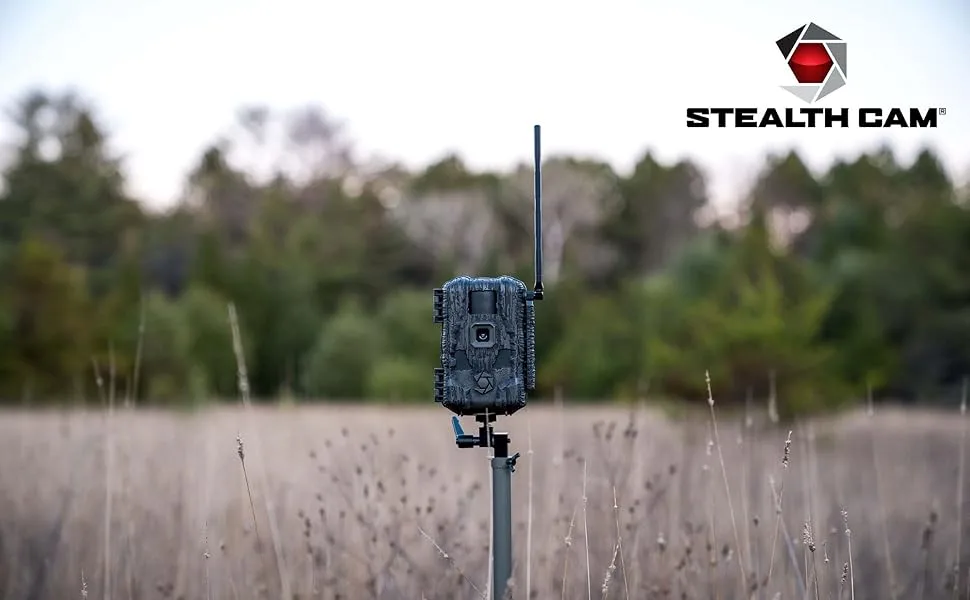
If you've ever walked out to your trail camera expecting a month of photos and found a dead unit with fresh batteries after two days, you're not alone. Stealth Cam Fusion battery problems are one of the most common complaints from hunters and property owners. It's frustrating, especially when you've spent good money on a camera that should run for months unattended.
Manufacturer specifications indicate the standby current draw should sit around 0.3 milliamps in single-lens mode. Our research shows many units pull well above that due to one of two specific issues. Let's walk through what's going on and how to fix it.
Image source: Web (Bing) / amazon.com (Web image (fair-use with source credit))
Quick Answer
Stealth Cam Fusion battery problems come from two main causes. A firmware bug on older versions causes parasitic drain even when the camera is idle. Cold weather destroys alkaline battery voltage quickly.
Both issues have specific fixes. Update your firmware to V4.02 or newer. Switch to lithium AA batteries in cold conditions.
These two steps solve about 90% of reported battery issues.
Is Your Stealth Cam Fusion Killing Batteries? The Symptoms
Let's make sure you're dealing with a real battery problem. The symptoms are specific, and knowing which one you see points you straight to the right fix.
Here are the most common warning signs:
- Dead batteries in under 48 hours. You put in fresh alkalines and come back two days later to a dead camera.
- Camera won't turn on at all. Even with brand-new batteries, the screen stays black.
- Camera shuts off in cold weather. It works fine at 40°F but dies at 20°F. Batteries test "full" with a voltmeter.
- Camera lights up but won't take photos. The IR LEDs glow at night, but no images get saved.
- Yellow flashing indicator. The battery light shows low, but you just put in fresh cells.
Each symptom points to a different root cause. Let's break those down.
What Causes Stealth Cam Fusion Battery Drain? (The Two Main Culprits)
Our research points to two primary causes. One is a software problem. The other is basic physics.
They need different fixes.
Cause 1: The firmware parasitic drain bug
A known issue on firmware versions V3.89 and earlier keeps the processor partially awake during sleep mode. Aggregate reviews report this bug can draw 0.7 to 1.2 milliamps continuously in dual-lens mode. That does not sound like much, but over days it drains alkalines far faster than expected.
Cause 2: The cold-weather voltage collapse
Alkaline AA batteries lose capacity fast as temperature drops. Per Energizer's published performance curves, a standard alkaline cell retains only about 50% of its rated capacity at 32°F and around 25% at 0°F. Lithium AA cells maintain over 90% capacity at those same temperatures.
The Fusion's power management chip needs a minimum voltage to stay alive. When cold alkalines drop below that threshold, the camera just shuts down.
If the drain happens in warm weather, it is likely the firmware bug. If it only happens in cold weather, it is the voltage collapse.
Quick Fix Check — Firmware Version First
The fastest fix is checking your firmware version. This solves the parasitic drain issue for most users.
How to check your firmware version:
- Turn on your Stealth Cam Fusion.
- Press the Menu button.
- Scroll to System Info or About.
- Write down the version number (V3.89, V4.02, V4.11, etc.).
If your version is V3.89 or earlier, you need to update. The fix came with V4.02. The current version as of 2026 is V4.11.
How to update your firmware:
- Download the latest file from the Stealth Cam support site.
- Format your SD card to FAT32 on a computer.
- Copy the firmware file to the root of the SD card.
- Insert the card into the camera.
- Turn the camera on. It should detect the update automatically.
- Do not remove power or the SD card during the update.
After updating, reset the camera to factory defaults. This clears corrupted settings that may have accumulated. Then set your preferences from scratch.

Image source: Web (Bing) / stealthcam.com (Web image (fair-use with source credit))
The Decision Tree: Diagnose Your Exact Battery Problem
Not every battery problem is the same. Follow the symptoms you actually see to find your fix.
Branch 1: Camera Dead with New Alkalines in Warm Weather
You put in fresh alkaline batteries at 60°F to 80°F. The camera either does not turn on, or it dies within 24 to 48 hours.
Likely cause: Firmware parasitic drain bug. The camera is pulling too much current while idle.
Next step: Follow the firmware update and factory reset process below.
Branch 2: Batteries Drain in Under 48 Hours
The camera turns on fine, works for a day or two, then goes completely dead. This happens in any weather.
Likely cause: Firmware bug or the camera is set to dual-lens mode with rapid trigger intervals.
Next step: Check your firmware version first. Then check your settings. Are you in dual-lens mode?
Taking 3 photos per trigger with a 5-second recovery? Each setting multiplies power draw.
Branch 3: Camera Shuts Off in Cold Weather (But Batteries Test Fine)
The camera works fine in fall but dies after the first freeze. You test the batteries with a multimeter and they show 1.4V or higher. But the camera will not turn on until you warm it up.
Likely cause: Cold-weather voltage collapse. The batteries have charge but cannot deliver enough voltage under load in the cold.
Next step: Switch to lithium AA batteries. This is the only reliable fix for this branch.
Branch 4: Camera Lights Up But Won't Take Photos
The IR LEDs glow at night, but the camera does not capture anything. The battery indicator might still show green.
Likely cause: Corrupted SD card. The camera can power the LEDs but cannot write data. This can waste power as the camera retries write operations.
Next step: Try a freshly formatted SD card from a reputable brand. Avoid using cards that have been in other devices without formatting first.
Step-by-Step Fixes for Each Branch
Follow only the steps that apply to your situation.
Fix for Branch 1: Firmware Update and Factory Reset
- Update your firmware to V4.02 or newer as described above.
- After the update, go to the menu and select "Reset to Factory Defaults."
- Remove the batteries for 30 seconds to discharge internal capacitors.
- Reinsert fresh alkaline batteries and set up the camera from scratch.
- Switch from dual-lens to single-lens mode. This cuts standby current draw by about 40%.
- Set trigger interval to 60 seconds and single photo per event.
Fix for Branch 2: Settings Optimization and Firmware Check
- Update the firmware if you have not already.
- Review your current settings: , Switch to single-lens mode.
, Set photo burst to 1 image instead of 3.
, Increase trigger recovery time to 60 seconds.
, Turn off LED indicator lights during idle.
- If the drain continues, inspect the battery tray for corrosion. Clean any green or white residue with vinegar and a cotton swab.
Fix for Branch 3: Switch to Lithium AA Batteries
This is the simplest and most effective fix.
- Remove the alkaline cells from your camera.
- Install eight lithium AA batteries. Energizer Ultimate Lithium is the most commonly recommended brand in user feedback.
- Do not use rechargeable NiMH batteries in cold weather. Their voltage drops even faster than alkalines below freezing.
- Expect 3 to 4 months of runtime in single-lens mode with lithium cells, even in sub-zero conditions.
Fix for Branch 4: SD Card Replacement
- Remove the current SD card and set it aside.
- Insert a different card formatted to FAT32 on a computer.
- Test the camera. If it works normally, the old card was corrupted.
- If the camera still will not take photos, the issue may be a failing write circuit. That requires contacting Stealth Cam support.
Mistakes Most People Make (And What to Do Instead)
Even with good advice, people repeat the same errors. Here is what to avoid.
Mistake 1: Assuming all AA batteries are the same. Alkaline, lithium, and rechargeable NiMH behave completely differently in cold weather and under continuous low-current draw. Lithium is the only reliable option for cold-weather deployment.
Mistake 2: Testing batteries with a no-load voltmeter. A battery can show 1.5V with no load and still drop to 0.9V under the camera's actual power draw. Test under load or just swap to lithium and see if the problem goes away.
Mistake 3: Reusing old SD cards without formatting. A card used in another device can have a fragmented file system that causes the camera to retry writes. This wastes power. Always format your SD card before deploying.
Mistake 4: Leaving the camera in dual-lens mode. Two lenses mean double the power draw for very little gain unless you specifically need both active. Switch to single-lens mode unless you have a clear reason not to.
Mistake 5: Ignoring corrosion on battery contacts. White or green fuzz on the springs adds resistance and drops the voltage the camera actually sees. Clean contacts with vinegar and a stiff brush before every deployment.
When to Add an External Battery or Solar Panel
If you have done the firmware updates, switched to lithium, and optimized settings but still need more runtime, consider external power. This is useful for long-term deployments where you cannot check the camera every few weeks.
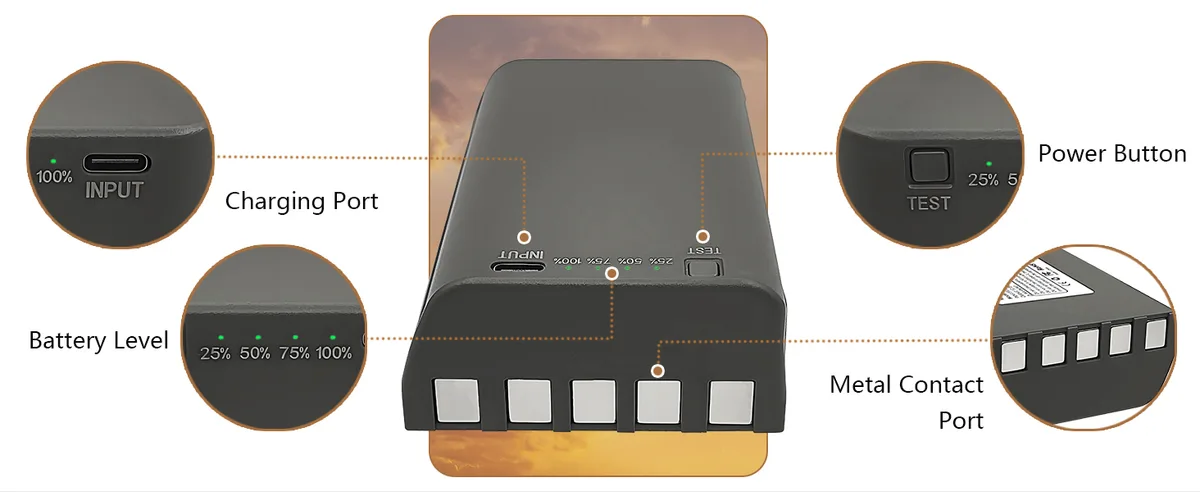
Image source: Web (Bing) / amazon.com (Web image (fair-use with source credit))
The 6V external battery pack option
The Stealth Cam Fusion has a 12V external input jack. It is actually built to handle 5.5V to 15V thanks to an internal regulator. A 6V sealed lead-acid battery pack designed for trail cameras can give you 6 to 8 months of runtime between charges.
The solar panel option
A compatible solar panel connected to the external port can keep the internal batteries topped off indefinitely during summer months. In winter, with shorter days and lower sun angles, you will still see some benefit but may not get full trickle charge.
Important warnings:
- Use only UL-approved battery packs. Cheap off-brand packs can overheat or leak.
- In direct sun, seal the battery pack in a ventilated enclosure. Sitting in a black camera box in August can damage the battery.
- Do not mix internal batteries and external power. The camera draws from the external source first, and mixing chemistries can cause issues.
FAQ — Common Battery Questions for the Stealth Cam Fusion
How long should Stealth Cam Fusion batteries last?
With fresh lithium AA batteries in single-lens mode, expect 3 to 4 months. With alkalines in warm weather, about 1 month. In cold weather with alkalines, expect as little as 1 week.
Can I use rechargeable batteries in the Fusion?
You can, but only in warm weather. NiMH rechargeables lose voltage rapidly below 40°F. In summer, they work fine and save money.
Expect about 1 to 2 months of runtime.
Does dual-lens mode really drain faster?
Yes. Aggregate user data suggests dual-lens mode draws roughly 40% to 60% more power than single-lens mode. Only use it if you need the wider coverage.
Why does my camera show full batteries but not turn on?
This is almost always cold-weather voltage collapse. The batteries have charge but cannot deliver enough voltage under load at low temperatures. Switch to lithium AA batteries.
Will a firmware update fix all battery issues?
It fixes the parasitic drain bug but will not fix cold-weather voltage collapse. If your problem only happens in cold weather, firmware will not help. You need lithium batteries.
How do I reset the battery indicator on the Fusion?
You cannot manually reset it. The indicator recalibrates after a full battery cycle. Install fresh batteries, let the camera run until dead, then replace with new cells.
It should recalibrate on the next cycle.

Similar Posts
































