Hotpoint Dishwasher Troubleshooting
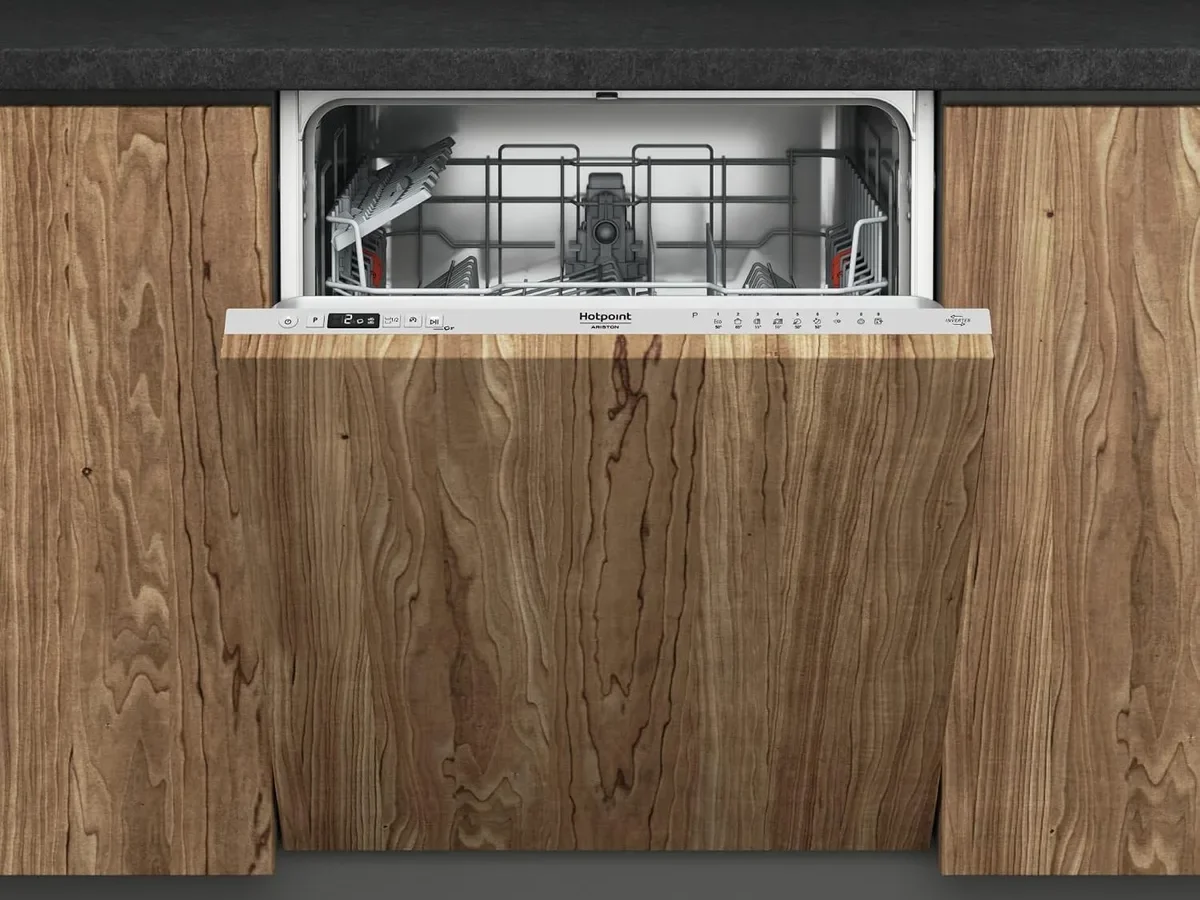
If your Hotpoint dishwasher has stopped working, you're in the right place. This guide walks you through the most common failures step by step without needing a technician's degree or a toolbox full of fancy gear.
Hotpoint dishwashers share the same core anatomy as most modern machines: a wash pump, a drain pump, a heating element, and a control board. Roughly 80% of service calls trace back to just three issues: a clogged filter, a blocked drain hose, or a faulty door latch. All three are fixable at home with basic tools.
Quick Answer
Most Hotpoint dishwasher problems come down to a clogged filter, a blocked drain hose, or a faulty door latch. Start by unplugging the unit and checking the filter basket for debris. Then inspect the drain hose for kinks or blockages. If those are clear, test the door latch and the float switch. Reset the machine by pressing the Start button for 10 seconds. This clears 80% of common failures.
Diagnosing the Problem: What Is Your Hotpoint Dishwasher Actually Doing?
Before you grab a screwdriver, play detective. The symptom your machine shows points directly at the culprit.
- No power, no lights, no response: Check the power outlet, the circuit breaker, and the door latch. Hotpoint dishwashers have a safety interlock that kills power when the door isn't fully closed.
- Starts but stops mid-cycle: This usually points to a float switch issue or a faulty heating element tripping the thermal cut-off.
- Water left standing in the bottom: Your drain pump or drain hose is the primary suspect. Debris like food particles or a broken glass shard can block the impeller.
- Leaking water onto the floor: Check the door gasket first, then the spray arms, and finally the hose connections where they meet the water supply.
- Dishes still dirty or cloudy: This is almost always a spray arm blockage or a wash pump that has lost its prime.
Each answer narrows the field. The next sections walk through each symptom so you can jump straight to the fix that matches your situation.
Image source: Bing (Web (fair-use with source credit))
The Big Three: Blocked Filter, Clogged Drain Hose, or Dead Pump
Three components account for the vast majority of Hotpoint dishwasher complaints. If your machine is misbehaving, start here before touching anything else.
The Filter Basket
The filter sits at the bottom of the tub, usually under the lower spray arm. It is a cylindrical mesh trap that catches food particles. Over time, it clogs with a greasy film that blocks water flow. To clean it, twist it a quarter turn counterclockwise and lift it straight out. Rinse it under hot running water and scrub gently with a soft brush. You should do this once a month as routine maintenance. For troubleshooting, this is the first stop.
The Drain Hose
The hose runs from the sump at the bottom of the tub to your sink's plumbing. It is a corrugated plastic tube that can trap food particles or develop a kink if the machine is pushed too far back against the wall. A kink acts like a pinched artery – water can't flow out, so it backs up into the tub. Check the entire length of the hose for twists and tight bends. Also confirm the loop is installed correctly: the highest point should be raised above the level of the water in the sink.
The Drain Pump
If the filter is clean and the hose is straight, the problem is likely the pump itself. The drain pump is a small electric motor located at the bottom of the machine near the sump. It has a spinning impeller that grinds up food waste and pushes water out. A broken piece of glass, a toothpick, or a large bone fragment can jam the impeller. You will hear a humming or buzzing sound if the motor is trying to run but can't spin.
Decision Guide: Dishwasher Won't Start or Won't Turn On
If your Hotpoint is completely dead, follow this logical order starting with the easiest fix.
First: Check the power source. Make sure the outlet is live by plugging in a lamp or your phone charger. If that works, move to the circuit breaker. A tripped breaker is common after a power surge. Flip it off and back on and try the machine again.
Second: Test the door latch. Hotpoint units have a safety interlock that prevents operation when the door isn't fully closed. Push the door firmly until you hear a click. If the latch feels loose or doesn't catch, the microswitch inside might be faulty. You can test it with a multimeter. If you are not comfortable with electrical work, call a professional.
Third: Check the child lock. If your model has a control panel with a keypad lock or control lock feature, you might have activated it accidentally. Look for a padlock icon on the display. Usually, you hold the Hi-Temp and Heated Dry buttons simultaneously for 5 seconds to unlock it.
Fourth: Look at the float switch. The float switch is a small plastic mushroom-shaped part in the bottom corner of the tub. It senses the water level and prevents overflow. If it is stuck in the raised position, the machine thinks the tub is full and won't start. Tap it gently to see if it moves freely.
Decision Guide: Dishwasher Not Draining (Standing Water)
A pool of grey, murky water at the bottom of your dishwasher is one of the most common complaints and one of the easiest to fix.
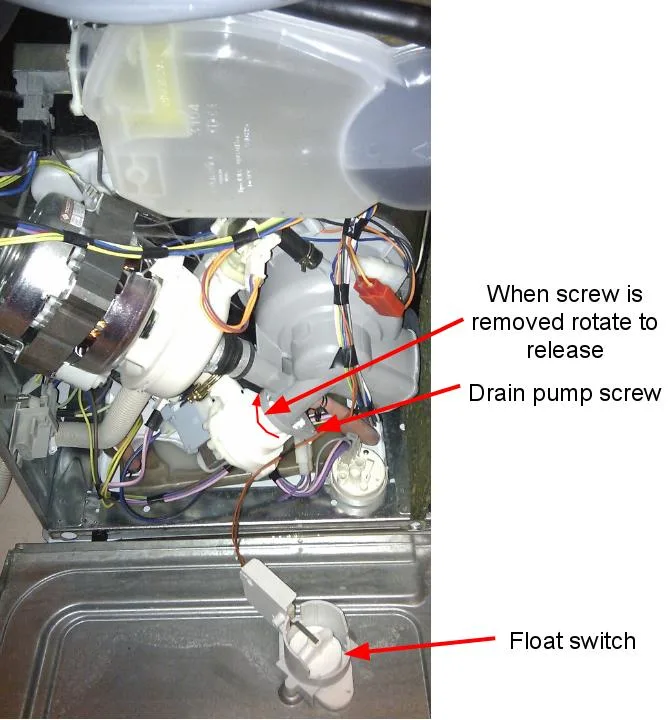
Image source: Bing (Web (fair-use with source credit))
Step 1: Clean the filter thoroughly. A clogged filter is the number one reason water won't drain. Remove the lower spray arm and the filter basket. Scrub both under hot water and pick out any large debris with a toothpick. Reinstall everything and run a short rinse cycle to see if the water clears.
Step 2: Listen for the drain pump. Start a drain cycle and put your ear near the bottom of the door. A humming noise with no water movement means the pump is trying to work but is jammed. No sound at all means the pump might be dead or the door latch microswitch is faulty.
Step 3: Inspect the drain hose for kinks or blockages. Slide the machine out from the wall and follow the hose from the sump to the sink drain. Look for sharp bends or places where the hose is pinched between the machine and the wall. Disconnect the hose at the sink end and check for food particles or a hardened grease plug.
Step 4: Check the garbage disposal. If your Hotpoint drains into a kitchen sink with a disposal, the drain hose connects to the disposal unit through a knockout port. If that knockout plug is still in place, water has nowhere to go. Remove the hose, pop out the plug with a screwdriver, and reconnect. This is a surprisingly common install mistake.
If you have done all four and water still sits in the tub, the drain pump itself is likely dead. Replacement pumps for Hotpoint models run between 50 and 120 dollars, depending on your unit's age and model number. It is a replaceable part, but requires disassembling the bottom of the machine. Weigh that against the cost of a service call.
Decision Guide: Dishwasher Leaking Water Onto the Floor
A leak is always stressful, but it is rarely as bad as it looks. The vast majority of leaks are fixable with a simple part replacement or a quick tightening job.
Check the door gasket first. The gasket is the rubber seal that runs around the inside edge of the door. Over time, it dries out, cracks, or gets food residue stuck in the grooves. Run your finger along the entire length, feeling for tears or stiff spots. Clean it with a warm soapy cloth and inspect for damage. If you see significant wear, replace the gasket. It is a cheap part, usually under 30 dollars, and it pops in with just a screwdriver.
Then inspect the spray arms. The upper and lower spray arms have small jets that spray water at your dishes. Sometimes a hard piece of food or a broken dishwasher tablet gets lodged in the jets, causing the arm to spin unevenly and splash water over the door edge. Remove the spray arms by twisting the retaining cap. Rinse them under hot water and poke out any blockages with a paperclip.
Also check the hose connections. Water can leak from where the supply line connects to the dishwasher's inlet valve, or from where the drain hose meets the sink plumbing. Tighten both connections with a wrench. If the seals look old or cracked, replace them with standard plumbing washers.
Finally, level the machine. A dishwasher that sits at an angle will tilt water toward the front door seal, where it can seep out. Place a spirit level on the top edge of the door. The machine should sit perfectly flat. Adjust the front legs by turning them with pliers until the unit is level from side to side and front to back.
Decision Guide: Dishes Still Dirty or Cloudy After a Cycle
This problem usually comes down to water flow or water temperature.
Check the spray arms for blockages. Remove both the upper and lower spray arms. Hold them up to the light and look through each jet. If you see a clog, poke it out with a toothpick or a paperclip. Also check that the spray arms spin freely when you give them a gentle push. A stuck arm means no water reaches your dishes.
Verify your water temperature. Your dishwasher needs incoming water at about 120 degrees Fahrenheit (49 degrees Celsius) to activate modern detergent enzymes and dissolve grease. Run the kitchen sink faucet until the water is hot before starting the dishwasher. If your water heater is set too low, your dishes won't get clean.
Use the right detergent. Use fresh detergent designed for automatic dishwashers. Avoid using hand-washing liquid, which creates excessive suds. If you have hard water, a rinse aid helps prevent spots and cloudiness.
Run the cleaning cycle monthly. Food residue and grease build up inside the machine over time. Run an empty cycle with a dishwasher cleaner or a cup of white vinegar placed in a dishwasher-safe container on the top rack.
Clearing Hotpoint Error Codes: What They Mean and How to Fix Them
Hotpoint dishwashers display error codes on the control panel or through blinking lights. Here are the most common ones as of 2026.
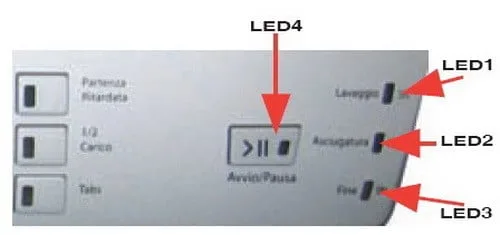
Image source: Bing (Web (fair-use with source credit))
| Error Code | What It Means | What to Do |
|---|---|---|
| F01 | Water fill issue | Check that the water supply valve is fully open. Inspect the inlet hose for kinks. If the inlet valve is faulty, replace it. |
| F02 | Drain issue | Clean the filter and check the drain hose for blockages. Listen for the drain pump. If silent, the pump may need replacement. |
| F06 | Keypad or control board fault | Unplug the machine for 60 seconds and plug it back in. If the code returns, the control board may need replacing. |
| F07 | Heating element failure | The water is not reaching temperature. Check the heating element with a multimeter. If it shows no continuity, replace it. |
| F08 | Thermistor problem | The thermistor reads water temperature for the control board. A faulty thermistor can cause erratic heating. Replace it if the error persists. |
| F09 | Overflow condition | The machine detected too much water. Check the float switch and the inlet valve. Both can cause this code. |
To reset most Hotpoint dishwashers, press and hold the Start button for 10 seconds. Then turn off the machine, wait 30 seconds, and turn it back on. If an error code returns immediately, you have a hardware problem.
Mistakes to Avoid That Make Things Worse (And What to Do Instead)
Using the wrong detergent. Hand-washing liquid creates a mountain of suds that can leak out and damage seals. Always use automatic dishwasher detergent and measure it correctly. Too much leaves residue; too little leaves food.
Ignoring the filter for months. A clogged filter forces the pump to work harder, eventually burning it out. Clean the filter monthly – it takes two minutes and extends the life of your machine.
Forcing the door closed. If the door won't latch, something is blocking the tracks or the latch mechanism is damaged. Pushing harder can crack the plastic frame. Check the tracks for debris and inspect the latch for visible damage.
Resetting the machine repeatedly. A machine that needs frequent resets has an underlying problem – a faulty thermistor, failing control board, or loose wire. Diagnose the root cause instead of patching the symptom.
Leaving standing water for days. Water left in the tub creates a breeding ground for bacteria and mold. If you can't fix the drain immediately, scoop out the water with a cup and towel. Leave the door open to dry the interior.
When to Call a Professional vs. DIY Repair: A Cost Reality Check
DIY-friendly repairs: Filter cleaning (free, 5 minutes). Drain hose unclogging (wrench, 20 minutes). Spray arm cleaning (no tools). Door gasket replacement (~$30 part, 15 minutes).
When to call a professional: Control board replacement requires disassembly and electrical testing – one wrong connection can fry the new board. Inlet valve replacement requires shutting off water and draining the line – a leak can cause water damage. Motor or pump replacement requires removing the entire bottom assembly. If you are not comfortable, pay a pro. Installation errors (leaks due to plumbing connections or drain loop) – a certified installer can fix quickly.
Cost comparison:
| Repair | DIY Cost (Parts) | Professional Cost |
|---|---|---|
| Drain pump replacement | 50 to 120 dollars | 200 to 350 dollars |
| Heating element | 30 to 70 dollars | 150 to 250 dollars |
| Door gasket | 20 to 40 dollars | 100 to 150 dollars |
| Control board | 80 to 180 dollars | 250 to 450 dollars |
If your machine is more than 10 years old and the repair costs exceed half the price of a new dishwasher, replacement is often the better financial choice.
Maintenance That Prevents 90% of Hotpoint Problems
Clean the filter monthly. Remove and scrub under hot water, paying attention to the fine mesh. A clean filter means better drainage and cleaner dishes.
Wipe the door gasket. Dampen a cloth with warm soapy water and run it along the entire gasket to remove food particles and sticky residue. This prevents leaks and keeps the seal flexible.
Run a cleaning cycle. Once a month, run an empty cycle on the hottest setting with a dishwasher cleaner tablet. This removes built-up grease and mineral deposits.
Check the spray arms. Remove them and rinse the jets. Spin them to ensure they rotate freely.
Inspect the drain hose. Pull the machine out every three months and check for kinks or cracks. Make sure the loop is still at the correct height.
Use rinse aid. If you have hard water, rinse aid prevents mineral buildup. Refill when the indicator light comes on.
Leave the door open after cycles. Let the interior air dry completely to prevent mold growth and keep the machine smelling fresh.
Frequently Asked Questions
Why is my Hotpoint dishwasher not turning on?
Check the power outlet and circuit breaker first. Then test the door latch – the machine won't start if the latch isn't fully engaged. If the control panel shows a padlock icon, the child lock is activated. Hold the Hi-Temp and Heated Dry buttons for 5 seconds to unlock it.
What does F01 mean on a Hotpoint dishwasher?
F01 indicates a water fill issue. The machine cannot draw water into the tub. Check that the water supply valve under the sink is fully open. Inspect the inlet hose for kinks. If both are fine, the inlet valve may be faulty and needs replacement.
How do I reset my Hotpoint dishwasher?
Press and hold the Start button for 10 seconds. The display should go dark or flash. Turn the machine off, wait 30 seconds, and turn it back on. If an error code returns, you have a hardware problem.
Why is water pooling at the bottom of my dishwasher?
The filter is likely clogged or the drain hose is blocked. Clean the filter basket first. If that doesn't work, check the drain hose for kinks or food debris. If the drain pump is humming but not moving water, the pump impeller may be jammed.
How often should I clean the filter in my Hotpoint dishwasher?
Clean the filter once a month. If you run heavy loads or have hard water, clean it every two weeks. A dirty filter causes poor drainage, bad odors, and dirty dishes.
Can I use vinegar to clean my Hotpoint dishwasher?
Yes. Place one cup of white vinegar in a dishwasher-safe container on the top rack. Run a hot cycle with no detergent. This removes grease and mineral deposits. Do not mix vinegar with bleach or commercial cleaners.
Final Verdict: Your Step-by-Step Repair Roadmap
Follow this roadmap to fix 90% of issues without a service call.
Step 1: Identify the symptom. Is it not starting? Not draining? Leaking? Dirty dishes? The symptom tells you where to look.
Step 2: Clean the filter. This fixes most problems. Remove it, scrub it, reinstall it. Run a short cycle to test.
Step 3: Check the drain hose. Look for kinks, blockages, or a missing knockout plug at the disposal connection.
Step 4: Test the door latch and float switch. Both can stop the machine from starting or running correctly.
Step 5: Check error codes. If the display shows a code, look it up in the table above and follow the specific fix.
Step 6: Run a maintenance cycle. Once a month, clean the interior and check the spray arms.
Step 7: Know when to call a pro. If you have checked everything and the problem persists, or if the repair involves electrical work you are not comfortable with, hire a qualified technician.
Your Hotpoint dishwasher can last 10 to 15 years with proper care. A little patience, a few basic tools, and this guide are all you need to get it running like new again.

Similar Posts