How To Use Oral B Electric Toothbrush Timer
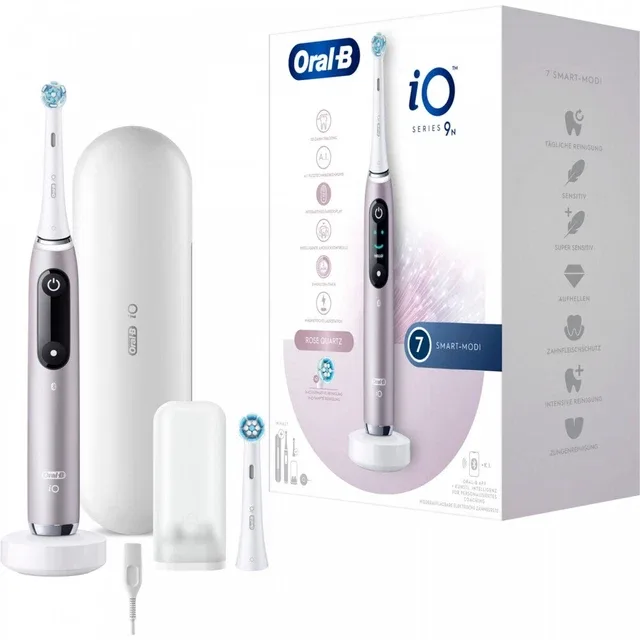
You just bought an Oral B electric toothbrush, and you're standing in front of the bathroom mirror wondering if that little buzz means something. The timer is one of the most useful features on these brushes, but it's also the one people misunderstand most often. Let's fix that right now.
How To Use Oral B Electric Toothbrush Timer is simpler than you think once you know what each beep and pulse actually means.
The American Dental Association recommends brushing for a full two minutes, twice a day. That's 120 seconds total, split into four 30-second quadrants. Oral B builds this exact timing into every electric model they sell as of 2026.
The trick is that different models behave slightly differently, so let's walk through which one you have and how to make the timer actually work for you.
Image source: Bing (Web (fair-use with source credit))
Quick Answer
Wet the brush head. Apply toothpaste. Place it against your teeth.
Turn it on. The timer starts automatically.
The brush will pulse every 30 seconds. That's your signal to move to the next quadrant. After two minutes, the brush pulses differently or stops.
That's it. You're done.
Which Oral-B Model Do You Have? (The Timer Differs by Model)
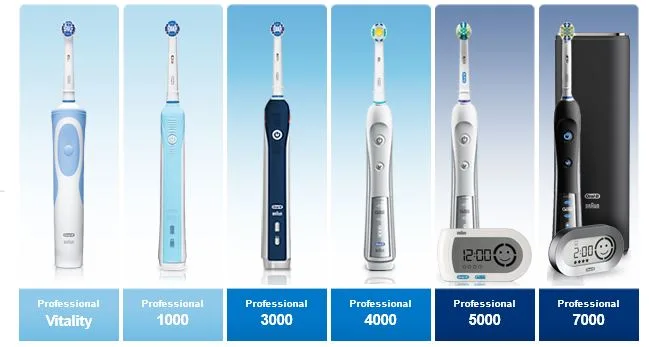
Image source: Bing (Web (fair-use with source credit))
Not all Oral B timers are the same. If you've ever tried your friend's brush and felt confused when yours didn't behave the same way, that's why. The timer features depend on which series you own.
Here's how to identify yours.
Oral B Vitality series. Entry-level model. It has a basic two-minute timer but no quadrant pacer. The brush simply stops after 120 seconds. You won't feel any pulses telling you to move. You have to keep track of the quadrants yourself.
Oral B Pro series. Most common mid-range line. It has both a two-minute timer and a 30-second quadrant pacer. The brush pulses briefly every 30 seconds to tell you it's time to switch. After two minutes, it pulses several times or changes speed.
Oral B Smart series. Adds Bluetooth connectivity. Same timer and pacer features as the Pro series, but it can sync with the Oral B app. The app gives you a real-time timer display and tracks which quadrants you've covered.
Oral B iO series. Premium line. The timer and pacer work the same way, but the iO models have a digital display that shows your progress. Some models show a smiley face when you've brushed for the full two minutes.
If you're not sure which model you have, check the handle. The model name is printed on the bottom or along the side. That small detail makes a big difference in how you'll use the timer.
For more help identifying your specific model, check the official Oral B support page.
How the Timer Actually Works
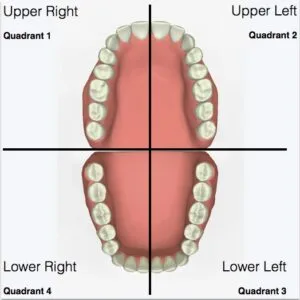
Image source: Bing (Web (fair-use with source credit))
Let's get into the mechanics. The timer has two primary functions that work together. Understanding both will make your brushing routine much more intentional.
The 2-Minute Auto Shut-Off
Every Oral B electric toothbrush that includes a timer has a built-in two-minute countdown. The timer starts the moment you begin brushing. It doesn't matter what mode you're in or which brush head is attached.
The clock is always running.
After exactly 120 seconds, the brush does one of two things depending on the model. On older or entry-level models, it stops vibrating entirely. On newer models, it pulses rapidly or changes speed to let you know time is up.
Some iO models play a short sound or display a checkmark on the screen.
The Quadrant Pacer (30-Second Pulse)
This is the feature that most people either love or ignore. The quadrant pacer is a subtle pulse that happens every 30 seconds. It's designed to remind you to move the brush to a different section of your mouth.
The idea is simple. You spend 30 seconds on your upper right teeth. You feel a pulse.
You move to your upper left. Another pulse. You move to your lower left.
Another pulse. You move to your lower right. After the fourth pulse, the brush signals that two minutes are up.
Some people don't feel the pulse because they're brushing too hard. The pressure sensor on some models can override the tactile feedback. If you're not feeling the 30-second prompts, try easing up on the pressure.
You should feel a distinct vibration change.
Model-Specific Timer Features
The quadrant pacer isn't available on every model. The Vitality series, as mentioned earlier, only has the basic two-minute timer. You'll need to mentally track your quadrants or use a separate timer.
On the Pro, Smart, and iO models, the quadrant pacer is active by default. You can't disable it on most models. That's actually a good thing.
It keeps you honest.
The iO series offers something extra. The digital display shows a timer countdown and a quadrant map. You can see exactly where you've been and where you still need to brush.
It's a nice visual cue that helps people who are new to electric brushing.
Step-by-Step: How to Use the Timer on Any Oral-B
Now that you know what your model can do, here's the exact process for using the timer correctly. Follow these steps every time you brush.
| Step | Action | Timer Feedback |
|---|---|---|
| 1 | Wet the brush head. Apply a pea-sized amount of toothpaste. | Timer hasn't started yet. |
| 2 | Place the brush against your teeth at a 45-degree angle toward the gumline. | Timer hasn't started yet. |
| 3 | Press the power button. | Timer starts immediately. |
| 4 | Brush your upper right quadrant for 30 seconds. | First pulse signals you to move. |
| 5 | Brush your upper left quadrant for 30 seconds. | Second pulse signals you to move. |
| 6 | Brush your lower left quadrant for 30 seconds. | Third pulse signals you to move. |
| 7 | Brush your lower right quadrant for 30 seconds. | Brush pulses or stops. Two minutes are up. |
| 8 | Rinse your brush head and your mouth. | Done. |
If you're using a model without the quadrant pacer, divide your mouth into four sections mentally. Spend about 30 seconds on each. It's less precise than the pacer, but it's better than brushing randomly.
For Smart and iO models, you can also use the Oral B app. The app shows a live countdown and highlights each quadrant as you brush. It's especially helpful if you find yourself losing track of time.
Common Mistakes People Make With the Timer (And How to Fix Them)
After reading through hundreds of user reviews and comments, a few problems keep showing up. Here are the most common mistakes and how to fix them.
Mistake 1: Not feeling the 30-second pulse. This is the number one complaint. People think the quadrant pacer isn't working. In most cases, it's working fine.
You're just not feeling it because you're brushing too hard. The pressure sensor on some models dampens the vibration feedback. Try relaxing your grip.
Let the brush float across your teeth. You'll feel the pulse much more clearly.
Mistake 2: Stopping before the timer finishes. Two minutes feels long when you're not used to it. Many people stop after 60 or 90 seconds because they think they're done. The timer won't stop you from turning the brush off early.
You have to commit to the full cycle. If you consistently stop early, try using the app timer. The visual countdown helps you stay on track.
Mistake 3: Pausing and restarting the timer. If you stop brushing mid-cycle, the timer behavior depends on the model. On most Oral B brushes, the timer pauses when the brush is stationary for a few seconds. When you start brushing again, the timer resumes from where it left off.
Some people think the timer resets completely. It doesn't. Check your model's manual to confirm the pause behavior.
Mistake 4: Ignoring the timer entirely. A lot of people just brush until they feel like stopping. The timer is there for a reason. Per the American Dental Association's two-minute brushing recommendation, brushing for less than two minutes leaves significant plaque behind.
Let the timer guide you, even if it feels inconvenient at first.
Mistake 5: Using the wrong model for your needs. If you bought a Vitality model expecting quadrant pacer feedback, you'll be disappointed. That's not a defect. It's a feature limitation.
If quadrant pacing matters to you, upgrade to a Pro or iO model. The timer experience is much more satisfying on those brushes.
Mistake 6: Not charging the brush. A dead battery means no timer. The timer won't work if the brush has no power. Oral B recommends charging the handle fully before first use.
Most models take 12 to 16 hours for a full charge. After that, you should get about one to two weeks of use. If your brush stops mid-cycle, check the battery level.

Similar Posts