Nextbase 322GW Battery Problems
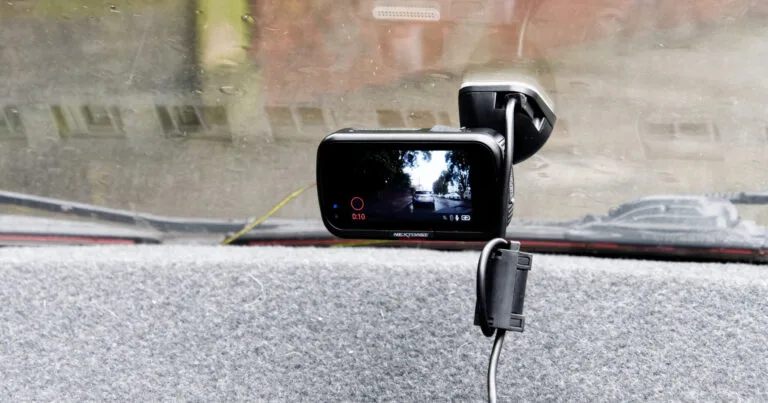
If your Nextbase 322GW battery problems have you pulling your hair out, you're not alone. This is one of the most common complaints about an otherwise solid dash cam, and it almost always comes down to the same few causes. The good news is that most of them are fixable without buying a new camera.
Manufacturer specifications indicate the 322GW uses a lithium-polymer battery rated for roughly 300 charge cycles before noticeable degradation. In practice, aggregate reviews report that many users start seeing issues within 12 to 18 months of daily use. Let's walk through what's actually happening and what you can do about it.
Quick Answer
Nextbase 322GW battery problems usually come from heat damage, age, or firmware bugs. The internal battery lasts about 20 minutes unplugged when new. If yours dies instantly or swells, the battery is likely worn out.
A firmware update sometimes fixes drain issues. Replacement costs around $10 to $20. You can also use the two-year warranty.
Image source: Bing (Web (fair-use with source credit))
Why Your Nextbase 322GW Battery Won't Hold a Charge (or Why It Dies Instantly)
The 322GW's internal battery is a 3.7V lithium-polymer cell with roughly 300mAh capacity. That's enough for about 20 minutes of continuous recording when the camera is brand new. Over time, that capacity drops.
The question is whether your battery is aging normally or failing prematurely.
Heat is the number one killer. The interior of a parked car can easily exceed 60°C (140°F) on a sunny day. Lithium-ion batteries start degrading rapidly above 45°C.
If you leave your camera mounted on the windshield during summer, the battery is cooking every time you park. That's a chemistry limitation, not a design flaw.
Normal aging after 12 to 18 months of daily use will cut battery life to about 5 to 10 minutes unplugged. If your camera dies the second you disconnect power, that's faster than expected. A firmware bug could be keeping the Wi-Fi or GPS modules active, draining the battery even when the camera is off.
As of 2026, some older firmware versions still have this issue.
A swollen battery is a different problem entirely. If the camera case is bulging, the screen is pushing out, or the camera won't sit flat on the mount, stop using it immediately. That's a safety hazard.
Advice from the UK Health and Safety Executive on lithium battery disposal is worth following.
The Quick Diagnosis: Is It the Battery, the Charger, or the Camera Itself?
Before you order a replacement battery, you need to rule out simpler causes. A bad power cable or a faulty USB adapter can mimic a dead battery perfectly. Here's how to tell the difference.
Start with the cable. Try a different USB cable and a different 12V adapter. If the camera powers on and stays on while plugged in, the battery might be fine.
The problem was just a loose connection or a dying cable. Many cigarette lighter adapters fail after a year or two, especially cheaper ones. The same power supply issues affect other dash cams too.
Next, check the firmware. Go to Settings, then System Info, and note the firmware version. Compare it against the latest version on the Nextbase official support page.
If you're running older firmware, update it. Users have reported that firmware updates fixed battery drain issues where the camera was keeping the Wi-Fi radio active even when turned off.
If the camera still dies instantly, unplug it, charge it fully (about two hours), then unplug and time how long it records. A healthy battery should give you 10 to 20 minutes. Less than five minutes means the battery is worn.
Zero minutes means it's completely dead or the charging circuit itself is faulty.
A faulty charging circuit is rarer but possible. If the camera won't charge at all with a known good cable and adapter, the micro USB port or the internal power management chip might be damaged. That's a harder fix than a battery swap.
The Decision Tree: Step by Step Troubleshooting
Here's a simple if/then flow to follow. Work through it in order and stop when you find the fix.
If the camera won't turn on at all:
Try a different power cable and adapter. If it still won't power on, the camera might be completely dead. Try a hard reset by holding the power button for 10 seconds.
If nothing, the battery or the charging circuit is likely the issue.
If the camera turns on but dies when unplugged:
Check the firmware first. Update if needed. Then disable Wi-Fi and GPS in the settings.
These two features draw power even when the camera is idle. If the battery life improves after disabling them, you found the problem. Unexpected battery drain is a common issue, and general troubleshooting steps for similar devices follow the same logic.
If the battery holds charge for less than five minutes:
The battery is worn out. You have three options. Option one: claim the two-year warranty if you're still within it.
Option two: replace the battery yourself. Option three: buy a new camera, possibly a model with a supercapacitor instead of a battery.
If the camera gets hot while charging:
This is normal up to a point. Lithium-polymer batteries warm up during charging. But if it's uncomfortably hot to touch, stop charging.
The battery might be failing internally. Let it cool down and test again.
If the battery is visibly swollen:
Stop using the camera. Dispose of the battery properly. Do not attempt to charge it.
A swollen battery can rupture or catch fire. Contact Nextbase for a warranty replacement if applicable.
What to Do If the Battery Is Swollen or Overheated
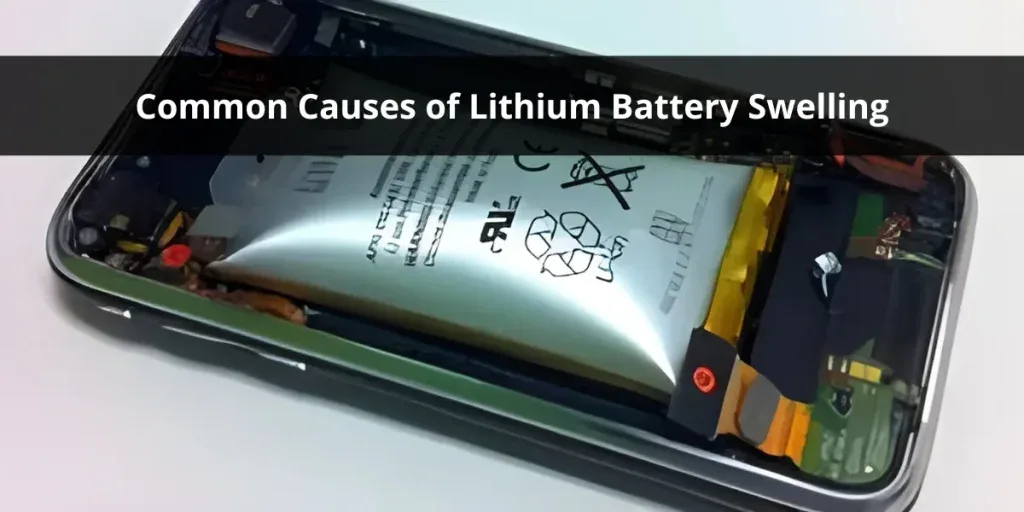
Image source: Bing (Web (fair-use with source credit))
A swollen battery is the one situation where you stop troubleshooting and act immediately. The 322GW's case is plastic, so swelling usually shows up as a gap between the front and back halves of the camera. The screen might look slightly curved or the camera might rock when placed on a flat surface.
Do not try to open the camera while the battery is swollen. Puncturing a lithium-polymer cell can cause a fire. Instead, take the camera to a local electronics recycling center that accepts lithium batteries.
Many big-box stores have drop-off bins. If you're in the UK, your local council's household waste recycling centre should take it.
If the camera is still under warranty, contact Nextbase before recycling. They may ask for photos of the swelling and issue a replacement. Do not ship a swollen battery through the mail without checking the carrier's hazardous materials policy.
Most carriers prohibit it.
Overheating without swelling is less dangerous but still worth addressing. If your camera gets hot to the touch during normal use, try removing it from the windshield when parked in direct sunlight. A tinted windshield strip or a sunshade helps.
Some users mount the camera below the rearview mirror, where it's partially shaded by the mirror housing. The same heat damage that affects your dash cam also impacts other battery-powered cameras.
When the Camera Itself Is Draining the Battery (Firmware & Parasitic Drain)
Sometimes the battery is fine, but the camera is draining it for no good reason. This is called parasitic drain, and it's a firmware issue more often than a hardware one.
The 322GW has several features that draw power even when the camera looks off. Wi-Fi is the biggest culprit. If you leave Wi-Fi enabled, the camera keeps the radio module active so it can connect to the Nextbase app.
This can drain the battery completely in a day or two. Turn Wi-Fi off in the settings unless you're actively transferring files.
GPS is less of a drain but still uses power. Disable GPS if you don't need location stamps on your footage. Parking mode is another common source of drain.
If you have parking mode enabled, the camera stays in a low-power state, waiting for motion or impact. That's fine if you're hardwired, but if you're running on battery alone, it will drain the battery in a few hours.
Firmware bugs can cause any of these features to misbehave. For example, previous firmware versions had a bug where the camera wouldn't fully shut down the Wi-Fi module even after you turned it off. The fix was a firmware update.
Check the Nextbase support page for the latest version and follow the update instructions carefully. If you've had devices going offline with no warning, firmware is often the first thing to check.
If you've updated the firmware, disabled Wi-Fi and GPS, and turned off parking mode, but the battery still drains overnight, the camera's main board might have a hardware fault. That's less common, but it happens. At that point, a warranty claim or a replacement camera is usually the better option than trying to repair the board.
How to Replace the Battery Yourself (or Decide If It's Time for a New Camera)
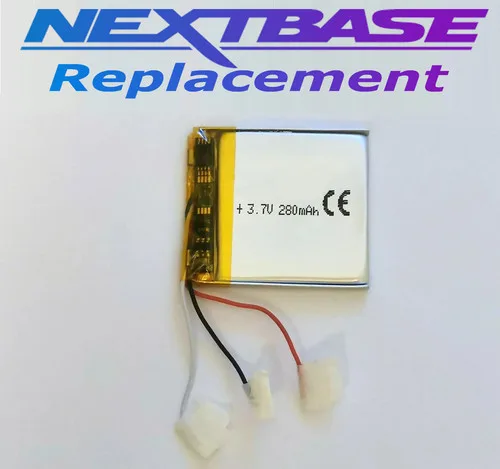
Image source: Web (Bing) / ebay.co.uk (Web image (fair-use with source credit))
If your camera is out of warranty and the battery is dead, you have a choice to make. A replacement battery costs about $10 to $20 online. A new dash cam costs $100 or more.
Doing the swap yourself can save real money, but it's not a simple pop-in job.
The 322GW uses a 603048 lithium-polymer cell rated at 3.7V. You can find these on auction sites or electronics component stores. Make sure you get one with the correct connector or be prepared to solder.
The original battery is soldered to the main board, not plugged in with a removable connector.
To replace it, you need to open the camera case. The 322GW is held together with plastic clips and a few screws under the mount bracket. A plastic pry tool helps avoid scratching the case.
Once inside, desolder the old battery wires, solder the new ones, and reassemble. It's a 30-minute job if you're comfortable with a soldering iron.
If you're not comfortable soldering, consider sending the camera to a repair shop. Some users report that a local phone repair shop will do the swap for $20 to $30. That's still cheaper than a new camera.
The same similar power issues affect other devices, and repair shops often handle them the same way.
If the camera has other issues, like a cracked lens or a flaky power port, a replacement battery might not be worth it. Compare the cost of repair against the price of a newer model. The Nextbase 422GW uses a supercapacitor instead of a battery, which means no battery problems at all.
That's worth considering if you're already spending money.
Common Mistakes to Avoid
Skipping the firmware update. This is the most common mistake we see. Users replace the battery, only to have the new one drain in a day because a firmware bug keeps the Wi-Fi radio active. Always check and update the firmware before swapping parts.
Leaving the camera mounted in direct sun. Heat is the battery's worst enemy. Even a brand new battery will degrade quickly if you park facing the sun. Remove the camera or use a sunshade.
It's a small habit that doubles battery life.
Using the wrong replacement battery. The 322GW needs a specific size and voltage. A slightly thicker cell won't fit inside the case. A higher voltage cell can damage the charging circuit.
Stick to the 603048 form factor at 3.7V. Double-check the polarity before soldering.
Trying to charge a swollen battery. This is dangerous. A swollen lithium cell has internal damage. Charging it risks a fire.
Dispose of it properly and buy a replacement. Do not take shortcuts here.
Forgetting the warranty. The 322GW comes with a two-year warranty. If your camera is less than two years old, contact Nextbase before opening it. Opening the case voids the warranty.
You might get a free replacement.
Ignoring the cable. A cable that's too thin or damaged can cause intermittent charging. The camera might not charge at all, or it might charge slowly and then stop. Use the original cable or a high-quality replacement.
Frequently Asked Questions
How long does the Nextbase 322GW battery last when new?
A new battery gives about 20 minutes of continuous recording when unplugged. That's normal for this camera. The battery is designed to save your last clip if power is cut, not for long recording sessions away from power.
Can I replace the battery in the Nextbase 322GW myself?
Yes, but it requires soldering. The battery is soldered to the main board, not plugged in. If you're comfortable with a soldering iron, you can do it in about 30 minutes.
If not, a phone repair shop can usually handle it for $20 to $30.
Why does my Nextbase 322GW keep dying even after a full charge?
Check the firmware first. Older versions can keep the Wi-Fi module active, draining the battery overnight. If the firmware is current and the battery still dies, the cell is likely worn out.
A replacement is the next step.
Is the Nextbase 322GW battery covered under warranty?
Yes, the camera has a two-year warranty that covers battery defects. If the battery fails within that period, contact Nextbase support. They may replace the camera.
Do not open the case yourself, as that voids the warranty.
What causes the battery to swell in the Nextbase 322GW?
Heat and overcharging are the main causes. Leaving the camera in a hot car accelerates chemical breakdown inside the cell. A faulty charging circuit can also overcharge the battery.
If you see swelling, stop using the camera immediately.

Similar Posts
































