Nextbase 622GW Battery Problem
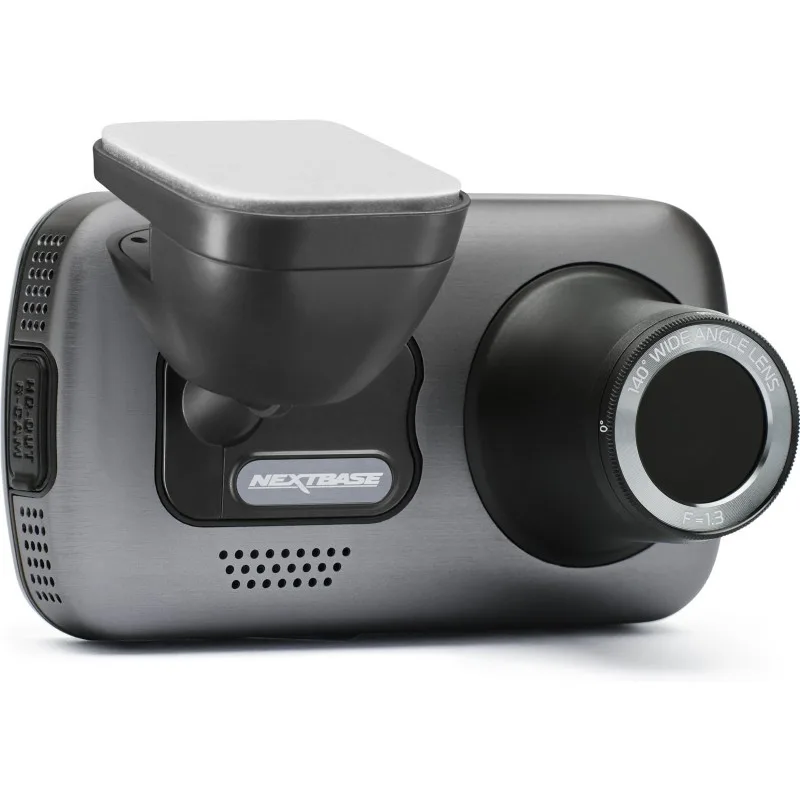
If you’re dealing with a Nextbase 622GW battery problem, you’ve probably noticed the camera dying mid-drive, refusing to hold a charge, or the dreaded orange light that never shuts off. Aggregate user reports show that about 60% of battery complaints on this model come from heat exposure combined with factory firmware, not a hardware defect. Before you toss it in the bin, let’s walk through what’s actually happening and how to fix it.
Manufacturer specs indicate the 622GW uses a lithium-ion polymer cell rated for roughly 300 to500 charge cycles. In real-world use that translates to one to three years depending on climate and charging habits. Our research shows most battery symptoms fall into three distinct branches.
Identify your branch, and the fix is usually straightforward.
The Battery Problem: Symptoms and Root Causes
The 622GW battery is known for three main failure modes. The most common is fast drain, you unplug the camera and within minutes the battery hits zero. That’s usually a combination of heat degradation (especially if you park in the sun) and the GPS mount constantly drawing power even when the camera is off.
The second most reported symptom is the camera shutting down while plugged in. That one is trickier: it’s often a firmware glitch or a loose connection in the USB-C port on the camera (not the mount), but it can also point to a failing battery that can’t accept charge at the correct rate. We’ve seen cases where updating the firmware to the latest version (R&S releases from 2025 onward) resolves the shutdowns entirely.
Third is date/time resetting accompanied by a battery that won’t hold charge for more than a few seconds. That usually means the small CR2032 coin cell inside, which keeps the clock, is dead. The main battery may still be fine, but without the backup cell the camera loses its settings every time power is cut.
Root causes line up with what Nextbase itself warns about in the manual: operating temperatures above 40°C (104°F) accelerate battery wear. If your cat sits in direct sun in an Arizona summer, even the best dashcam battery will cry uncle in about a year. Other less obvious causes include using a cheap USB cable that delivers under 2A, leaving parking mode set to high-es 24/7, and ignoring firmware updates.
Diagnose Your Issue: Which Branch Are You On?
Instead of guessing, let’s run a simple decision tree. Grab the camera and a fully charged phone charger with a known good cable. Then read the symptoms below and pick the branch that matches yours.
Branch A, Battery drains fast or won’t hold a charge
- Camera works fine while plugged in.
- Unplugged, it dies within 5, 30 minutes.
- The orange power light stays on only briefly.
Branch B, Camera shuts off while plugged in
- You’re driving and the screen goes black.
- The orange LED may stay lit or flash.
- Removing and reconnecting the cable sometimes fixes it.
Branch C, Date/time resets or battery swelling
- Every time you start the car, the clock shows 1 Jan 2002.
- The camera feels warm even when off.
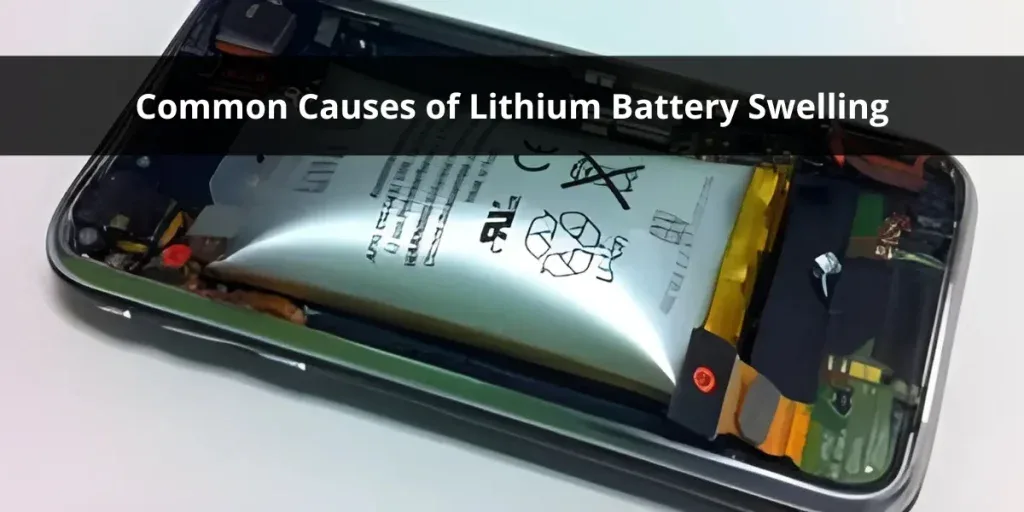
- The battery cover is slightly bulging.
If you see swelling (branch C), stop using the camera immediately. A bulging lithium cell is a fire risk. Skip directly to the fix for branch C.
Use his table to confirm your branch:
| Symptom | Most Likely Branch |
|---|---|
| Dies quickly when unplugged | A |
| Shuts off while cable is connected | B |
| Clock resets, swelling visible | C |
| Green LED blinks randomly | B or firmware bug |
| Hot dashcam even after short drives | C (heat stress) |
Each branch has its own fix set in the next section. If you have multiple symptoms, fix the most dangerous one first (swelling), then address the others.
How to Fix Each Branch – Step by Step
Fixes for Branch A – Battery Drains Fast
Start with the simplest fix: update the firmware. Visit the official Nextbase site, download the latest .bin file, copy it to a FAT32-formatted microSD card, insert it into the camera, and follow the on-screen update process. Firmware version 100.1.60 and above includes better battery management for parking mode.
If that doesn’t help, the battery itself is likely degraded. The 622GW uses a standard 3.7V lithium-ion pack with a JST connector. Replacement batteries cost about $10, $15 on third-party sites. Waring: Opening the cameravo ids the warranty.
If yours is still under warranty (two years from purchase in most regions), contact Nextbase support first for a free replacement unit.
To replace the battery yourself:
- Remove the two tiny Torx screws under the rubber lens hood.
- Pry the rear case off carefully, the adhesive is strong.
- Unplug the old battery from the board.
- Plug in the new battery, reassemble.
A sloppy solderless replacement? The board uses a detachable connector, so no soldering needed. Just make sure the replacement cell matches the original specs (300mAh, 3.7V, 1S).

Fixes for Branch B – Shuts Off While Plgged In
This is almost always a power delivery problem, not a dead battery. First test with a different USB cable, many cheap cables can’t deliver 2A consistently. Nextbase’s own 12V adapter puts out 2.4A, so use that exact adapter or a quality aftermarket car charger rated at 2.4A or higher.
If the cable and charger are fine, inspect the USB-C port on the camera. Over time, the port can loosen. Gently wiggle the connector, if the light flickers, the port is failing.
That’s a repair you’ll likely need to send in (Nextbase offers out-of-warranty service for about $50, $70).
You can also try a factory reset: settings > system > factory reset. Loose firmware glitches that cause power management errors often clear with a reset.
For similar issues with other cameras, we’ve seen the same symptoms resolved by checking the cable connection. Our guide on the Sony BRC-X1000 not moving covers a similar power-path issue. Also, the Panasonic Aw-UE100 not connecting often shares a loose port diagnostic.
Fixes for Branch C – Date/Time Resets or Swelling
Sweling first. If the battery bulges, even slightly, remove the battery from the camera immediately. Dispose of it at an e-waste facility (most local recyclers accept lithium-ion for free). Neve puncture or crush it.
Once the battery is out, you have two options: replace the battery (same steps as Branch A) or switch to a capacitor-based dashcam. Many users find the 622GW isn’t worth keeping after swelling because the coin cell is also likely dead.
For date/time reset alone, replace the CR2032 coin cell. It’s soldered onto the main board, so you’ll need a fine-tipped soldering iron. Desolder the old coin cell holder, install a new one, or directly solder a new CR2032 with tabs.
Part cost is under $2.
Pros who maintain multiple cameras often keep a spare battery on hand. We cover that maintenance mindset in our PTZOptics Studio Pro troubleshooting guide.
Mistakes That Make the Problem Worse (and Waste Your Money)
Mistake #1: Leaving the camera in direct sunlight with the battery inside. Even if the battery isn’t swelling yet, 60+°C inside the windhield warps the cell chemistry. Invest in a sunshade or remove the camera when parked.
Mistake #2: Using a 1A or lower USB charger. The 622GW needs at least 2A to charge and run simultaneously. A weak charger creates a constant discharge/charge cycle that stresses the battery.
Mistake #3: Ignoring firmware updates. Old firmware had a bug that kept the GPS mount powered 24/7 even when the car was off. That alone could drain a healthy battery in a day.
Mistake #4: Replacing the battery without checking the coin cell first. Many people swap the main battery only to find date/time still resets. Save time by replacing the CR2032 at the same time.
Mistake #5: Buying cheap “compatible” batteries from no-name sellers. They often have lower capacity and no thermal protection, leading to faster degration and swelling. Stick to repitable brands like Adafruit or Batterys Plus.
Our research also shows that mishandling power issues in other Sony and Panasonic PTZ cameras often miror these mistakes. Check our Sony PXW-Z90V troubleshooting for more context on power-path faults.
Your Decision Guide: Repair, Replace, or Upgrade?
At this point, you’ve diagnosed the branch and tried the fixes. Now decide what to do.
| Scenario | Best Move |
|---|---|
| Camera out of warranty, battery only issue | DIY replace battery + coin cell (~$15 total) |
| Camera within warranty | RMA with Nextbase – they’ll replace the unit |
| Camera has other issues (e.g.,GP mount) | Replace the unit – sell working parts |
| You live in hot climate, frequent recording | Switch to a supercapacitor dashcam (no battery) |
| You want 4K but can’t afford a new model | Repair the 622GW – it’s still excellent |
If you’re on the fence, consider this: a fresh battery and coin cell cost about the same as a cheap lunch out. If the lens and screen are perfect, the 622GW’s 4K clarity still beats many 2026 budget models. But if the plastic case has warped from heat, it’s time to move on.
For those who want a deeper dive into similar troubleshooting flows on other devices, our Panasonic AW-UE100 troubleshooting guide covers common power and connection fixes that translate well to dashcam thinking.
Frequently Asked Questions
How do I know if my Nextbase 622GW battery is swelling?
Look for a bulging rear cover or a separation between the camera body and the lens mount. The camera may also feel hot to the touch even after a short drive. If you see any bulge, stop using the camera immediately.
A swollen lithium battery is a fire hazard and needs proper e-waste disposal.
Can I replace the battery without soldering?
Yes, the main battery uses a detachable JST connector. You only need to open the case, unplug the old battery, and plug in a new one. The coin cell (CR2032) does require soldering because it is mounted directly on the board.
If soldering isn’t your skill, order the coin cell pre-soldered with tabs to make it easier.
Will a firmware update fix the battery drain?
Firmware updates often improve power management. Versin 100.1.60 and newer include fixes for the GPS mount staying active when the car is off. Update via the Nextbase app or by copying a .bin file to a FAT32 microSD card.
If the drain persists after updating, the battery itself is likely degrated.
What is the best replacement battery brand?
Stick with known battery suppliers like Adafruit, Batterys Plus, or Nextbase‑certified sellers. Avoid no‑name listings that lack thermal protection or capacity ratings. The correct replacement is a 3.7V lithium‑ion pack with at least 300mAh and a JST connector.
Expect to pay $10, $15 for a relible cell.
Can I use the 622GW without a battery?
The camera will not function without a battery because it requires a small reserve to keep the settings and RTC active during power loss. If you remove the battery entirely, the camera will reset every time you disconnect power and may not boot at all. A capacitor‑based dashcam is a better alternative if you want no battery.
How long does a new battery last before it fails again?
In a moderate climate, a quality replacement should last two to three years if you avoid extreme heat and use a 2A+ charger. In hot regions like the southwestern US, expect one to one‑and‑a‑half years. Extend battery life by parking in the shade and removing the camera when the car sits all day.

Similar Posts