How Long Does An AI Translator Battery Last: Battery Tips
Most AI translator batteries last 6 to 12 hours with regular use, but network strength and translation mode can change that.
The answer to how long does an AI translator battery last depends on the device, battery size, screen use, microphone activity, and internet connection. After testing and comparing real travel use, the clearest lesson is simple: a translator may last all day with light use, but heavy conversations can drain it much sooner.
How long does an AI translator battery last?
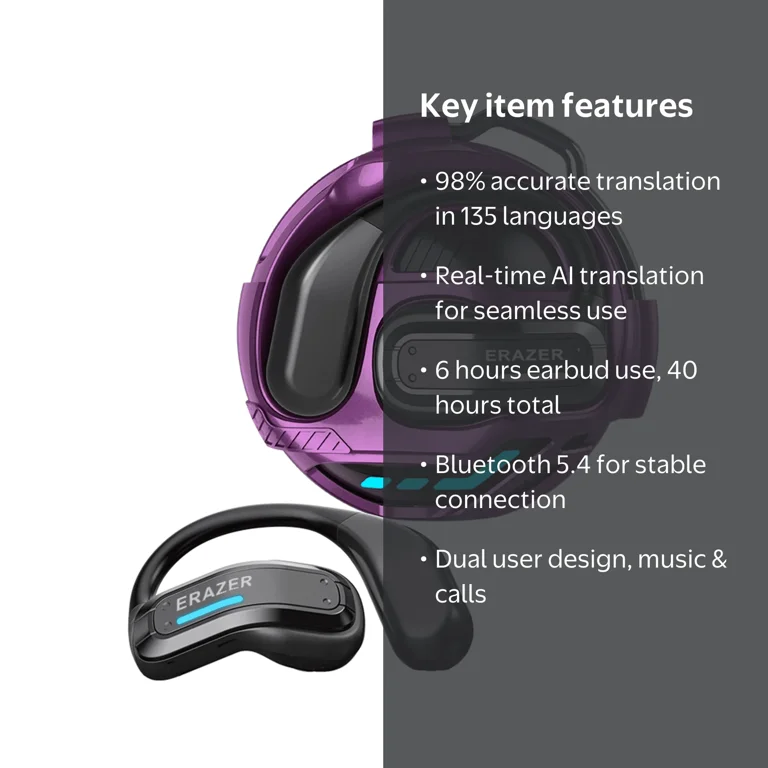
A dedicated AI translator usually lasts between 6 and 12 hours during normal use. This range includes short conversations, pauses, screen checks, and occasional photo or text translation.
Some models may last longer in standby mode. Others may run for only 4 to 8 hours when they use mobile data, bright screens, speakers, and constant voice detection.
The answer to how long does an AI translator battery last can be grouped into three common use levels:
• Light use: 10 to 20 hours, with short translations and long idle periods
• Normal travel use: 6 to 12 hours, with regular conversations and map or phrase checks
• Heavy use: 3 to 8 hours, with nonstop speech, camera translation, mobile data, and loud audio
A phone running an AI translator app may show a wider range. Modern smartphones have larger batteries, but the app shares power with the display, cellular service, GPS, and other background tasks.
What affects AI translator battery life?
Battery life is not controlled by battery size alone. The processor, microphone, speaker, display, software, and internet connection all play a role.
Translation mode
Voice translation often uses less power than camera translation. A camera must stay active, process an image, and sometimes send the image to a cloud service.
Offline translation can also save power. The device does not need a steady cellular or Wi-Fi signal. However, offline language packs may require more processing power on the device.
Internet connection
Cloud-based AI translation depends on Wi-Fi or mobile data. A weak signal can drain the battery faster because the device keeps searching for a stronger connection.
This is similar to a traveler walking through a train station while holding a phone with poor service. The phone works harder in the background, even when the user is not doing much.
Screen brightness
A bright screen can use more power than many users expect. This matters when you hold the translator up for long talks or use camera translation in direct sunlight.
Lowering brightness, shortening the screen timeout, and using dark mode can help extend battery life.
Speaker volume
A translator with a loud speaker uses more energy than one set at a moderate volume. Loud output is helpful in busy streets, airports, and markets, but it can reduce the total operating time.
Battery capacity
Battery capacity is measured in milliampere-hours, or mAh. A larger mAh rating often means longer use, but it does not guarantee better battery life.
Two devices with the same battery capacity may perform very differently. One may use an efficient chip, while another may consume more power for constant cloud communication.

How long does an AI translator battery last in real travel situations?
Real travel use is usually less demanding than nonstop laboratory testing. Most people translate a sentence, listen to the answer, put the device away, and use it again later.
Here are common examples:
• Airport use: 8 to 12 hours, because translations are short and spaced apart
• Restaurant and shopping use: 10 to 15 hours, with brief conversations
• Guided tour use: 6 to 10 hours, due to frequent listening and speaking
• Business meeting use: 5 to 9 hours, especially with long two-way conversations
• Camera translation use: 3 to 7 hours, depending on image processing and screen brightness
• Remote travel with weak mobile service: 4 to 8 hours, because the modem works harder
In my practical experience with travel technology, the biggest surprise is not the first conversation. It is the repeated checking of the screen, changing languages, raising volume, and reconnecting to Wi-Fi. Small actions add up like drops filling a cup.
For a full day abroad, I prefer to start with a charge above 80 percent. I also carry a small power bank, especially when traveling in rural areas or during long bus and train trips.

How long does an AI translator battery last compared with a smartphone?
A smartphone often has a larger battery than a dedicated translator. However, a phone also performs many other tasks at the same time.
A translation app may compete with:
• Cellular service
• GPS navigation
• Camera use
• Email and messaging
• Social media
• Bluetooth earbuds
• Background app updates
A dedicated translator is built for a narrower task. This can make its battery performance more predictable during travel.
Still, a smartphone may be more convenient. It does not require carrying another device, and it can switch between translation apps, maps, currency tools, and travel documents.
The better choice depends on your needs. A dedicated translator can reduce phone use and preserve your phone battery, while a smartphone app may offer more languages and advanced AI features.
When asking how long does an AI translator battery last, compare the full travel setup, not just the device. A translator that lasts eight hours may be more useful than a phone app that lasts five hours but leaves you without navigation later.

Do offline AI translators last longer?
Offline translation can improve battery life because it removes the need for constant communication with a remote server. The device can translate using language files stored on its internal memory.
However, offline translation is not always more efficient. Some AI models require significant processor power. If the device has a weak processor, it may work harder to produce results.
Offline mode also has limits:
• Some languages may not be available
• Results may be less natural
• Slang and local expressions may be harder to translate
• Voice recognition may be less accurate
• Updates may require Wi-Fi
For basic travel phrases, offline translation can work very well. It is also valuable on flights, in rural regions, and in countries where your mobile plan is expensive.
Before traveling, download language packs and test them in airplane mode. This simple step can prevent stress when you have no signal.

How to make an AI translator battery last longer
You can often add several hours of use with a few simple habits. These steps work for both dedicated translators and translation apps.
- Charge the device fully before leaving
A full charge gives you the best starting point. Avoid assuming that a device charged to 40 percent will last all day.
- Download offline language packs
Offline files reduce dependence on mobile data. They can also help in places with weak service.
- Reduce screen brightness
Use the lowest comfortable brightness. The display is one of the easiest power users to control.
- Shorten the screen timeout
Set the screen to turn off after 15 or 30 seconds when possible. This prevents the display from staying active between conversations.
- Use moderate speaker volume
Set the volume high enough to hear clearly, but avoid maximum volume unless the environment is noisy.
- Turn off unused connections
Disable Bluetooth, GPS, or mobile data when you do not need them. Some translators also search for Wi-Fi in the background.
- Avoid extreme temperatures
Very hot or cold conditions can reduce lithium-ion battery performance. Keep the device close to your body in cold weather, but do not place it directly against a heat source.
- Carry a compact power bank
A 5,000 mAh power bank can provide useful backup power for a small translator. Check the correct cable and output before your trip.
- Update the software before travel
Updates may improve power management and translation performance. Install them at home, where you have stable Wi-Fi and time to test the device.
- Restart the translator when needed
A restart can stop a frozen process or connection loop that quietly drains power. It is a small fix, but it can help during a long day.

How battery age changes translator performance
Lithium-ion batteries lose capacity over time. After many charge cycles, the device may still show a full charge but run for less time than it did when new.
For example, a translator that once lasted 10 hours may provide only 7 or 8 hours after years of frequent use. Heavy heat exposure, deep discharges, and constant charging at high temperatures can speed up wear.
Signs of an aging battery include:
• Sudden drops from 30 percent to 10 percent
• Shutdowns during voice translation
• A device that becomes unusually warm
• Much shorter use after a full charge
• A battery level that stays fixed and then falls quickly
Do not use a device if the battery is swollen, cracked, or unusually hot. Stop charging it and seek safe replacement advice from the manufacturer.
Battery health explains why how long does an AI translator battery last may differ between a new model and one used daily for several years.

How to estimate battery life before buying
Manufacturers often list battery life under specific test conditions. Those conditions may include low brightness, short translation sessions, strong Wi-Fi, and moderate volume.
Your real use may be more demanding. To estimate practical battery life, review these details:
• Battery capacity in mAh
• Claimed active translation time
• Standby time
• Charging time
• USB charging support
• Offline language support
• Mobile data requirements
• Camera translation features
• Replacement battery options
A useful rule is to reduce the advertised active time by 20 to 30 percent for normal travel. If a company claims 12 hours, plan around 8 to 10 hours unless you will use the device lightly.
User reviews can help, but treat them carefully. One traveler may use short phrases on Wi-Fi, while another may record long talks through a weak cellular signal.
If you need a translator for a full workday, choose a model with at least 8 hours of stated active use. If you travel for several days, prioritize fast charging and power bank support over a small difference in battery capacity.
What are the benefits of a longer-lasting translator battery?
A longer-lasting battery provides more than convenience. It can make communication feel calmer and more natural.
Key benefits include:
• Less need to search for outlets
• Fewer interruptions during conversations
• Better access to translation in emergencies
• More freedom in rural or remote areas
• Less dependence on your phone battery
• Greater confidence during long trips
A reliable battery is especially useful for families, older travelers, tour guides, and business travelers. When communication is already difficult, a dead device can feel like a locked door.
Long battery life also reduces charging anxiety. You can focus on the person in front of you instead of watching the battery icon.
Limitations of AI translator battery claims
Battery claims are useful, but they are not promises for every user. Testing conditions differ by model and brand.
A manufacturer may measure battery life with a controlled number of translation requests per hour. It may not include constant camera use, maximum volume, poor reception, or long screen-on periods.
AI translation itself also has limits. Cloud systems may be more accurate for complex sentences, while offline systems may be faster or more private. Some languages have better speech recognition than others.
Privacy is another factor. Cloud translation may send voice or text data to a remote server. Review the device’s privacy settings and service terms before using it for medical, legal, or confidential business conversations.
For important matters, treat AI translation as a helpful tool, not a perfect interpreter. Confirm names, numbers, prices, directions, and safety instructions when possible.
A simple battery test you can do at home
A short home test gives a better estimate than a product page alone.
Charge the translator to 100 percent.
Connect it to the network you expect to use while traveling.
Set the screen brightness and volume to normal levels.
Translate a short phrase every 10 minutes.
Use voice translation for one hour.
Test camera translation for 10 minutes.
Note the battery percentage after each test.
Repeat the test with offline language packs.
This test will not produce a perfect scientific result. It will show how the device behaves under your settings and network conditions.
If the battery drops 15 percent during one hour of mixed use, you may estimate about 6 to 7 hours of similar active use. Keep a safety margin because weak service and cold weather can reduce that result.
Frequently Asked Questions: How Long Does an AI Translator Battery Last?
How long does an AI translator battery last on one charge?
Most dedicated AI translators last about 6 to 12 hours with normal use. Heavy voice, camera, and mobile data use can reduce that time to around 3 to 8 hours.
Can an AI translator last all day?
Yes, many models can last all day with light or moderate use. For constant conversations, carry a power bank or select a device with fast charging.
Does using Wi-Fi improve AI translator battery life?
A strong Wi-Fi connection may use less power than a weak cellular signal. Poor reception can make the translator work harder and reduce battery life.
Does offline translation save battery?
Offline translation can save power by avoiding constant cloud communication. However, some devices use more processing power for offline AI, so the result depends on the model.
How often should I charge an AI translator?
Charge it before each travel day if you expect regular use. Lithium-ion batteries do not need to reach zero percent before charging.
Can a phone be better than a dedicated AI translator?
A phone may offer more apps and languages, but it also uses power for many other tasks. A dedicated translator may provide more predictable battery life for communication.
What should I do if the translator battery drains quickly?
Lower the brightness, use a strong network, turn off unused connections, and test offline mode. If the device still drains fast or becomes hot, contact the manufacturer and stop using it if the battery looks swollen.
Conclusion
So, how long does an AI translator battery last? Most models provide 6 to 12 hours of normal use, while heavy camera, voice, and mobile data use may cut that range in half. Battery size matters, but network strength, screen brightness, speaker volume, translation mode, and battery age matter just as much.
For stress-free travel, charge the device fully, download offline languages, reduce power use, and carry a small power bank. Compare real-world battery tests instead of relying only on advertised figures, then choose a translator that fits your travel style. Explore more travel technology guides and share your own battery experience in the comments.

Similar Posts