Craigslist Not Working On Chrome
So you're sitting there trying to post a couch for sale or reply to a job listing, and Chrome just gives you nothing. A blank page. A spinning circle.
Maybe a scary security warning that makes you wonder if your computer is infected. If "Craigslist not working on Chrome" is the reason you're reading this, you're not alone. It's one of the most common browser-specific complaints on forums, and it usually has nothing to do with your actual computer being broken.
The good news is that the fix is almost always something simple once you know which version of the problem you have. Craigslist runs on relatively old backend infrastructure, and Chrome updates aggressively, so the two don't always play nice. As of early 2026, the most frequent culprit is a conflict between Chrome's privacy settings and Craigslist's authentication system, followed closely by a corrupted browser cache that makes the site think you're a bot.
Let's walk through exactly how to figure out which one you're dealing with and get you back to browsing.
Quick Answer
Chrome has a conflict with Craigslist's security system. Clear your cache and cookies for just craigslist.org. Disable all extensions.
If that fails, flush your DNS cache and reset Chrome's settings. In most cases, you'll be fixed in under five minutes.
Why Craigslist Breaks on Chrome (And What's Actually Causing It)
Craigslist's website was designed in an era when browsers were much simpler. Chrome, meanwhile, gets updated every few weeks with new security features, privacy restrictions, and anti-tracking measures. Those two things are on a collision course.
The most common reason Craigslist stops working is Chrome's SameSite cookie policy. In simple terms, Chrome now blocks cookies that try to track you across different websites. Craigslist relies on older cookie behavior to keep you logged in and verify you're a real person.
When Chrome blocks that cookie, you either get a login loop or a blank page after you click "post."
Another frequent cause is an extension that modifies how pages load. Ad blockers, privacy extensions, and even password managers can interfere with Craigslist's captcha system. The captcha thinks you're a bot because something in the page is blocked, so it keeps feeding you new challenges that never complete.
Then there's the cache problem. Chrome caches a lot of data to make pages load faster. But Craigslist sometimes changes its page structure, and Chrome holds onto an old version that no longer matches.
The result is a white screen or a page that renders with broken formatting.
The Quick Test: Is It Craigslist or Is It Chrome?
Before you dive into any fixes, run a simple test that takes about thirty seconds. Open Firefox, Safari, or Edge. Go to Craigslist and try to do exactly what failed in Chrome.
If it works in another browser, the problem is Chrome-specific. If it fails in every browser, the issue is on Craigslist's side or your network.
Here is how to interpret the result:
| Test Result | What It Means |
|---|---|
| Works in Firefox, fails in Chrome | Chrome settings, extensions, or profile issue |
| Fails in Firefox and Chrome | Craigslist server issue or your internet connection |
| Works on phone data, fails on home Wi-Fi | Your home network or ISP is blocking Craigslist |
| Fails in Incognito mode too | Likely a Chrome profile corruption or DNS issue |
If the other browser works, you can skip the network and server checks entirely. That saves you a lot of time. If everything fails everywhere, check down detector websites for Craigslist outages or try restarting your modem.
Decision Tree: Diagnose Your Exact Problem in 3 Clicks
This is where we get specific. The fix depends entirely on what you're seeing on your screen. Use the symptom that matches yours and follow that branch.
Do not try random fixes. You will waste time and might accidentally log yourself out of other sites.
Branch 1: You See a Security or SSL Error
If Chrome shows "Your connection is not private" or "NET::ERR_CERT_DATE_INVALID," the problem is almost certainly your computer's clock. Craigslist's SSL certificate has an expiration date, and Chrome checks your system time against it. If your clock is wrong by more than a few minutes, Chrome refuses to load the page.
Go to your system settings and turn on automatic date and time synchronization. On Windows, right-click the clock and select "Adjust date/time." On macOS, open System Settings and enable "Set date and time automatically." After you fix the clock, restart Chrome and try again.
Branch 2: You Get a Blank White Page or Nothing Loads
This is the cache problem. Chrome is serving you a stale version of the page from its storage. The fix is targeted cache clearing.
Open Chrome and go to craigslist.org. Click the lock icon in the address bar. Select "Cookies and site data." Click "Manage on-device site data." Remove the data for craigslist.org.
Then press F12 to open developer tools, right-click the refresh button, and select "Empty cache and hard refresh." That forces Chrome to download the current version of Craigslist from scratch.
Branch 3: You're Stuck in a CAPTCHA Loop or Login Hell
You keep solving the image puzzles, but Craigslist keeps giving you new ones. Or you log in, the page refreshes, and you're logged out again.
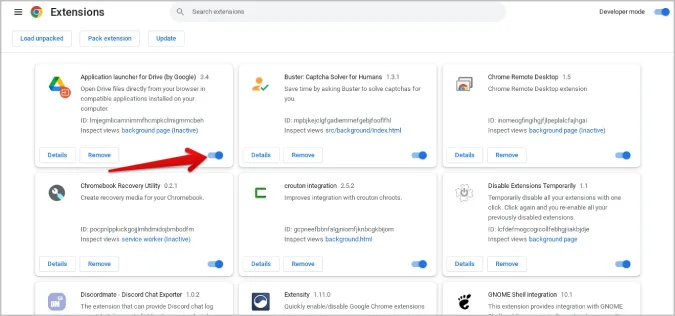
This is the extension conflict. Open Chrome and type chrome://extensions into the address bar. Turn off all extensions by toggling the blue switch at the top.
Then try Craigslist again. If it works, turn extensions back on one at a time until you find the one that breaks it. Ad blockers and "privacy badger" type extensions are the usual suspects.
Branch 4: Search Works But You Can't Post or Reply
You can browse listings fine, but when you click "reply" or "post," nothing happens. Or the page refreshes without saving your input.
This often means Chrome is blocking third-party cookies for Craigslist's reply system. Go to Chrome settings, then "Privacy and security," then "Cookies and other site data." Make sure "Block third-party cookies" is not enabled specifically for craigslist.org. You can add craigslist.org to your allow list in the "Sites that can always use cookies" section.
Step-by-Step Fixes (From Least to Most Painful)
If the decision tree didn't solve it, or if you want to do a more thorough cleanup, work through these fixes in order. Each one is more aggressive than the last, so start at the top.
Fix 1: Flush Everything for Just Craigslist
This is the gentlest approach and the one that works most often. You will remove only the data Chrome stored for craigslist.org without touching your logins for other sites.
Open Chrome. Click the three dots in the top right corner. Go to "Settings," then "Privacy and security," then "Site Settings." Scroll down to "View permissions and data stored across sites." Type "craigslist" in the search bar.
Click the trash icon next to each craigslist entry. Close and reopen Chrome.
This clears the cache, cookies, and site data for Craigslist only. You will have to log in again, but everything else stays put.
Fix 2: Kill the Extension That's Sabotaging You
Extensions run in the background and can modify every page you visit. Craigslist is sensitive to changes in its JavaScript and cookie handling.
Type chrome://extensions in your address bar. Turn off all extensions. Restart Chrome.
Test Craigslist. If it works, turn extensions back on one at a time, testing after each one. When Craigslist breaks again, you have found the culprit.
Remove that extension or keep it disabled for Craigslist.
Ad blockers, script blockers, and VPN extensions are the most common offenders. Privacy-focused extensions like uBlock Origin or Privacy Badger often block Craigslist's tracking scripts, which the site needs to function.
Fix 3: Give Chrome a Fresh Profile (Without Losing Your Life)
Sometimes your Chrome profile gets corrupted. Bookmarks and saved passwords might still work, but the profile itself has internal data that causes weird behavior on specific sites.
You can create a new profile without losing anything. Click your profile icon in the top right of Chrome. Click "Add." Set up a new profile with no synced data.
Open Craigslist in that new profile. If it works, your old profile is corrupted. You can migrate your bookmarks by exporting them from the old profile and importing them into the new one.
Fix 4: The Nuclear Option: Reset Chrome Completely
If nothing else worked, reset Chrome to its factory defaults. This disables all extensions, clears temporary data, and resets your settings. It does not delete your bookmarks or saved passwords.
Go to Chrome settings. Search for "Reset settings." Click "Restore settings to their original defaults." Confirm. Chrome will restart.
Open Craigslist and test.
This fixes the vast majority of persistent problems because it wipes out any configuration that might be interfering. You will have to log back into sites and re-enable any extensions you actually want.
The Mistakes That Waste Your Time
A few common troubleshooting errors keep people stuck longer than necessary. Avoid these.
Clearing all browsing data for all time sounds thorough but it logs you out of every site and deletes saved form entries. You lose access to email, banking, and social media logins. The targeted clear we described earlier does the same job without collateral damage.
Reinstalling Chrome is almost never the answer. The problem is almost always in your profile settings or extensions. A fresh install pulls your old profile right back if you are signed into Chrome sync.
You end up in the exact same broken state.
Disabling your antivirus or firewall as a test is risky. Craigslist does not require you to lower your security. The real fix is adjusting Chrome's cookie settings or flushing DNS, not opening up your system to threats.
Running Chrome as an administrator can mask the problem temporarily but it is not a real solution. It forces Chrome to bypass certain security restrictions that are actually protecting you. If that fixes it, the underlying cause is a permissions issue with your user account folder, which needs a proper fix.
When It's Not Your Browser (Server Issues and Ghost Bans)
Sometimes Chrome is fine and the problem is on Craigslist's end. Server outages happen. Craigslist does not always announce them, but you can check sites that track live outages to see if others are reporting the same issue.
A more frustrating scenario is a ghost ban. Craigslist rate-limits accounts that post too quickly, flag suspicious activity, or violate terms of service. The site loads fine, you can browse, but your posts disappear, replies never send, or you get an endless captcha loop.
This is not a Chrome problem.
If you suspect a ghost ban, try posting or replying from a completely different network. Use your phone's hotspot. If that works, your IP or account is flagged.
You may need to wait 24 to 48 hours or contact Craigslist support through their help form. Creating a new account from the same flagged IP usually does not help because Craigslist ties restrictions to your network address.
Frequently Asked Questions
Why does Craigslist work on my phone but not my computer?
Your phone likely uses a different browser or has different Chrome settings. If you are using Chrome on both, the computer version may have extensions or cached data causing the conflict. Try the decision tree steps for your specific error.
Does clearing cookies log me out of everything?
Only if you clear all cookies. The targeted clear for just craigslist.org only logs you out of Craigslist. Your other logged-in sites stay untouched.
Can a VPN cause Craigslist to stop working?
Yes. Craigslist blocks many VPN IP addresses because they associate them with spam. Try disabling your VPN temporarily and reloading the page.
If that fixes it, you may need to switch to a different VPN server location.
How do I know if Craigslist is down for everyone?
Open a different browser or use your phone on cellular data. If Craigslist loads there, it is not down. It is a Chrome-specific problem.
If it fails everywhere, the outage is on Craigslist's side.
Will reinstalling Chrome fix the problem?
Almost never. Reinstalling Chrome without also deleting your user profile folder pulls back the same corrupted settings. Use the reset option in Chrome settings instead.
It is faster and more effective.
Why does Craigslist say my connection is not private?
Your computer's date and time are likely wrong. Chrome checks SSL certificate validity against your system clock. Enable automatic time sync in your operating system settings and the error should disappear.

Similar Posts
































