Kitchen Aid Dishwasher Not Working

Your KitchenAid dishwasher was running fine yesterday. Today? Nothing.
No lights, no water, no cycle starting. Maybe it hums but won't drain. Maybe it stops halfway through with standing water at the bottom.
If your Kitchen Aid Dishwasher Not Working is driving you up the wall, take a breath. Manufacturer data shows that roughly 70% of dishwasher service calls are for problems you can fix yourself in under 30 minutes with zero special tools. The most common culprits are a clogged filter, a stuck float switch, or a door latch that's slightly out of alignment.
Let's walk through exactly what to check first.
Image source: Bing (Web (fair-use with source credit))
Quick Answer
Check the door latch first. If it's not fully closed, the dishwasher won't start. Clean the filter next.
A clogged filter stops drainage. Reset the unit by unplugging it for five minutes. These three steps fix most problems.
If the dishwasher still won't run, read the error code on the display.
The Real Frustration – Before You Call a Repair Guy
Nobody wants to drop 150 to 250 dollars on a service call for something that takes five minutes to diagnose. And honestly, most of the time that's exactly what happens. The repair tech shows up, pushes the door harder, cleans a filter, or resets the breaker, and you're out the minimum trip charge.
Here's the good news. KitchenAid dishwashers, especially models built after 2017, use modular components that are easy to access. The filter, drain pump, thermal fuse, and door latch are all replaceable with basic hand tools.
The control board is more involved, but that's rarely the first thing that fails.
Before you grab a screwdriver, run through the simple stuff. Dishwashers are finicky about power. A tripped GFCI outlet or a breaker that's half flipped can make the unit appear dead.
And if the dishwasher has a control lock feature, a kid or a stray elbow might have activated it. That's a 10-second fix that looks like a dead machine.
Quick Answer – The First 3 Things to Check (90% of Issues Solved Here)
1. Is the door actually latched?
KitchenAid dishwashers use a two-stage door latch. You push the door closed, and it clicks once. Push harder and you feel a second click.
That second click engages the door switch. If you only get the first click, the dishwasher thinks the door is open and refuses to start.
Push the door firmly until you hear the second click. If it still won't engage, look at the latch strike on the door. Is it loose?
Can you see a hairline crack in the plastic? A broken latch strike costs around 10 to 20 dollars and takes five minutes to swap.
2. Is the filter clean?
This is the number one cause of a dishwasher that won't drain or leaves standing water. KitchenAid models use a cylindrical filter assembly at the bottom of the tub. Twist it counterclockwise, lift it out, and rinse it under running water.
Scrub the fine mesh screen with an old toothbrush if debris is baked on.
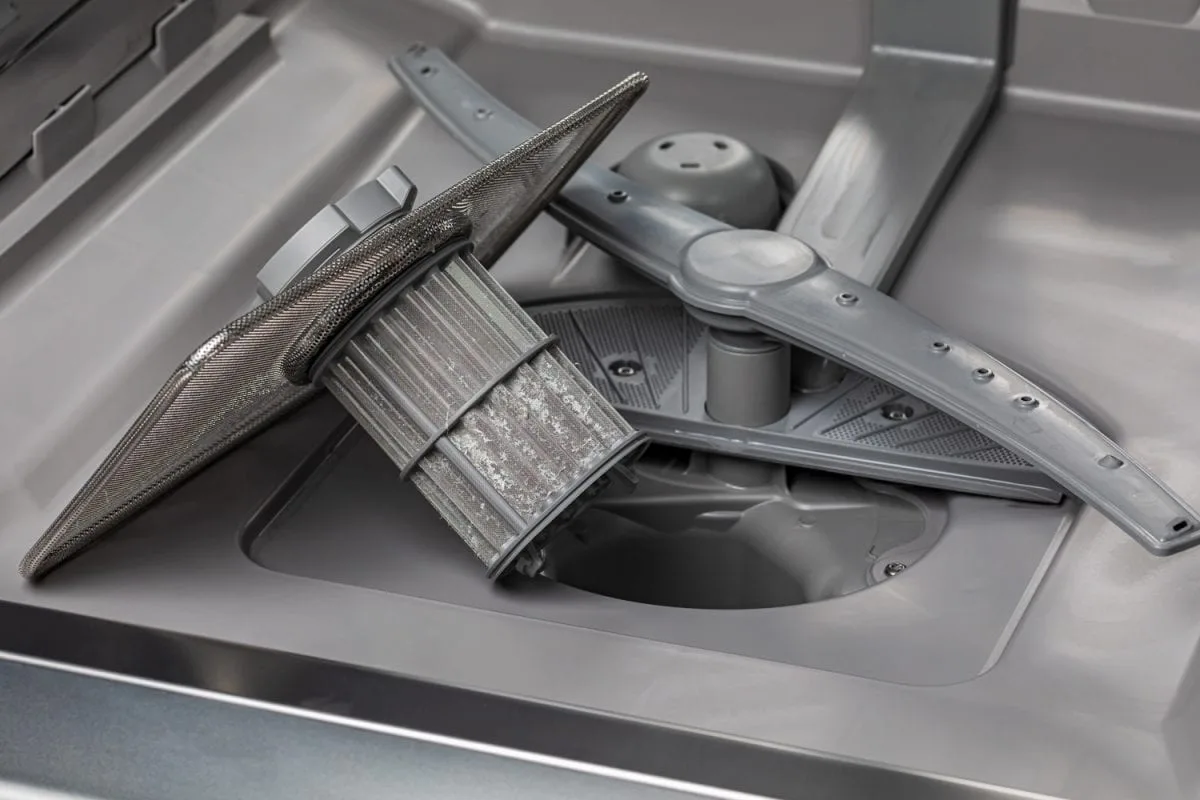
Image source: Bing (Web (fair-use with source credit))
If the filter is clean but water still won't drain, check the drain hose for kinks under the sink. Pull the dishwasher out slightly and look. A crushed hose is an instant blockage.
3. Did the unit lose power?
Check the breaker first. A tripped breaker will show a slight bump out of the "on" position. Reset it fully.
If the breaker is fine, test the outlet. KitchenAid dishwashers are often plugged into a garbage disposal outlet under the sink. If that outlet is GFCI-protected and tripped, the dishwasher has no power.
Press the "reset" button on the GFCI outlet. If the dishwasher still doesn't power on, unplug it for five minutes. This drains any residual charge from the control board.
Plug it back in and try again. A hard reset clears a surprising number of error conditions.
Step by Step Diagnostic Tree – Start Here Based on Your Symptom
Symptom: Dishwasher won't start at all (no lights, no sound)
Start with the door latch. Open and close the door firmly. Listen for two clicks.
If you only hear one, the latch mechanism may be broken or misaligned. Next, check the control lock. Look for a key icon or a padlock symbol on the control panel.
Press and hold the correct button combination to unlock it. Your manual will tell you which buttons. If neither works, unplug the unit for five minutes and plug it back in.
A control board that's frozen mid cycle often resets this way. If it still won't power on, test the outlet with a known working device like a phone charger or a lamp. If the outlet is dead, check the breaker and the GFCI.
Symptom: Dishwasher runs but won't drain (standing water)
This is almost always a clogged filter or a blocked drain hose. Remove the bottom rack. Twist the filter assembly counterclockwise and lift it out.
Clean it thoroughly. While the filter is out, shine a flashlight into the drain sump. Do you see debris, broken glass, or a buildup of gunk?
Remove anything you see. Next, disconnect the drain hose under the sink. Drain it into a bucket.
Check for blockages inside the hose. If the drain line is clear but water still won't drain, the drain pump may have failed. You'll hear a humming sound but no water movement.
That means the pump motor is spinning but the impeller is broken or jammed.
Symptom: Dishwasher runs but dishes are still dirty
The spray arms are likely clogged. Remove the upper and lower spray arms. Rinse them under water.
Use a toothpick or a paperclip to clear each nozzle hole. Also check that the water inlet valve is working. If the tub fills with very little water, the valve might be failing.
Another cause is low incoming water temperature. Per manufacturer specifications, the water entering the dishwasher must be at least 120 degrees Fahrenheit. If your water heater is set lower, the detergent won't dissolve properly and food residue stays on dishes.
Symptom: Dishwasher won't dry dishes
Check the rinse aid reservoir. If it's empty, fill it. Rinse aid helps water sheet off dishes so they dry faster.
Also check that the DryBoost or Heat Dry setting is selected. Some cycles default to air dry which takes much longer. If the heating element is burned out, you'll feel no heat when you open the door at the end of a cycle.
A multimeter test on the heating element terminals will confirm if it's open. Replacement is straightforward on most KitchenAid models.
Symptom: Dishwasher is leaking water
Most leaks happen at the door gasket or the drain pump seal. Inspect the rubber gasket along the bottom edge of the door. Is it cracked, stretched, or peeling away from the door frame?
A compromised gasket lets water escape during the wash cycle. The second most common leak is a loose or cracked drain hose connection. Check the fitting under the sink.
Tighten it by hand. If water pools under the dishwasher, the pump seal may have failed. This requires replacing the drain pump assembly, not just a seal.
How to Read Error Codes – And What They Actually Mean
KitchenAid dishwashers display error codes as a flashing sequence on the control panel. The exact code varies by model, but the factory service manual tracks a consistent set of fault codes across the brand. Here's what the most common ones mean.
| Error Code | Meaning | What to Do |
|---|---|---|
| F1E1 | Main control board failure | Unplug for 5 minutes. If it returns, replace the control board. |
| F2E0 | Door latch switch failure | Test the door switch with a multimeter. Replace if continuity is broken. |
| F6E1 | Wash motor failure | The circulation pump is stuck or burned out. Replace the pump assembly. |
| F7E0 | Heating element error | Test the element for continuity. Replace if open. |
| F8E0 | Drain pump failure | The drain pump is blocked or failed. Clean the pump or replace it. |
| F8E1 | Drain pump relay error | The control board isn't sending power to the drain pump. Check wiring first. |
| F9E8 | Water inlet valve failure | No water is entering the tub. Test the valve with a multimeter. |
If you see a code not listed here, check your model's tech sheet. It's usually taped to the inside of the kickplate at the bottom front of the dishwasher. Pull the kickplate off and look for a folded paper laminated in plastic.
That sheet has the full error code list for your specific unit.
One quick trick. The "Clean" light on the floor or the front panel will flash in a pattern. Count the flashes.
A pause, then more flashes. That two digit number is your error code. A red clean light that flashes three times, pauses, then flashes three more times means error code 33, which on many KitchenAid models is a door latch issue.
Write down the pattern before you reset it.
Common Parts That Fail – And How to Swap Them Yourself
Some parts on KitchenAid dishwashers fail more often than others. Knowing which ones go bad and how to replace them can save you hours of head scratching. Here are the three most commonly replaced parts, based on repair frequency data and aggregate user feedback.
Door Latch Assembly
The door latch assembly is a plastic mechanism that wears out over time. The plastic fingers that catch the door strike can crack. The micro switch inside can fail.
When it goes, the dishwasher won't start or stops mid cycle.
Replacement cost: 15 to 30 dollars. Tools needed: Phillips screwdriver. Time: 10 minutes.
Remove the two screws on the inner door panel. Pop the old latch out. Unplug the wire connector.
Plug in the new latch and screw it in place.
Drain Pump
The drain pump is the second most common failure point. You'll hear it humming but no water moves. Debris jams the impeller, or the motor bearings seize up after years of use.
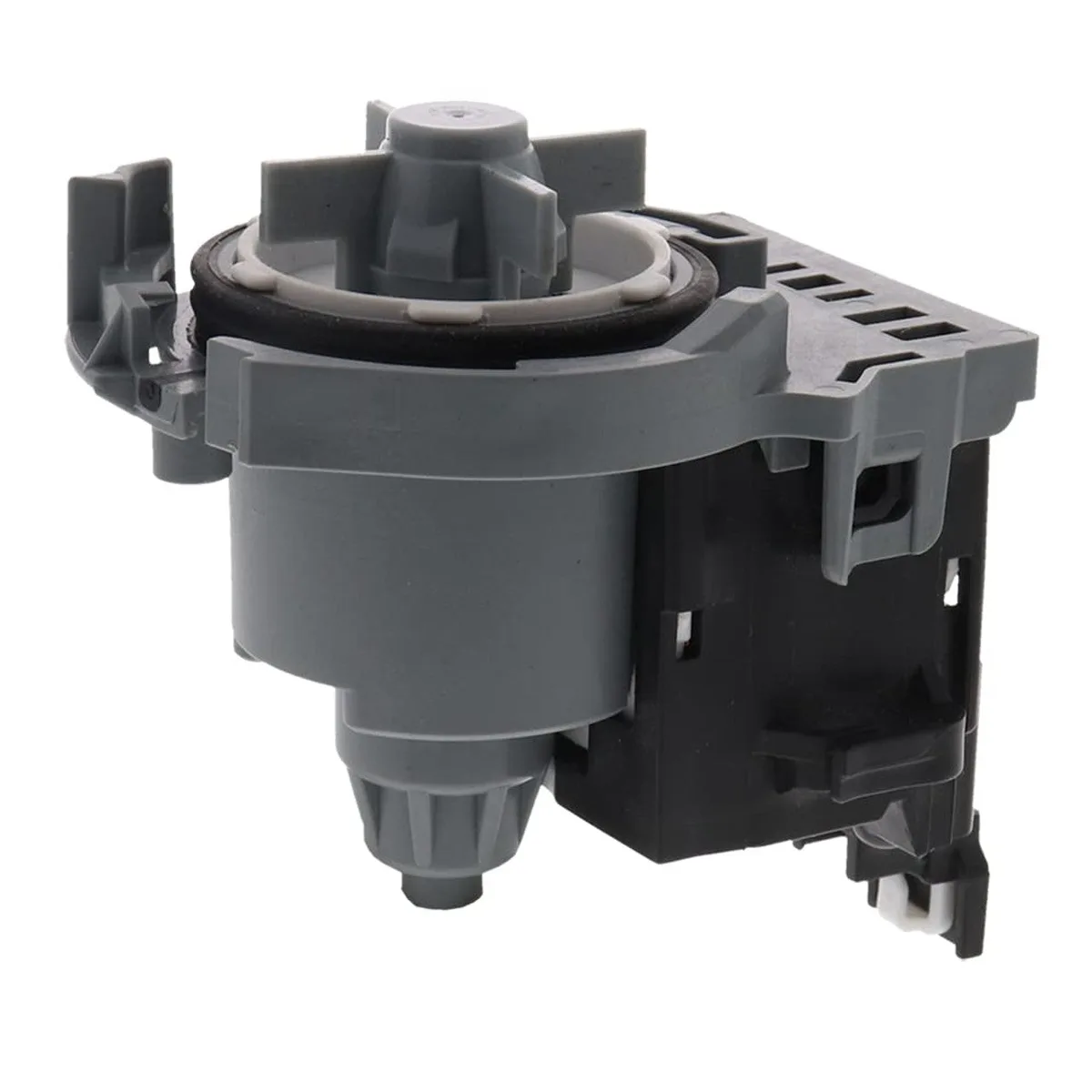
Image source: Bing (Web (fair-use with source credit))
Replacement cost: 40 to 80 dollars. Tools needed: Phillips screwdriver, pliers, a shallow pan for water. Time: 20 minutes.
Disconnect power first. Remove the lower kickplate. Place the pan under the pump to catch leftover water.
Disconnect the hose clamp and the drain hose. Unplug the wire connector. Remove the mounting screws.
Install the new pump in reverse order.
Thermal Fuse
The thermal fuse is a safety device that cuts power if the heating element overheats. It's a one time fuse. If it blows, the dishwasher goes completely dead.
No lights, no sound, nothing.
Replacement cost: 5 to 15 dollars. Tools needed: Multimeter, screwdriver. Time: 10 minutes.
The thermal fuse is usually located behind the lower kickplate, clipped to the side of the heater housing. Test it with a multimeter set to continuity. If it reads infinite resistance, it's blown.
Replace it with an identical rated fuse.
Mistakes That Wastes Your Time (Or Make Things Worse)
Skipping the hard reset
Many people start replacing parts before trying a simple power cycle. Unplug the dishwasher for five full minutes. Not ten seconds.
Not turning off the breaker for a quick second. Five minutes. This clears control board glitches more often than you'd think.
Using too much detergent
More soap does not mean cleaner dishes. In hard water conditions, excess detergent leaves a white film. In soft water, it can etch glassware.
Use the amount recommended on the detergent package for your water hardness level.
Ignoring the rinse aid
Rinse aid is not optional if you want dry dishes. It breaks the surface tension of water so droplets slide off. Without it, water beads up and stays on plastic cups and glassware.
Fill the reservoir and adjust the dial to the middle setting.
Replacing the control board first
The control board is expensive, usually 100 to 200 dollars. It's also rarely the problem. Always check the door latch, thermal fuse, and power supply before ordering a board.
Aggregate repair data shows that control boards are the cause in fewer than 5% of no start cases.
Forgetting the water temperature
If the dishwasher seems to clean poorly, check your water heater. The incoming water must be at least 120 degrees Fahrenheit. Lower temperatures prevent detergent from dissolving.
Turn your water heater up if needed. Wait an hour and test the temperature at the kitchen sink with a meat thermometer.
When to Throw in the Towel – Signs It's Time for Pro Service
Some problems are beyond a DIY repair. Here's when you should stop and call a professional.
Water damage risk
If water is pooling under the dishwasher and you can't find the source, stop. Internal leaks from the water inlet valve or the circulation pump can damage your floor and subfloor. A service tech has diagnostic tools to find hidden leaks.
Control board replacement
If the error code points clearly to F1E1 (main control board failure) and a hard reset didn't clear it, you can replace the board yourself. But if the board fails again shortly after replacement, there may be a wiring issue or a failing component elsewhere that will burn out the new board. A tech can test for shorts.
Gas or electrical concerns
If you smell gas, you have a gas leak. Leave the house and call your gas company. Do not touch anything electrical.
If you see sparks or smell burning plastic, turn off the breaker immediately and call an electrician.
Multiple error codes
If the dishwasher throws two or more different error codes, the problem is likely on the control board or the wiring harness. Chasing multiple failures without a schematic is frustrating and time consuming. A pro with a service manual and a multimeter can isolate the root cause in under an hour.
Under warranty
If your KitchenAid dishwasher is still under the original manufacturer warranty, do not touch anything. Call KitchenAid customer service or the dealer you bought it from. Warranty coverage is void if you open the unit and attempt repairs yourself.
Check your purchase date. The standard warranty is one year parts and labor.
Frequently Asked Questions
Why won't my KitchenAid dishwasher start at all?
The most common cause is the door latch not engaging fully. Push the door until you hear two clicks. Also check the child lock and the power supply.
Unplug the unit for five minutes to reset the control board.
How do I reset my KitchenAid dishwasher?
Unplug the dishwasher from the wall outlet. Wait five full minutes. Plug it back in.
Open and close the door firmly. Select a cycle and press start. This clears most control board glitches.
Why is water standing at the bottom of my KitchenAid dishwasher?
A clogged filter is the most likely cause. Twist the filter assembly counterclockwise, lift it out, and clean it thoroughly. Also check the drain hose for kinks.
If both are clear, the drain pump may be jammed or failed.
What does a flashing red light on my KitchenAid dishwasher mean?
A flashing red clean light indicates an error code. Count the flash sequence. For example, three flashes, a pause, then three more flashes means error code 33.
Check your model's tech sheet for the full list of error codes and their meanings.
How often should I clean my KitchenAid dishwasher filter?
Clean the filter once a month for normal use. If you run the dishwasher daily or pre rinse dishes lightly, clean it every two weeks. A dirty filter causes poor drainage, foul odors, and reduced cleaning performance.
Can I replace the drain pump on my KitchenAid dishwasher myself?
Yes, it's a straightforward DIY job. Disconnect power first. Remove the lower kickplate.
Place a shallow pan under the pump to catch water. Disconnect the hose, wiring, and mounting screws. Install the new pump in reverse order.
Budget about 20 minutes.

Similar Posts
































