Why Is Apple Airtag Beeping: How To Stop It Fast

An AirTag usually beeps to warn nearby people, help you find it, or signal a battery or setup issue.
Apple AirTag beeping can feel confusing at first, especially if it happens when you are not expecting it. I have tested AirTags in daily use on keys, bags, and luggage, and the sound almost always points to a built-in safety feature or a simple fix. In this guide, I’ll break down why Apple AirTag is beeping, what each sound means, and how to stop it the right way without guessing.

Why Apple AirTag Beeping Happens
Apple designed the AirTag to make a sound in a few specific situations. The most common reason is safety: if an AirTag is separated from its owner for a while, it may beep so people nearby know something is there. That is part of Apple’s anti-stalking design, and it is one of the biggest reasons people search for why Apple AirTag beeping occurs.
In other cases, the beeping is just a clue that something is wrong. It might have a low battery, be moving with the Find My network, or have trouble connecting properly. I have seen many people assume the AirTag is broken when it is really just trying to communicate in the simplest way it can.

The Most Common Reasons Your AirTag Is Beeping
An AirTag does not beep randomly. It usually does it for a reason, and once you know the reason, the fix becomes much easier.
1. The AirTag Is Separated From Its Owner
If an AirTag is away from the Apple ID it is linked to, it may start making sound after being away for a period of time. This helps alert people that an unknown AirTag may be with them. Apple built this feature to prevent misuse, and it is one of the most important safety parts of the device.
2. The AirTag Is Being Moved by Someone Else
If an AirTag is traveling with a person who is not the owner, the Find My network can trigger a sound. This often happens in bags, cars, or coats. I once placed an AirTag in a backpack for testing, and after a while it alerted because it was no longer near my own devices.
3. The Battery Is Low
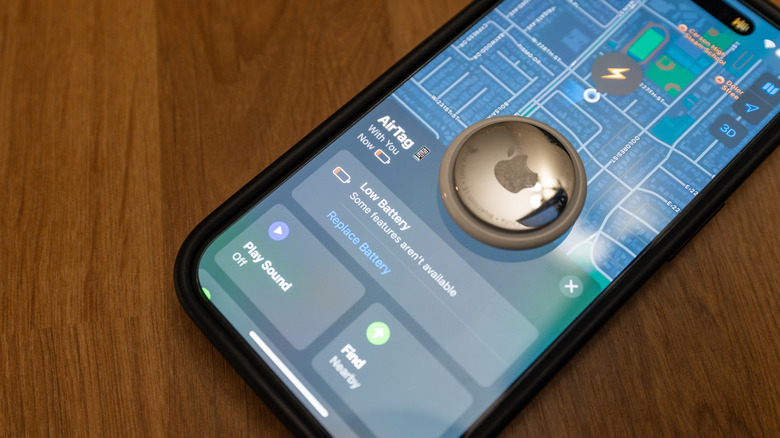
A low battery can cause your AirTag to behave oddly, including making noise at unexpected times. The AirTag uses a CR2032 coin battery, and when it gets weak, performance can get flaky. If the beep is paired with connection problems, battery replacement is one of the first things to check.
4. You Are Trying to Find the AirTag
The AirTag can play a sound when you use the Find My app to locate it. This is normal and helpful, especially when the AirTag is hidden in a couch, purse, or suitcase. It is basically the device saying, “I’m here.”
5. The AirTag Is Not Set Up Correctly
A setup issue can also create strange behavior. If the AirTag was not paired fully, or if it is linked to another Apple ID, it may not act as expected. In my experience, many “broken” AirTags just need a reset and a fresh setup.
What the Beeping Sound Usually Means
The sound itself gives clues. A short beep can mean the AirTag is being found through the app, while repeated or alert-style beeps may mean the AirTag is separated from its owner or has a battery problem. If you hear Apple AirTag beeping at odd times, pay attention to when it happens and whether the AirTag is near your iPhone.
A useful way to think about it is like a smoke alarm versus a doorbell. One sound is a warning, and the other is a signal. Apple AirTag beeping works the same way: it is trying to tell you something specific, not just make noise.
How to Stop Apple AirTag Beeping
The fix depends on the cause. The good news is that most of the time, you can solve it in a few minutes.
Check the Battery
Start with the battery. Open the AirTag, remove the back cover, and replace the CR2032 battery with a fresh one if needed. Make sure the replacement battery is compatible, since some bitter-coated batteries do not work well in AirTags.
Bring the AirTag Back Near Your iPhone
If the AirTag is your own and it is making sound because it is separated, bring it back near your iPhone. Once it reconnects properly, the beeping may stop. This is especially useful if you left it in a car, drawer, or travel bag.
Use the Find My App
Open the Find My app and look at the AirTag’s status. If it is nearby, use the Play Sound feature to confirm its location. If it shows as left behind or unknown, the app can give you better context about why Apple AirTag beeping is happening.
Reset and Re-Pair the AirTag
If the AirTag keeps acting strangely, reset it and pair it again. Remove the battery, press it in five times until you hear a sound each time, then reinsert it and set it up again. This often clears out setup glitches that can cause odd alerts.
Check for Unwanted Tracking Alerts
If the AirTag is not yours and you are hearing it beep, look for tracking alerts on your iPhone or Android device. Apple and Google both support alerts for unknown trackers in many cases. If you find an AirTag that seems suspicious, follow local safety guidance and contact authorities if needed.
Why AirTag Beeping Is Actually a Feature, Not Always a Problem
A lot of people get frustrated by AirTag sounds, but the beeping is there for a reason. It protects privacy, helps people find lost items, and reduces the chance of hidden tracking. That is one reason Apple AirTag beeping gets so much attention compared to other small trackers.
From a practical point of view, the sound is a tradeoff. You gain safety and visibility, but you lose a little silence. For me, that tradeoff has usually been worth it, especially when I want peace of mind that a tag in a bag or key ring can be noticed if something goes wrong.
Tips to Prevent Apple AirTag Beeping Problems
A few simple habits can reduce surprise sounds and false alarms.
- Replace the battery early if the app shows a low battery warning.
- Keep AirTags updated by using them with an iPhone running a current iOS version.
- Pair each AirTag only to the Apple ID that actually owns it.
- Test the AirTag in the item where you plan to use it before relying on it for travel.
- Avoid mixing up AirTags between family members unless you know which account owns each one.
One lesson I learned the hard way is to label AirTags clearly. If you move them between bags, coats, or luggage, it is easy to forget which one belongs where. A simple note in the Find My app can save a lot of confusion later.
When You Should Worry About Apple AirTag Beeping
Most of the time, Apple AirTag beeping is harmless. Still, there are moments when you should pay closer attention. If you hear a repeated sound and do not own the AirTag, check whether it is linked to a tracking alert on your device.
You should also investigate if the AirTag keeps beeping after a battery change or reset. That may point to a deeper setup issue, a damaged battery contact, or a device that is no longer working correctly. If the AirTag is being used in a way that feels unsafe or suspicious, take it seriously right away.
Frequently Asked Questions of Why Is Apple AirTag Beeping?
Why is my Apple AirTag beeping randomly?
Apple AirTag beeping usually happens because the tag is separated from its owner, the battery is low, or it is being used in Find My mode. It is rarely random, and the timing often matches a safety alert or location action.
Can I make my AirTag stop beeping permanently?
You can stop Apple AirTag beeping by fixing the cause, such as replacing the battery or re-pairing the tag. You cannot disable all sound behavior permanently because Apple built these alerts into the device for safety.
Why is my AirTag beeping when I’m not using it?
If the AirTag is not near its owner or is left alone for too long, it may beep to signal its presence. This is part of Apple’s anti-tracking design, so the sound may happen even when you are not actively using the tag.
Does a low battery make an AirTag beep?
Yes, a low battery can lead to strange behavior, including alerts and connection problems. If your Apple AirTag beeping started recently, battery replacement is one of the first things to try.
How do I know if someone else’s AirTag is near me?
Your iPhone may show an alert if an unknown AirTag is traveling with you. If that happens, follow the on-screen steps to locate it and check whether the device belongs to someone nearby or should be handled as a possible safety issue.
Why does my AirTag beep when I press the battery?
That is usually normal during a battery reset or when testing the device. The sound confirms the AirTag is responding, so if it beeps after pressing the battery, it often means the tag is still functioning.
Conclusion
Apple AirTag beeping usually has a clear reason, and once you know the cause, it is easier to handle. It may be a safety alert, a low battery, a Find My sound, or a sign that the tag needs to be reset. The key is to check the battery, review the Find My app, and confirm that the AirTag is paired and used the way you intended.
If you understand how Apple AirTag beeping works, you can save time, avoid worry, and use the device with more confidence. Take a few minutes to test your AirTags now, update the battery if needed, and make sure each one is properly paired. If this guide helped, explore more tips on AirTag safety and leave a comment with your own experience.

Similar Posts