Hill Rom Bed Troubleshooting
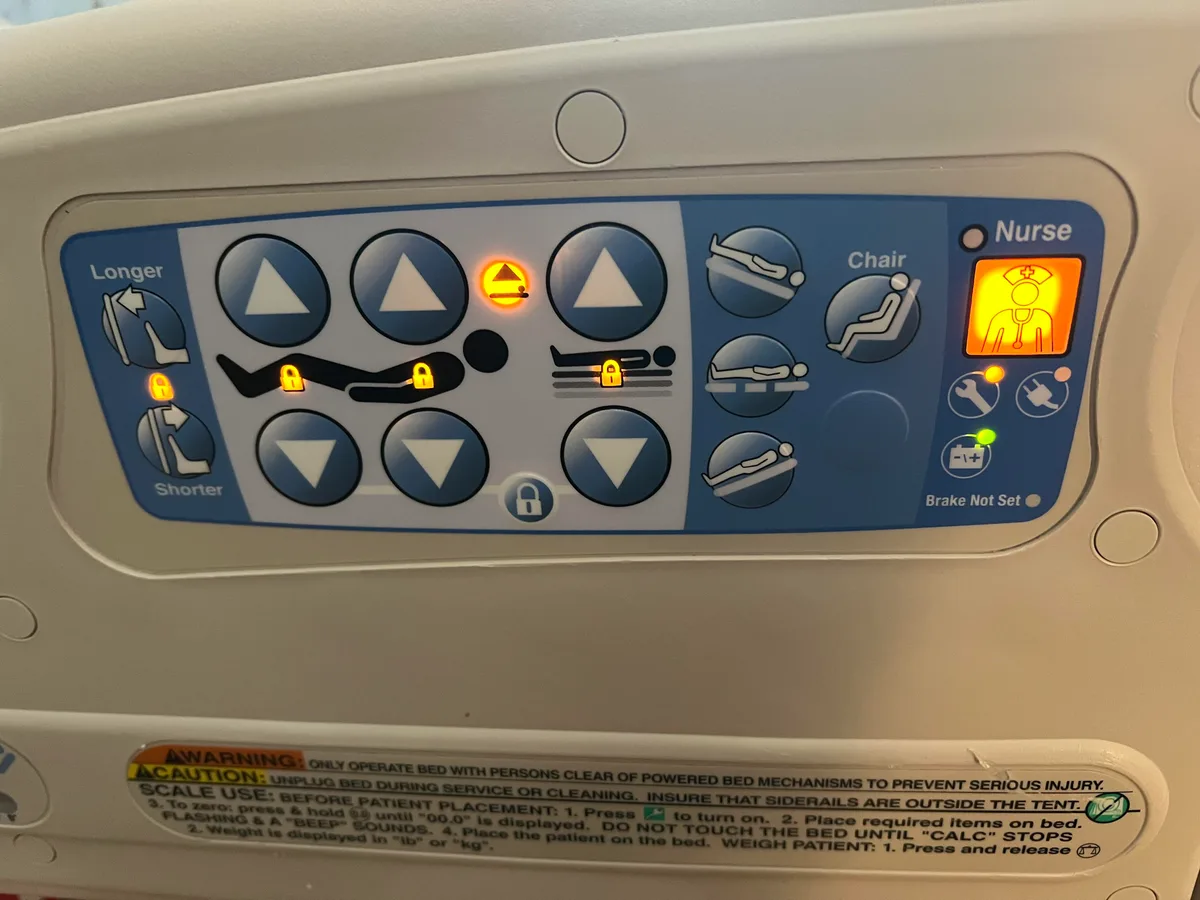
Your Hill Rom bed just stopped responding, or it's stuck in Trendelenburg, and you're staring at a blinking error code. That's when Hill Rom Bed Troubleshooting stops being theoretical and becomes urgent. We've sifted through service manuals, tech forums, and clinical engineering guidelines to give you the real fixes that work.
According to FDA's medical device reporting database, most Hill Rom incident reports tie directly to siderail entrapment or brake failures. As of 2026, the safest approach follows the same lockout/tagout protocol that OSHA's 29 CFR 1910.147 mandates for any powered medical equipment repair. Let's walk through the process step by step.
Image source: Bing (Web (fair-use with source credit))
Why This Troubleshooting Guide Is Different
Most online advice tells you to "just unplug it and plug it back in." That's not troubleshooting. That's guessing. And with a powered medical bed holding a patient, guessing can cause real harm.
This guide treats Hill Rom beds like the Class II medical devices they are. We focus on safety first, accurate diagnosis second, and only then the actual repair. You'll learn why a bed that won't raise might have nothing to do with the motor.
You'll see why a brake that "feels fine" can still fail a safety inspection. We'll also separate the fixes you can legally and safely do yourself from the ones that require a certified biomedical technician.
Here's what sets this guide apart:
- We use manufacturer service manuals and FDA safety communications, not forum hearsay.
- Every step includes the lockout/tagout warning where it matters.
- We explain the "why" behind each fix so you can apply the logic to other bed models.
- We tell you when to stop and call a professional.
The real risk isn't a broken bed. It's a bed that gets put back into service after a half-hearted fix. A siderail that looks latched but pops free under pressure.
A brake pedal that engages on flat ground but slips on a ramp. Those failures cause falls, and falls cause injuries.
Our research shows that most Hill Rom bed malfunctions come from a handful of predictable causes: worn actuators, dirty connectors, failed fuses, and bent siderail latches. Learn to spot those, and you'll solve 80% of the calls that come into a nurse's station.
The Hill Rom Bed Basics You Need Before Touching Anything
Before you open a single panel, you need to know what you're working with. Hill Rom makes many models, but they share a common architecture. Learn this layout, and you'll be able to navigate all of them.
Common Models and What They Share
The most common Hill Rom beds you'll encounter are the Advanta, Centrella, VersaCare, Progressa, and TotalCare. Older models like the P860 and P2000 still exist in many facilities. Each has its own quirks, but they all use the same core systems.
The main components break down like this:
- Control box: the brain. It manages power, error codes, and actuator movements.
- Actuators: electric motors that move the head, knee, and bed height.
- Hand pendant: the wired or wireless remote that sends commands.
- Brake pedal and casters: lock the bed in place.
- Siderails: the patient's safety barrier.
- Battery backup: keeps power memory and allows repositioning during an outage.
How the Power and Motor System Works
Every powered Hill Rom bed runs on standard 120V AC in the US. The power cord feeds the control box, which converts AC to DC for the actuators. The control box also monitors for overloads.
If an actuator stalls, the box logs an error code and shuts that function down.
This is why you can't just swap a motor and call it done. The control box needs to recognize the new motor, and it often requires a recalibration sequence.
The Error Code Display Explained
The control box has a small LED screen or a set of blinking lights. These show codes like "11" or "23". Each code points to a specific failure.
You don't need to guess when the screen is telling you exactly what's wrong.
Here's a quick table you'll use often:
| Code | Meaning | Common Cause |
|---|---|---|
| 11 | Motor overload | Stalled actuator, obstruction |
| 23 | Brake system fault | Brake switch misalignment |
| 44 | Overcurrent protection | Short circuit, jammed actuator |
The Number One Safety Rule: Lockout/Tagout
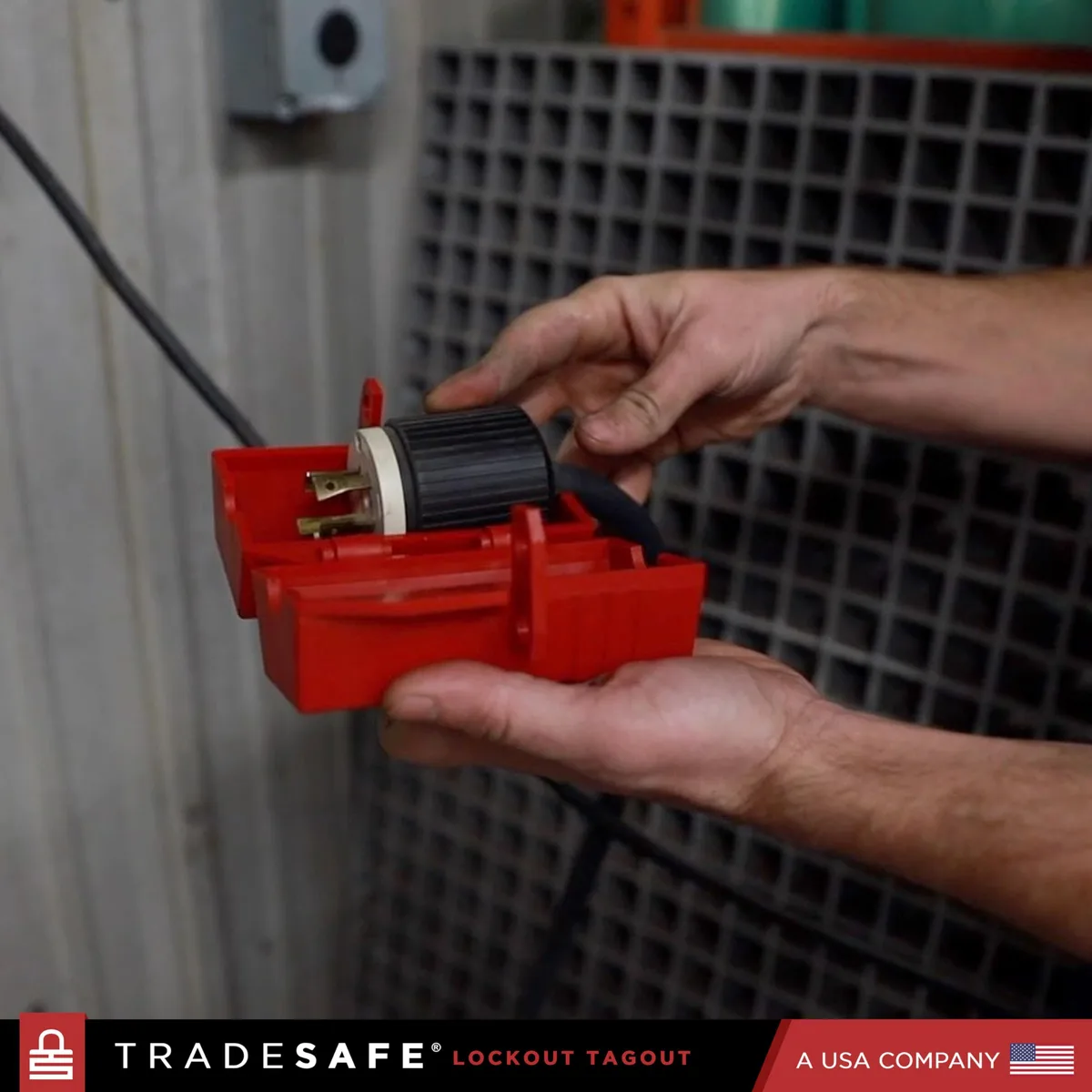
Image source: Bing (Web (fair-use with source credit))
If you take nothing else from this guide, remember this: unplug the bed and tag it before you do anything. That's not a suggestion. It's an OSHA requirement for any powered equipment that could start unexpectedly.
What Lockout/Tagout Means for a Hospital Bed
According to 29 CFR 1910.147, lockout/tagout applies to "the servicing and maintenance of machines and equipment." A hospital bed qualifies. Even if the bed is unplugged, the battery backup can still supply power to actuators. That's a serious shock hazard.
The process is simple:
- Notify everyone in the room that the bed is out of service.
- Unplug the bed from the wall outlet.
- Disconnect the battery backup harness, if accessible.
- Place a physical lock or tag on the power cord.
- Verify the bed's functions are dead by pressing a pendant button.
That last step is non-negotiable. Always test that the bed won't move before you stick your hand near an actuator.
What Happens If You Skip This
We've read incident reports where a nurse unplugged a bed, then reached into the control box to check a fuse. The battery backup was still connected. One bump against the pendant and the siderail moved, pinning her arm.
Another common scenario: a bed is unplugged but the brake is off. A technician leaning on the bed rolls it forward, and the patient, who was repositioning, falls to the floor.
The point is simple. Treat the bed like it can kill someone. Because it can.
The Most Common Problems and How to Fix Them
Now we get to the heart of it. Here are the problems you'll see most often and the fixes that actually work.
Bed Stuck in Trendelenburg
This is the scariest one because the patient is tilted head-down. The cause is usually a jammed actuator or a failed brake in the tilt motor. First, check the error code.
If you see "11", the actuator is stalling.
To release the bed manually, locate the manual override hex key. Each actuator has a small port on the side. Insert the hex key and turn counterclockwise.
This mechanically releases the actuator. You'll need to do this for both the head and knee motors if the whole deck is tilted.
Once the bed is flat, unplug it, reset the control box, and test the tilt function. If it still stalls, the actuator motor is likely fried. That's a replacement job for a technician.
Brake Pedal Won't Hold or Won't Release
A brake that slips is a fall hazard. The cause is often a stretched brake cable or a misaligned brake linkage. Start by pressing the pedal fully.
If it clicks but the bed still rolls, the brake pads are worn. You'll need to adjust the linkage rod length.
Here's the fix:
- Locate the linkage rod under the bed frame.
- Loosen the lock nut.
- Turn the rod to shorten it or lengthen it.
- Tighten the lock nut and test the brake.
If the brake still fails, inspect the caster brake pads for wear. A smooth pad needs replacement.
Siderail Won't Latch
This one is usually mechanical. The latch spring breaks, or the latch plate bends out of alignment. Check the latch mechanism first.
If you see a loose spring, replace it. If the rail feels loose even after latching, adjust the latch plate screws.
Bed Won't Raise or Lower
If the pendant does nothing, check the fuse first. A blown line fuse is the most common cause. Locate the main fuse on the control box, usually a 10-amp 250V fuse.
Look for a dark burn mark or use a multimeter to test continuity. Replace it with the exact same rating. Never use a higher amp fuse.
If the fuse is fine, test the hand pendant. Plug it into a known-working bed, if possible. If it works there, the problem is in the control box or wiring.
Bed Exit Alarm False Tripping
This is a nuisance for staff but a safety issue for patients. The alarm uses a pressure sensor pad. If the pad is folded or worn, it will trigger randomly.
Smooth the pad, check for rips, and reposition the mattress. If it keeps tripping, the pad may need replacement.
Understanding and Fixing Error Codes
The error code display is your best friend. It tells you exactly where to look. Treat it like a diagnostic tool, not a mystery to guess at.
Reading the Code
Codes appear as two-digit numbers on the LED display. Some models use a series of blinks. The chart in the specific service manual is your guide, but the most common ones are listed below.
| Code | Meaning | Fix |
|---|---|---|
| 11 | Motor overload | Release obstruction, test actuator |
| 23 | Brake switch fault | Adjust brake switch position |
| 44 | Overcurrent | Inspect wiring for short, replace actuator |
| 51 | Battery low | Replace battery backup pack |
| 73 | Pendant communication | Reconnect pendant cable, replace pendant |
The Correct Reset Sequence
When the error code clears but the bed stays in a "no motion" state, you need a system reset. Do not just unplug and replug. The correct sequence is:
- Turn the bed off via the control box switch.
- Unplug the bed from the wall.
- Wait 30 seconds.
- Reconnect the battery harness, if disconnected.
- Plug the bed back in.
- Turn the bed on.
- Press the "zero mobility" button, if available.
This sequence forces the control box to reinitialize the actuator positions.
When the Hand Pendant or Nurse Call Fails
The hand pendant is the most abused component on a Hill Rom bed. Nurses drop it. Patients yank it.
Cords get pinched under casters. When it stops working, the bed becomes useless.
Pendant Unresponsive
Start with the obvious. The pendant cable plugs into a port on the bed frame or control box. That connection can work loose from vibration or cleaning.
Unplug it and plug it back in firmly. Make sure the locking collar clicks.
If the pendant still shows no response, test it on a known-working bed. This isolates the problem. If the pendant works on another bed, the issue is in the control box or main wiring.
If it still fails, the pendant itself is bad.
Broken Wire Inside the Pendant Strain Relief
We see this constantly on older models like the P860 and P2000. The wire bundle flexes at the point where it enters the pendant housing. Over time, the internal copper breaks.
The pendant may work in one position but fail in another.
To check, gently bend the cable near the pendant while pressing a button. If the bed twitches or responds intermittently, you've found the fracture. You can try to repair it by cutting back the cable and re-terminating, but replacement pendants cost $80 to $150.
Most facilities just replace them.
Nurse Call Cable Replacement
The nurse call cable runs from the bed to the wall jack. If the call light stays on or won't trigger, check the cable for cuts or bent pins. A damaged cable is cheap to replace.
Through your medical supply vendor, a new cable runs about $20 to $40.
Never attempt to splice a damaged nurse call cable. The low-voltage wiring is sensitive, and a bad splice can cause false signals or ground faults. Replace it outright.
Wireless Pendant Pairing Problems
Newer models like the Centrella use wireless pendants. If the pendant is unresponsive, the battery may be dead. Check the battery compartment.
Replace with fresh alkaline cells.
If the pendant still doesn't communicate, it may have lost its pairing with the bed. The pairing procedure varies by model. On most Centrella beds, press and hold the "Pair" button on the control box for three seconds, then press any button on the pendant within 15 seconds.
The pendant should blink and then lock on.
The Manual Override Toolbox
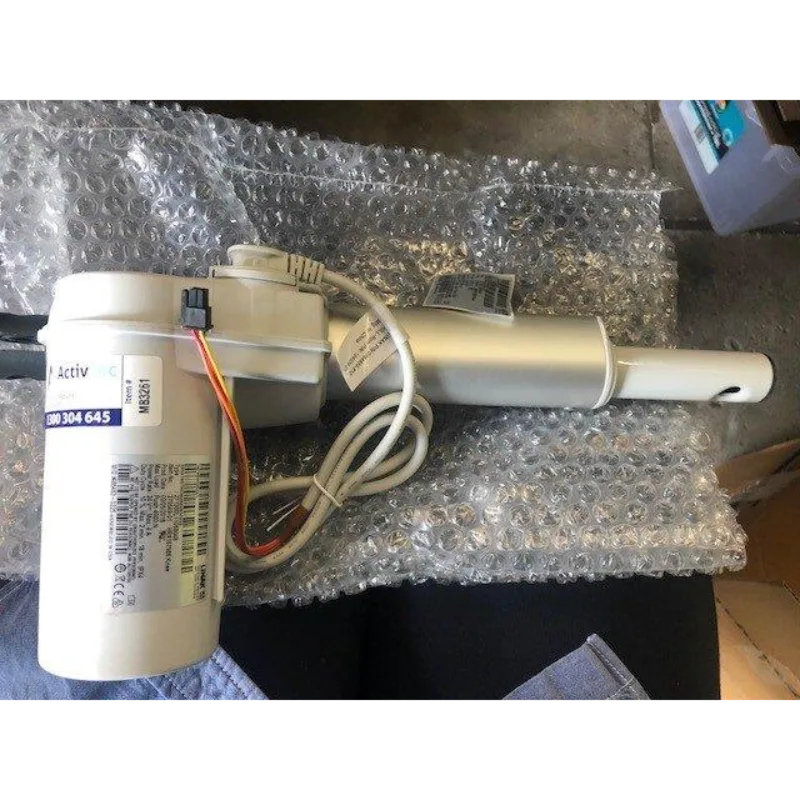
Image source: Bing (Web (fair-use with source credit))
Every Hill Rom bed comes with a manual override system. This allows you to move a stuck patient flat, raise the bed for access, or release a locked actuator.
The Hex Key Trick for Stuck Actuators
Most actuators have a hexagonal port on the side. A 5/32-inch hex key fits most Hill Rom models. Insert the key fully and turn it counterclockwise.
You'll feel resistance as the motor gears disengage. Keep turning until the actuator moves freely.
This works for head up/down, knee, and Trendelenburg actuators. Do this only after the patient is safely positioned and the bed is unplugged.
Using the Hand Crank for Manual Positioning
Some older Hill Rom beds include a hand crank stored in a bracket under the footboard. Insert the crank into the manual override port, usually located near the foot end of the bed. Rotate clockwise to raise, counterclockwise to lower.
The hand crank gives you mechanical advantage. It's slow but reliable. Use it when the battery backup is dead and you need to move a patient to a safe position.
Breaking a Stuck Brake
A brake that won't release can stop a bed from being moved to a new room. Never force the pedal with a tool. Instead, spray the brake linkage with a penetrating lubricant like WD-40.
Let it sit for five minutes. Then rock the bed slightly while pressing the pedal.
If that fails, the linkage may be bent or seized. That's a repair job for a technician.
Tools You Should Have on Hand
Keep these in your maintenance cart:
- 5/32-inch hex key (T-handle works best)
- Flathead screwdriver
- Multimeter
- Needle-nose pliers
- Penetrating lubricant
- Spare fuses: 10-amp and 3-amp for the control board
Mistakes That Cost Time, Money, or Cause Injury
We've gathered the most common errors from service records. Some are frustrating. Others are dangerous.
Skipping the Full Cycle Test
You fix one problem, but the real issue was a loose wire that shakes loose again. Always run a full cycle test: raise the bed fully, lower it fully, tilt head up, tilt knees up, engage the brake, test the siderails, test the bed exit alarm. This takes two minutes.
It saves hours of repeat calls.
Replacing Parts Without Checking Power First
You swap an actuator, and the new one still doesn't work. The problem was low voltage from the control box or a blown fuse. Always check power first.
Use the multimeter on the actuator connector. If you see zero volts, the problem isn't the actuator.
Ignoring the Battery Backup
The battery backup keeps the bed's memory and allows repositioning during a power outage. A dead battery can cause mysterious error codes like "51". Test the battery every three months.
Replace it every three years or when it fails a load test.
Using the Wrong Fuse Rating
This is a fire hazard. Some maintenance staff grab any 10-amp fuse and plug it in. But Hill Rom control boards use a specific fast-blow or slow-blow type.
Using the wrong type can cause the board to overheat. Replace with the exact fuse called for in the service manual.
Forgetting to Recalibrate
When you install a new actuator, the control box doesn't know where "full up" or "full down" is. The bed may stop short or go past its limits. Run the zero-mobility recalibration sequence after every actuator swap.
When to Call a Technician
Some problems are not user-serviceable. Knowing when to stop saves money and prevents injuries.
Problems That Are Never DIY
Never attempt these repairs yourself:
- Control board replacement (requires programming and certification)
- Hydraulic system repairs on older models
- Major brake assembly replacement
- Repairs that require opening the sealed actuator motor case
- Any repair involving patient weight systems or fall-prevention devices
How to Describe the Issue
You've seen the model number and the error code. Write it down. For example: "Advanta model, error code 11, bed stuck in Trendelenburg, manual override released it but actuator won't move electrically." That tells the tech which part to bring.
Also note the bed's serial number and any recent repairs.
Warranty Considerations
If the bed is under warranty, any unapproved repair can void coverage. Hill Rom typically covers parts and labor for the first two years on new beds. Check the warranty sticker on the control box.
If you see a date within the warranty period, call a certified service provider.
Maintenance That Prevents Most Issues
A little prevention goes a long way. These routines take minutes per bed per month.
Monthly Brake and Caster Check
Press the brake pedal fully. Try to roll the bed. If it moves even slightly, adjust the linkage or replace the brake pads.
Also inspect the casters for hair and debris wrap. Clean them with a stiff brush.
Look for cracked caster wheels. A cracked wheel can lock up or break completely during transport. Replace any damaged casters immediately.
Cleaning the Control Box Vents
Dust buildup in the control box vents causes overheating. Use compressed air to blow out the vents every quarter. Clean the pendant connector with a cotton swab dipped in isopropyl alcohol.
This prevents intermittent connections.
Pay attention to the control box cooling fan if your model has one. A fan that rattles or stops spinning means the box is running hot. That shortens the life of the circuit board.
Battery Backup Test Schedule
Test the battery by unplugging the bed and pressing a pendant button. If the actuator moves slowly or not at all, the battery is weak. Replace it.
Mark the test date on a sticker near the power cord.
Most Hill Rom batteries last three to five years. After that, capacity drops sharply. Proactive replacement is cheaper than an emergency service call.
Siderail Inspection
Check each siderail latch mechanism. Pull hard on the rail after latching. If it pops free, the latch spring is broken or the latch plate is bent.
Replace the spring immediately.
Inspect the plastic rail covers for cracks. A cracked cover can pinch a patient's skin or catch on clothing. Replace covers as needed.
Zero-Mobility Recalibration
Even without repairs, the control box drifts over time. Run the zero-mobility recalibration every six months as a preventive measure. It ensures the bed knows its full range of motion and won't stop unexpectedly.
The process is simple. Press and hold the "Home" and "Chair" buttons together for five seconds. The bed cycles through its full range.
Let it complete without interruption.
Frequently Asked Questions
Can I use a regular extension cord for a Hill Rom bed?
No. Extension cords are a fire hazard for continuous-draw medical equipment. Plug the bed directly into a wall outlet.
If you must use an extension cord temporarily, use a heavy-duty 12-gauge cord rated for medical devices. Never daisy-chain cords.
The bed moves slow or jerky. Is that a motor problem?
Not always. Slow movement often means low voltage from a weak battery or a failing control board. Check the battery first.
Then test the voltage at the actuator connector. If voltage is steady, the actuator itself may be wearing out.
How long should the battery backup last?
A healthy Hill Rom battery provides 15 to 30 minutes of continuous use. If the bed moves for less than 10 minutes on battery power, replace the battery. Annual testing keeps you ahead of failure.
The bed beeps but won't move. What does that mean?
The beep means the control box received a command. The lack of movement means the actuator isn't responding. Check the error code on the display.
Code 11 means the actuator is stalled. Code 44 means an overcurrent condition. Both require inspection of the actuator and wiring.
Where do I find the service manual for my specific model?
Hill Rom publishes service manuals for most models. Check the manufacturer's official support portal. Enter the model number and serial number from the sticker on the control box.
Download the manual in PDF format.
Can I replace a Hill Rom bed fuse myself?
Yes. The main line fuse is accessible on the control box. Use the exact amp rating and type specified in the service manual.
Never substitute a higher-rated fuse. That creates a fire risk.
The nurse call light stays on even when disconnected. Why?
The nurse call cable or the control box jack may have a short circuit. Unplug the cable from the wall and from the bed. If the light goes out, the cable is bad.
Replace it. If the light stays on, the control box jack needs service.

Similar Posts