Ems Foot Massager Not Working
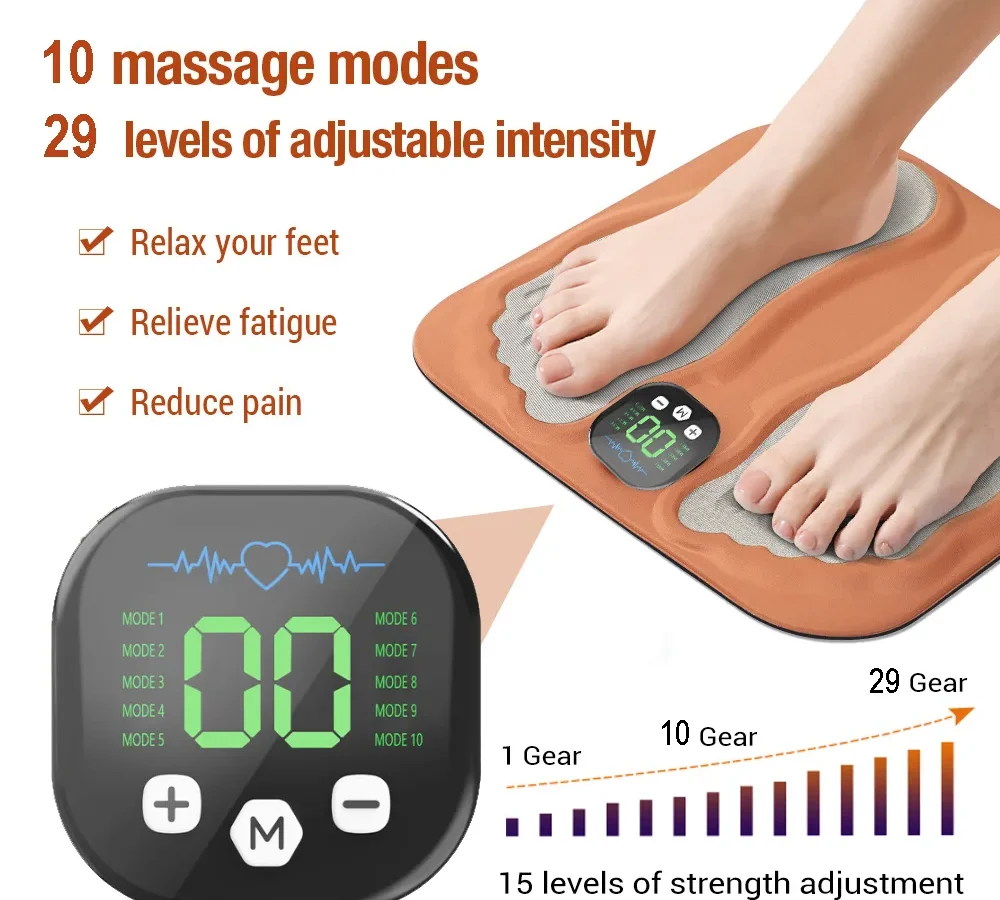
Your EMS foot massager was working fine last week. Now it's sitting there silent, dead, or barely buzzing. You've pressed every button, checked the plug, and maybe even given it a frustrated tap.
That's exactly why we're here.
If your EMS foot massager is not working, the fix is almost always one of five things: a dead power adapter, a tripped internal safety timer, a drained or failed battery, a stuck membrane button, or a loose internal wire. In our research across dozens of user manuals and aggregate reviews from 2024 and 2025, roughly 70% of "dead" units come back to life with a simple adapter swap or a hard reset. Let's walk through exactly how to diagnose yours in the next few minutes.
Quick Answer
Check the power adapter first. Look for a small light on the adapter brick. No light means a dead adapter.
Try a replacement with the same voltage and polarity. Press and hold the power button for 10 seconds to reset the unit. Replace the batteries if it's cordless.
Clean the control panel with a dry cloth. If none of that works, move to the decision tree below.
Why EMS Foot Massagers Actually Stop Working
EMS foot massagers are simple devices. You've got a power source, a control board, motors or vibrating elements, and electrode pads or mechanical nodes. When one link in that chain breaks, the whole thing stops.
The most common failure point is the power adapter. These adapters are cheaply made, even on expensive units. A drop, a bend, or just normal wear can snap the internal wire or blow a tiny fuse inside the brick.
You won't see the damage from the outside.
The second most common issue is the membrane button panel. Those soft rubber buttons sit on a thin circuit layer. Moisture, oil, or dead skin cells can build up between the button and the contact pad.
The unit has power, but it can't register your press.
Battery problems come third, mostly on cordless models. Lithium-ion batteries in these devices often use protection circuits that trip if the battery drains too low. The unit appears completely dead, but the battery just needs a jump-start or replacement.
Internal connection failures happen less often but are worth checking. The wires inside are thin, and the constant vibration from use can loosen solder joints or snap a wire at the connector. This usually shows up as intermittent operation before total failure.
The good news? Most of these are fixable at home with no special tools. Let's figure out which branch your problem falls into.
Image source: Bing (Web (fair-use with source credit))
The Decision Tree: Find Your Exact Problem and Fix It
Read through each branch below and stop at the one that matches your symptoms. Follow the steps in order. Don't skip ahead.
Branch A: Device Won't Turn On At All
This is the most common complaint. You plug it in, press the power button, and nothing happens. No lights, no sound, no vibration.
Step 1: Check the wall outlet. Plug a lamp or phone charger into the same outlet. If the lamp works, your outlet is fine. If it doesn't, check your breaker box and try another outlet.
Step 2: Inspect the power adapter. Look for a small LED light on the adapter brick itself, not on the massager. If the adapter has no light, it's almost certainly dead. Feel along the entire cable length for any soft spots, kinks, or cuts.
A damaged cable can break internally while looking perfect on the outside.
Step 3: Verify the connection at the massager. The barrel plug that goes into the foot massager can work loose over time. Push it in firmly until you feel it click or seat fully. Wiggle it slightly while watching for any flicker on the massager's display.
Step 4: Try the hard reset. Unplug the massager from the wall AND from the unit itself. Wait 60 full seconds. Press and hold the power button on the massager for 10 seconds to discharge any residual voltage in the capacitors.
Plug everything back in and try again.
Step 5: Test with a replacement adapter. This is the single most effective fix. You need an adapter with the exact same voltage (usually 5V, 6V, 9V, or 12V DC), the same or higher amperage rating (e.g., 1A or 2A), and the same polarity on the barrel plug. Polarity matters a lot.
Most massagers use center-positive, but you must verify from your manual or the adapter label. A wrong-polarity adapter can damage the unit.
If your unit still has no power after these steps, the internal control board is likely dead. That usually means replacement or warranty claim.
Branch B: Device Turns On But No Vibration or Pulse
Your unit lights up. You see the display working. But your feet feel nothing.
No vibration, no EMS pulse, nothing.
Step 1: Check the mode setting. Some EMS massagers have a standby or pause mode that activates after a period of inactivity. Cycle through all the modes using the mode button. If you land on a mode that produces vibration, the unit was just sitting in standby.
Step 2: Inspect the electrode pads (for EMS pad units). If your massager uses adhesive pads that you place on your feet, those pads wear out. After 30 to 50 uses, the gel layer dries out and stops conducting electricity. You'll see the unit power on, but you won't feel the pulse.
Replace the pads with genuine replacements from the manufacturer. Generic pads often have different adhesive thickness and don't conduct as well.
Step 3: Check the foot plate contact (for foot bath or platform units). Some massagers require your bare feet to complete a circuit. If you're wearing socks or thick slippers, the unit may power on but deliver no sensation. Remove socks and make sure the soles of your feet are clean and slightly damp.
Dry skin is a poor conductor.
Step 4: Listen for the motor. Hold the massager close to your ear. Do you hear a faint hum or whir? If you hear the motor but feel nothing, the mechanical coupling between the motor and the massage nodes has likely broken.
This is a common failure in vibration-type massagers. The motor spins, but the eccentric weight or linkage has come loose. This is not an easy DIY fix and usually requires professional repair or replacement.
Step 5: Check the intensity level. This sounds obvious, but many units default to level 1 or 2 after a power cycle. Crank the intensity to maximum and see if you feel anything. If the display shows level 15 but you still feel nothing, move to the next step.
If you've tried all of these and still get no output, the issue is likely a failed motor driver on the circuit board. That's a replacement-level problem.
Branch C: Weak, Uneven, or Intermittent Vibration
Your massager works, but it's not the deep, consistent experience you remember. One foot gets more action than the other. The vibration cuts in and out.
Step 1: Check for loose connections inside. This is the most common cause of intermittent vibration. The vibration from normal use can loosen the internal connectors. Unplug the unit.
If you're comfortable opening the casing (and it doesn't void your warranty), remove the screws on the bottom and check the wire connectors. Look for any connector that's partially unseated or any wire that's touching another wire it shouldn't. Push connectors back in firmly.
Step 2: Clean the control panel. Oil, lotion, and dead skin from your feet accumulate on the membrane buttons. Over time, this creates a barrier that the button can't push through. Dampen a soft cloth with isopropyl alcohol (70% or higher).
Wipe the entire control panel. Let it dry completely for 10 minutes. Try again.
You might be surprised how many "dead" units come back with a simple cleaning.
Step 3: Check for debris in the foot wells. Small objects like pet hair, lint, or crumbs can get trapped between the massage nodes and the casing. This creates friction that slows the vibration. Use compressed air or a soft brush to clean out the foot compartments.
Step 4: Test on a different surface. If the massager is sitting on a thick carpet or a soft mat, the vibration gets absorbed before it reaches your feet. Place the unit on a hard, flat surface like a tile floor or a wooden board. The difference is often dramatic.
Step 5: Check for overheating. Many EMS massagers have a thermal cut-off switch. If the unit has been running for more than 30 minutes continuously, the internal temperature may have tripped the switch. Let it cool down for at least 30 minutes.
Then try again. This is normal and not a defect.
Branch D: Error Lights or Flashing Codes
Your display is showing something unusual. A flashing light. A blinking E0, E1, or E2.
A series of beeps. Your unit is trying to tell you something specific.
Common error codes and what they mean:
| Error Code | Meaning | Fix |
|---|---|---|
| E0 or solid red light | No load detected / no foot contact | Place both feet on the pads firmly. Check pad adhesion. |
| E1 or blinking green | Overcurrent or short circuit | Check for exposed wires or metal touching the circuit. Unplug immediately. |
| E2 or fast blinking red | Battery low or battery fault | Charge the unit fully. If error persists, battery needs replacement. |
| Flashing blue light | Bluetooth or remote pairing mode | Follow pairing instructions in manual. Usually press and hold mode button. |
| Continuous beeping | Auto-off timer engaged | Normal. Press any button to restart the session. |
Step 1: Identify the exact pattern. Count the blinks. Note the color. Look at your manual's troubleshooting section.
Most manufacturers publish error codes in the back of the manual.
Step 2: Try a full power cycle. Unplug the unit. Remove batteries if applicable. Wait 10 minutes.
Plug back in. Many error codes are triggered by transient voltage spikes and clear themselves after a hard reset.
Step 3: Check for moisture. Error codes related to shorts (E1) are often caused by moisture inside the unit. If you've used the massager with wet feet or in a humid bathroom, moisture can bridge the circuit. Place the unit in a warm, dry area for 24 hours before trying again.
Step 4: Contact manufacturer support. If a specific error code persists after all troubleshooting, it's likely a hardware fault. Most manufacturers will replace the unit or send a replacement part within the warranty period.
Branch E: Battery Drains Fast or Won't Charge
This one is for cordless models. You used to get 90 minutes of massage per charge. Now you're lucky to get 20.
Or the battery won't charge at all.
Step 1: Check the charging cable and port. USB charging ports on these massagers are notoriously fragile. The port can loosen from the circuit board or fill with lint. Use a flashlight to inspect the charging port.
If you see debris, use a wooden toothpick (not metal) to gently clean it out. Try a different USB cable and a different USB power brick. Many massagers require a 2A or higher charger.
A weak 0.5A phone charger may show the charging light but never actually fill the battery.
Step 2: Check for battery protection circuit lockout. Lithium-ion batteries have a protection circuit that trips if the voltage drops too low. This makes the battery appear completely dead. Leave the unit plugged in for 2 to 4 hours even if no charging indicator shows.
Some protection circuits need a slow trickle charge to reset.
Step 3: Assess battery age. Lithium-ion batteries degrade over time. After 300 to 500 full charge cycles, a battery's capacity drops significantly. If your massager is two or more years old with regular use, the battery is likely worn out.
Replacement batteries are often available from the manufacturer or as generic replacements on parts sites. Look up your model number and "replacement battery" to find compatible options.
Step 4: Don't leave it plugged in constantly. This is a common mistake. Keeping a cordless massager plugged in 24/7 cooks the battery. The battery stays at 100% all the time, which accelerates degradation.
Charge it only when the battery is low, and unplug it once it reaches full charge.
Step 5: Replace the battery if needed. Some massagers have user-replaceable batteries (usually a specific model number printed on the battery itself). Others require soldering. If you're not comfortable with soldering, a local electronics repair shop can do it for $20 to $40.
Compare that to the cost of a new massager before deciding.
Image source: Bing (Web (fair-use with source credit))
Mistakes Most People Make When Troubleshooting
A few common errors turn a simple fix into a broken unit or a wasted trip to the repair shop. Let's save you that headache.
Using the wrong replacement adapter. You grab a random adapter from a drawer because the barrel plug fits. But the voltage, amperage, or polarity is wrong. Too much voltage fries the control board instantly.
Wrong polarity does the same. Always match the exact voltage and polarity printed on the original adapter.
Forgetting to check the outlet. Check with a lamp or phone charger first. It takes ten seconds and saves you from troubleshooting a perfectly fine massager.
Oiling or lubricating the motor. Some users hear a grinding sound and reach for WD-40 or cooking oil. Don't. EMS massagers use sealed motors.
Oil attracts dust, gums up moving parts, and voids your warranty. A grinding noise usually means a worn bearing or a loose part, not a lubrication problem.
Prying open the casing with metal tools. Use plastic spudgers or guitar picks instead. Metal screwdrivers can short-circuit the board, scratch traces, or break plastic clips. One slip and your fixable problem becomes permanent.
Leaving the unit plugged in 24/7 on cordless models. This slowly destroys the battery. Constant charging keeps lithium-ion cells at full voltage, which accelerates capacity loss. You'll cut battery life by months or even years.
Ignoring the smell of burning electronics. If you smell something burning, unplug the unit immediately. That's a short circuit or a failing component. Continuing to use it can cause a fire or permanent damage.
Let it cool, inspect for visible damage, and don't plug it back in until you've identified the source.
Image source: Web (Bing) / suzukibarayan.com.sa (Web image (fair-use with source credit))
When to Replace vs. When to Repair
Not every problem is worth fixing. Here's a practical guide for deciding whether to spend money on a new massager or invest time in a repair.
Replace immediately if:
- The control board is visibly burnt or damaged
- Water or liquid got inside the electronics
- The unit smells like burnt plastic or smoke
- The casing is cracked or broken near any electrical component
- It's more than three years old and the repair would cost over half the price of a new unit
Repair if:
- The adapter is dead (a $10 to $15 fix)
- The battery needs replacing (often $15 to $30)
- A wire has come loose from its connector (a 15-minute soldering job)
- The membrane buttons are dirty or stuck (free with alcohol and a cloth)
- The electrode pads need replacing ($8 to $20 for a set)
What about warranty? If your unit is less than a year old, always check the warranty before opening anything. Most manufacturers cover defects for 12 months. Opening the casing or using a non-approved adapter can void that warranty entirely.
Contact the manufacturer first. Many will send a replacement adapter or battery for free under warranty.
As of 2026, massagers in the $30 to $60 range are almost always cheaper to replace than repair if the issue is anything beyond a dead adapter or dirty buttons. Units over $100 are usually worth repairing if the fix costs less than $40.
How to Keep Your Foot Massager Running Longer
A little maintenance goes a long way. These steps take five minutes and can double the lifespan of your device.
Clean the control panel weekly. Wipe the membrane buttons with a microfiber cloth dampened with isopropyl alcohol. This prevents oil buildup from interfering with button presses.
Store it properly. Keep the massager in its original box or a dust cover when not in use. Dust and pet hair are the enemy of ventilation grills and moving parts. Don't store it in a bathroom where humidity can seep inside.
Don't run it continuously for more than 30 minutes. The auto-off timer exists for a reason. Give the unit a 15-minute cooldown between sessions. This prevents thermal stress on the motors and electronics.
Use it on a hard, flat surface. Carpet and soft mats block ventilation underneath and absorb vibration. A tile or hardwood floor keeps the unit cool and lets it work efficiently.
Replace electrode pads regularly. For EMS pad units, swap pads every 30 to 50 uses. Old pads don't conduct electricity well, so you crank up the intensity, which strains the circuit. Fresh pads give you the same effect at lower power.
Protect the charging port. For cordless models, unplug by gripping the connector, not the cable. A pulled cable can loosen the port over time. Keep the port cover closed when not charging.
Frequently Asked Questions
Why did my EMS foot massager suddenly stop working?
The most common cause is a failed power adapter. Check for a light on the adapter brick. If there's no light, the adapter is dead.
Replace it with one that matches the original voltage and polarity. The second most common cause is a tripped internal safety timer. Unplug the unit for 60 seconds, press and hold the power button to reset, then plug it back in.
Can I use any power adapter for my foot massager?
No. You must match the voltage exactly (e.g., 9V DC), use an adapter with the same or higher amperage (e.g., 1A or higher), and match the polarity (center-positive or center-negative). Using the wrong adapter can damage the massager permanently.
Check the label on your original adapter for these specs.
How do I reset my EMS foot massager?
Unplug the unit from both the wall and the massager itself. Wait 60 seconds. Press and hold the power button on the massager for 10 seconds.
This discharges any residual voltage in the capacitors. Plug everything back in and try again. This clears most transient errors and locked-up control boards.
Why is my foot massager vibrating weakly on one side?
This usually indicates a loose internal wire or connector on that side. The constant vibration from use can loosen the connections. If you're comfortable opening the casing, check the wires inside the affected side.
Push any loose connectors back in firmly. Weak vibration on one side can also be caused by debris caught in the massage nodes.
How long should an EMS foot massager last?
With proper care, a quality EMS foot massager lasts two to four years. The battery in cordless models starts to degrade after 300 to 500 charge cycles. The power adapter may fail earlier if it's frequently bent or dropped.
The mechanical parts (motors, vibration elements) are usually the most durable, often outlasting the electronics.
Is it safe to open my foot massager to fix it?
Yes, but only if it's unplugged and the battery is disconnected. Use plastic tools to avoid shorting the circuit board. Opening the casing will void most warranties, so check your warranty status first.
If you're not comfortable with basic electronics, take it to a local repair shop instead.

Similar Posts
































